
Caterpillar ET Factory Password Generator is an offline companion for protected Cat Electronic Technician service operations. It opens the request information created by Cat ET, displays the service-tool serial, engine and ECM serials, total tattletale, reason, interlock, diagnostic clock and software part number, then produces the two password fields required by the active request.
Factory passwords are session-specific security controls, not reusable master credentials. Caterpillar service literature states that a different password pair is needed after leaving the current factory-password screen, and protected changes must be tied to the exact ECM, reason and technician authorization.
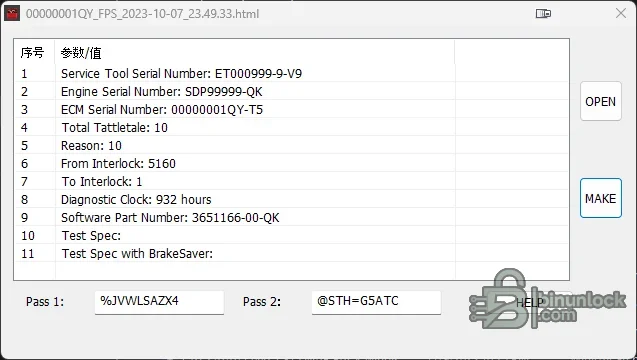
Factory passwords are session-specific security controls, not reusable master credentials. Caterpillar service literature states that a different password pair is needed after leaving the current factory-password screen, and protected changes must be tied to the exact ECM, reason and technician authorization.
What this resource is for#
Use the utility only when an authorized Cat ET session has generated a complete factory-password request for a machine or engine the workshop is entitled to service. Typical protected workflows include replacing an ECM, changing an interlock or configuration parameter, programming a rating and clearing selected events after the underlying problem has been corrected.Confirmed functions#
- Open a Cat ET factory-password HTML request
- Parse service-tool, engine and ECM serial identifiers
- Read total tattletale, reason code, from/to interlock and diagnostic-clock fields
- Display software part number and other request context
- Generate the paired password values for the same active request
- Retain a sample request and short licence-password note supplied with the package
- Keep password calculation separate from Cat ET communication and programming
Supported vehicles, controllers and files#
- Cat ET request layouts recognized by the included utility
- Engine and machine ECM workflows where Cat ET presents the matching factory-password screen
- Protected configuration, interlock, rating, flash or event-clear operations only when the official procedure calls for factory passwords
- Machine Security System operations may require product ID, ECM serial, tool serial, tattletale and reason data
- Exact support depends on Cat ET generation, ECM family, request format and password scheme
Package contents#
- Factory-password generator executable
- Sample Cat ET request document for understanding required fields
- Reference image supplied with the tool
- Short licence-password note required by the packaged application workflow
- Four source files fully extracted and hash-pinned; the executable is unsigned and was not launched
System, hardware and interface requirements#
- Windows workshop PC or isolated virtual machine
- Installed and licensed Caterpillar Electronic Technician for the target product
- Compatible Caterpillar communication adapter and current drivers
- Complete request file exported from the active Cat ET factory-password screen
- Authorized dealer or owner approval, stable equipment power and correct service documentation
Recommended workshop workflow#
- Connect through Cat ET and identify the exact machine, engine and ECM
- Start the protected operation and save the generated request without editing it
- Confirm serial numbers, tattletale, reason, interlock and diagnostic clock against the live screen
- Open that same request in the calculator and record both returned fields securely
- Enter the pair only into the originating Cat ET session
- Complete the procedure, verify parameters and remove request/password data from public locations
Compatibility limits and responsible use#
- A password pair is valid only for its matching request context and current session
- This package does not replace Cat ET, a communication adapter or official authorization
- Incorrect reason, clock, serial or interlock data produces an unusable result
- Protected parameter changes can affect engine rating, emissions, security and machine safety
- Do not clear events until the cause is repaired and documented
Troubleshooting#
- Request will not open: export a fresh untouched HTML file from the exact Cat ET screen
- Fields are blank: confirm request format and inspect the file without changing its encoding
- Passwords rejected: do not reuse an old pair; compare every displayed request field and regenerate for the live session
- Interlock change fails: verify both old and new interlock information required by the service procedure
- Cat ET operation still blocked: confirm licence, ECM compatibility, communication quality and authorization


