
CodeMASTER 5 is a Windows key-database and cutting-control application for professional locksmith work with compatible REDT Miracle machines. It helps the operator locate an automotive key profile, enter or decode the bitting, inspect the blade geometry before cutting, save a verified profile and send the prepared job to supported hardware.
The software is useful only as one part of a complete, calibrated key-cutting setup. It does not program transponders, learn immobilizer keys or determine ownership; a matching Miracle machine, the correct clamp, cutter, decoder and legally obtained key information are still required. Confirm the machine generation and the exact key blank before relying on any profile.
CodeMASTER is a geometry and machine-control tool, not an automatic compatibility oracle. A profile being present does not prove that every year, market or replacement lock in that model uses the same blade, spacing or depth system.
Do not assume compatibility with later A9, A80, S10 or CodeMASTER2/CodeMaster4 platforms merely because the brand is the same. Those families use different software and update paths. If the machine is not positively identified as compatible, use its matching vendor package instead.
That list describes database families, not guaranteed coverage of every vehicle. Always narrow the selection by vehicle, market, model year, lock type and physical blank. Facelift changes, regional cylinders, aftermarket lock sets and replacement ignition assemblies can use a different profile even under the same vehicle name.
Other officially documented Miracle workflows include edge-cut, double-sided and laser/sidewinder keys, with optional clamps for Tibbe FO21/TBE1 and LDV FO19 work. These are machine capabilities, not a promise that every clamp or cutter is included with a used machine or with this software package. Check the on-screen clamp, cutter diameter, alignment and origin instructions for the exact selected profile.
The MSI identifies itself as an Intel/x86 package and contains no explicit Windows launch-condition row. The contemporary REDT manuals reference ActiveSync for older handhelds and Windows Mobile Device Center on Windows Vista, Windows 7 or later for PDA synchronization. For this legacy desktop build, a dedicated Windows 7-era workshop computer is the conservative baseline; modern Windows releases may require compatibility testing and a correctly signed communication driver.
A wrong blank, incorrect clamp origin or uncalibrated cutter can damage both the blank and the machine. Code adjustment should be used only to compensate for a measured and understood deviation, not as a substitute for calibration.
The resource version field is bound to the exact file-table version of a pinned English main executable inside the MSI. The installer itself is unsigned, and no program or installer was executed during packaging because two genuine application screenshots were already supplied. The original RAR was fully tested and extracted before the MSI was repackaged.
The manufacturer manuals warn that some install/update actions can erase prior PDA or SD-card profiles. Read the destination and preservation option carefully; keeping a filesystem copy of the original card is safer than relying on an update button.
The software is useful only as one part of a complete, calibrated key-cutting setup. It does not program transponders, learn immobilizer keys or determine ownership; a matching Miracle machine, the correct clamp, cutter, decoder and legally obtained key information are still required. Confirm the machine generation and the exact key blank before relying on any profile.
What the software does#
The main workspace combines a searchable manufacturer and model tree with bitting entry, geometry preview and machine-control functions. The retained program database contains thousands of VIF key-profile records, while the installer also carries help media and the program components required by the original desktop package.- Browse automotive keys by manufacturer, model and profile family
- Search the database and optionally restrict results to matching keys
- Enter known bitting values with depth limits defined by the selected profile
- Preview the calculated blade shape before sending a cutting job
- Use code adjustment when a documented depth correction is required
- Save a verified cutting profile to supported machine or removable storage workflows
- Create and maintain a user-defined profile when complete spacing, depth and blade data are available
- Select machine, clamp-origin, cutter and communication options from the program menus
CodeMASTER is a geometry and machine-control tool, not an automatic compatibility oracle. A profile being present does not prove that every year, market or replacement lock in that model uses the same blade, spacing or depth system.
Miracle machine compatibility#
The source package identifies this desktop build for Miracle A5, A7 and SEC-E9 equipment. REDT documentation independently describes CodeMASTER operation with the Miracle A5 and A7, including PC/PDA workflows, Bluetooth communication, SD-card profile handling, decoding and automatic cutting. The manufacturer download page also lists the A5 management-and-cutting program as the CodeMASTER generation associated with that machine.- Miracle A5: documented for standard edge, double-sided and laser/sidewinder keys, with optional Tibbe and LDV clamps
- Miracle A7: documented for standard and laser keys, decoding, cutting, Bluetooth/mobile operation and user-defined profile management
- SEC-E9: named by the supplied package; confirm the controller generation, communication method and firmware with the machine vendor before connecting
Do not assume compatibility with later A9, A80, S10 or CodeMASTER2/CodeMaster4 platforms merely because the brand is the same. Those families use different software and update paths. If the machine is not positively identified as compatible, use its matching vendor package instead.
Automotive makes represented in the key database#
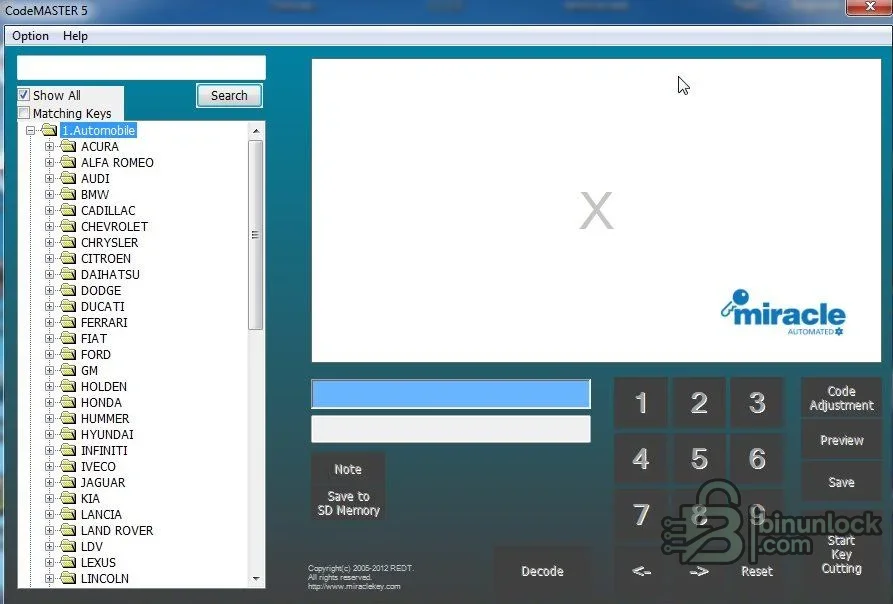
The official A5 documentation lists broad automotive coverage including Acura, Alfa Romeo, Audi, BMW, Cadillac, Chrysler, Citroen, Daihatsu, Dodge, Ducati, Ferrari, Fiat, Ford, GM, Holden, Honda, Hyundai, Infiniti, Iveco, Jaguar, Kia, Lancia, Land Rover, Lexus, Lincoln, Mazda, Mercedes-Benz, Mercury, Mini, Mitsubishi, Nissan, Opel, Peugeot, Piaggio, Porsche, Proton, Renault, Rover, Saab, Skoda, Subaru, Suzuki, Toyota, Vauxhall, Volkswagen and Volvo. The actual program tree visible in the supplied screenshots follows this manufacturer-based organization.That list describes database families, not guaranteed coverage of every vehicle. Always narrow the selection by vehicle, market, model year, lock type and physical blank. Facelift changes, regional cylinders, aftermarket lock sets and replacement ignition assemblies can use a different profile even under the same vehicle name.
Key profiles, blade families and examples#
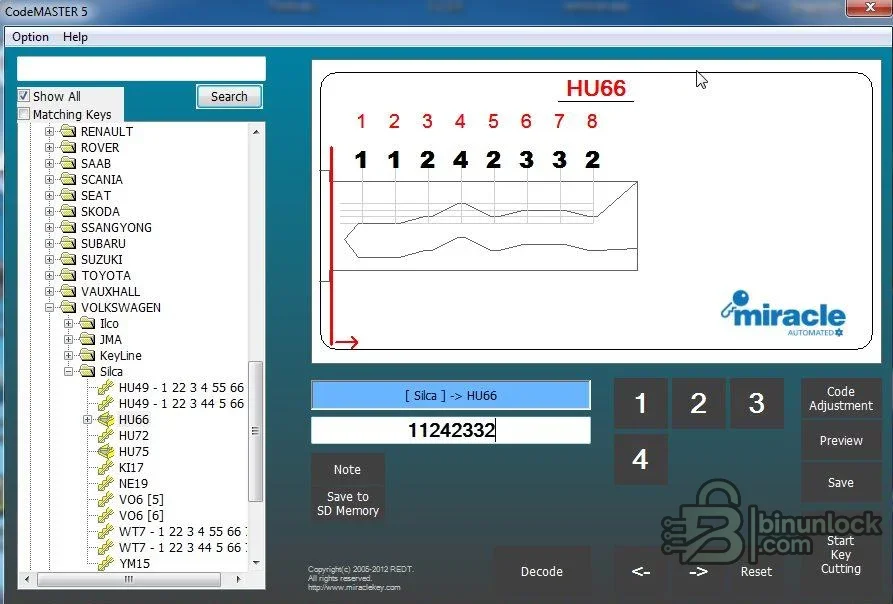
The interface can display the selected blank/profile name, cut positions, allowed depth numbers and a two-dimensional preview. The supplied working screenshot shows a Volkswagen Silca HU66 selection with eight entered bitting positions. Official update notes for this software generation mention additions such as Land Rover LF10, Mercedes YM23 and a newer HU64 profile, Ford seven/eight/ten-cut HU101, Audi/Volkswagen HU162 and expanded Kia and Hyundai data.Other officially documented Miracle workflows include edge-cut, double-sided and laser/sidewinder keys, with optional clamps for Tibbe FO21/TBE1 and LDV FO19 work. These are machine capabilities, not a promise that every clamp or cutter is included with a used machine or with this software package. Check the on-screen clamp, cutter diameter, alignment and origin instructions for the exact selected profile.
Recommended system and connection requirements#
- A dedicated Windows PC capable of running legacy 32-bit x86 desktop software
- Administrator rights for the MSI installation and any required communication driver
- At least 200 MB free disk space for the installed application, profile database, temporary installer data and saved jobs
- A display suitable for the fixed desktop interface; 1024×768 or higher is a practical minimum
- A compatible REDT Miracle machine with its correct power supply, clamp, cutter and decoder
- The machine-specific USB/serial or Bluetooth connection supported by that controller generation
- A stable direct USB port when a USB-to-serial driver is required; avoid unpowered hubs
- Offline storage for exported profiles, before/after photographs and customer authorization records
The MSI identifies itself as an Intel/x86 package and contains no explicit Windows launch-condition row. The contemporary REDT manuals reference ActiveSync for older handhelds and Windows Mobile Device Center on Windows Vista, Windows 7 or later for PDA synchronization. For this legacy desktop build, a dedicated Windows 7-era workshop computer is the conservative baseline; modern Windows releases may require compatibility testing and a correctly signed communication driver.
Safe bitting and cutting workflow#
- Verify customer authority and record the vehicle, lock or key job without posting identifying codes publicly.
- Identify the key blank from its physical profile and trusted catalog data; never select it from vehicle name alone.
- Inspect the cutter, decoder and clamp, remove swarf safely and calibrate the machine according to its manual.
- Choose the exact manufacturer/model/profile in CodeMASTER and confirm the displayed clamp, alignment and cutter instructions.
- Enter a known bitting or decode a suitable original key, then review every position and allowed depth.
- Use Preview to inspect the blade outline before transmission. If the shape, shoulder/tip alignment or depth sequence looks wrong, stop.
- Cut a low-cost test blank where appropriate and verify smooth mechanical operation without forcing the lock.
- Save only a confirmed profile and keep a private job record; do not publish bittings, customer names, addresses or key codes.
A wrong blank, incorrect clamp origin or uncalibrated cutter can damage both the blank and the machine. Code adjustment should be used only to compensate for a measured and understood deviation, not as a substitute for calibration.
Package contents and verified release evidence#
The cleaned publication package contains the original CodeMASTER MSI installer rather than a pointer archive. Its Windows Installer database was opened read-only and reports REDT as the manufacturer, 3,129 file-table entries and roughly 89 MB of uncompressed program data. The database includes the main application, multiple language-specific program components, thousands of VIF key profiles, an online-update component and an instructional cutter-change video.The resource version field is bound to the exact file-table version of a pinned English main executable inside the MSI. The installer itself is unsigned, and no program or installer was executed during packaging because two genuine application screenshots were already supplied. The original RAR was fully tested and extracted before the MSI was repackaged.
Installation and first-start notes#
- Create a restore point or VM snapshot on the dedicated workshop computer.
- Scan the downloaded archive and extracted MSI with current security tools.
- Install while the cutting machine is disconnected unless the official hardware procedure explicitly requests connection.
- Do not allow the legacy online-update component through the firewall until the machine generation and vendor endpoint are verified.
- Start the application without a cutting job and inspect the product/machine selection and communication settings.
- Install only the driver appropriate to the actual USB or serial adapter, then connect the machine and confirm a stable port.
- Back up machine SD-card data and any user-created profiles before using update or synchronization controls.
The manufacturer manuals warn that some install/update actions can erase prior PDA or SD-card profiles. Read the destination and preservation option carefully; keeping a filesystem copy of the original card is safer than relying on an update button.
Troubleshooting#
- Program opens but no machine is found: confirm the selected Miracle model, port, driver, cable path and whether that controller expects USB/serial or Bluetooth
- Bluetooth connects and then drops: disable power saving on the adapter, keep the controller awake and wait for reconnection before transmitting
- Profile is missing: verify the database/update generation and search by blank/profile family; do not substitute a visually similar profile
- Preview is obviously wrong: clear the bitting, confirm the cut-count and allowed depth range, then re-enter values from a trusted source
- Machine requests a different clamp or cutter: follow the exact on-screen hardware instruction and recalibrate after tool changes
- Write to SD memory is unavailable: check that the card uses the machine-supported filesystem, is not write-protected and has a verified backup
- Installer fails on a modern PC: use an isolated compatible Windows environment rather than weakening system-wide security controls
- Online update fails: do not use third-party update files; preserve the working database and obtain a machine-specific package from the vendor


