
DPS Files is an offline Windows utility for examining data produced around General Motors Service Programming System workflows. The interface can search SPS-related files, display recovered VIN and PIN information, work with utility and calibration entries, handle GMLAN seed-key calculations and save or load analysis sessions. It does not replace SPS, connect to a vehicle or authorize programming on its own.
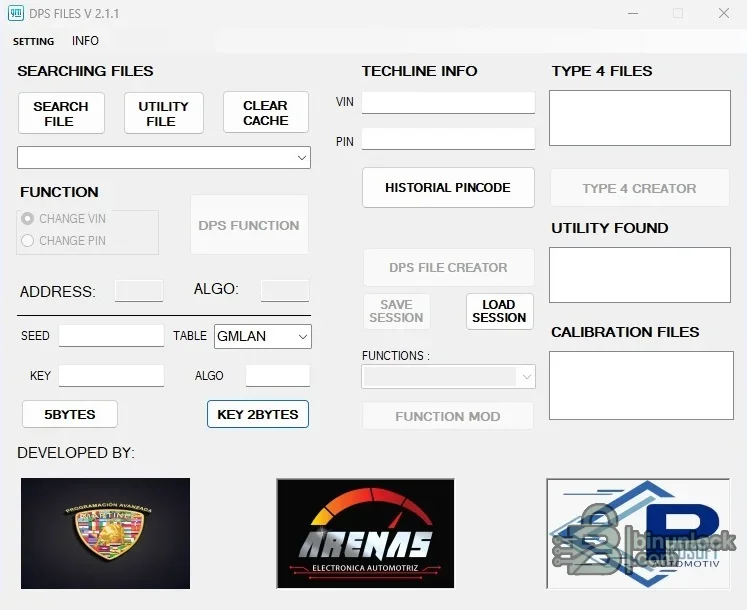
Not every SPS file contains every field. Empty controls or lists can mean the selected file type is unsupported, incomplete or lacks that record; it is not automatically a program error.
Do not infer vehicle support from a VIN alone. Match calibration identifiers, module address, service number and SPS session context to the exact controller.
Keep these components together in a dedicated folder. Do not substitute DLLs or configuration files from another release merely because a filename matches.
Use copies of SPS data rather than modifying the only session directory. Running older unsigned utilities on an isolated VM limits exposure of workshop credentials and customer data.
The tool must not be used to bypass access controls or obtain vehicle credentials without permission.
If the program identifies a VIN but no calibration entries, inspect the associated utility files and session structure. Do not merge unrelated sessions to force a result.
Confirmed interface functions#
- Search a selected file and locate related utility data
- Clear the working cache before a new analysis
- Display VIN and PIN fields recovered from applicable data
- Review historical PIN-code information
- List Type 4 files, utilities and calibration files found in the source set
- Create or process DPS data where the corresponding controls are enabled
- Calculate five-byte and two-byte key values using the selected GMLAN table
- Save and load an analysis session
Not every SPS file contains every field. Empty controls or lists can mean the selected file type is unsupported, incomplete or lacks that record; it is not automatically a program error.
GM data scope#
The tool is intended for GM SPS and Techline-related file analysis, including calibration and utility data. It can help organize authorized recovery or research when the user already has the relevant files from a legitimate service session. The package does not include current calibration subscriptions, server access, vehicle data packages or a model-by-model ECU compatibility matrix.Do not infer vehicle support from a VIN alone. Match calibration identifiers, module address, service number and SPS session context to the exact controller.
Included utilities#
The cleaned archive preserves the primary setup application, seed-key helper, key generator, CRC helper and small configuration library supplied by the source package. Several components are unsigned and one is explicitly a key generator; all were inspected statically and never executed during preparation. No malware-clean claim is made.Keep these components together in a dedicated folder. Do not substitute DLLs or configuration files from another release merely because a filename matches.
System requirements#
- Windows desktop with permission to read the SPS working or export files being examined
- Sufficient local space for copied calibration, utility and session data
- GM SPS or Techline access only when legitimately obtaining or applying official service data; it is not included
- A separate diagnostic or J2534 interface only for the later vehicle workflow, not for offline file inspection
Use copies of SPS data rather than modifying the only session directory. Running older unsigned utilities on an isolated VM limits exposure of workshop credentials and customer data.
Recommended analysis workflow#
- Copy the relevant SPS files into a case-specific offline folder.
- Record their original paths, dates, sizes and hashes.
- Clear the program cache and search one source set at a time.
- Record the VIN, PIN, utility, Type 4 and calibration results without exposing them publicly.
- Save a session if further comparison is needed.
- Cross-check every identifier against the vehicle, module and official service record.
- Use any calculated key only in the authorized diagnostic procedure that produced the matching seed.
Security and privacy#
VIN, PIN, seed-key and calibration-session data can be sensitive. Verify ownership and service authorization, store working folders securely and redact results before asking for help. A seed and key are session and algorithm dependent; reusing values from another vehicle or module is unsafe and usually invalid.The tool must not be used to bypass access controls or obtain vehicle credentials without permission.
Troubleshooting#
If a search finds nothing, verify that the source file is complete and was produced by the expected SPS workflow. Check whether the file is compressed, encoded or part of a larger session directory. For seed-key issues, record the table selection, seed length, module context and redacted error rather than repeatedly trying algorithms.If the program identifies a VIN but no calibration entries, inspect the associated utility files and session structure. Do not merge unrelated sessions to force a result.


