
Easy Kill EDC17 is an offline ECU-file editor for a defined set of Bosch diesel and petrol calibration families used by BMW and Volkswagen Group vehicles. It works with an existing tuning file on the workshop PC; it does not connect to the vehicle, identify an ECU over OBD or read and write control units.
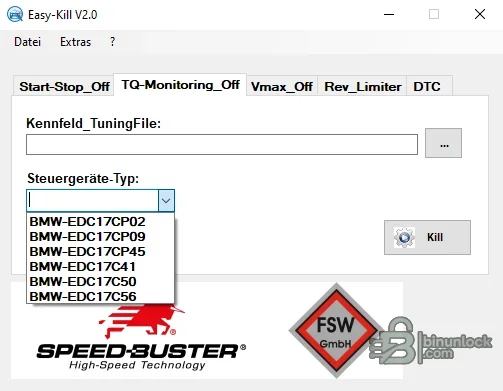
The program separates its operations into Start-Stop, torque-monitoring, maximum-speed, rev-limiter and DTC tabs. Each tab exposes its own controller list, so compatibility must be checked for the exact operation rather than assumed from the product name. The screenshots below are the genuine interface and show the controller selectors supplied by the application.
This is a specialist calibration utility, not a one-click universal solution. Always begin with a verified original read, make changes only on a copy and retain a recovery path through the tool that produced the file.
The utility does not explain every byte it changes and does not provide a map definition. Compare the original and modified files in a binary-diff tool before accepting any result.
This list describes menu entries, not guaranteed support for every software number within an ECU family. A different flash layout, calibration revision, partial read or tuner-modified file can prevent detection or produce an unsafe раtсh.
Do not use a file identified only by its extension. Confirm byte size and ECU identifiers, then hash the original before opening a working copy.
If the program reports success but modifies a very large portion of the file, stop. Do not program the result until the reason is understood.
The main executable and bundled data-provider library are unsigned. They were inspected statically and were not executed during packaging.
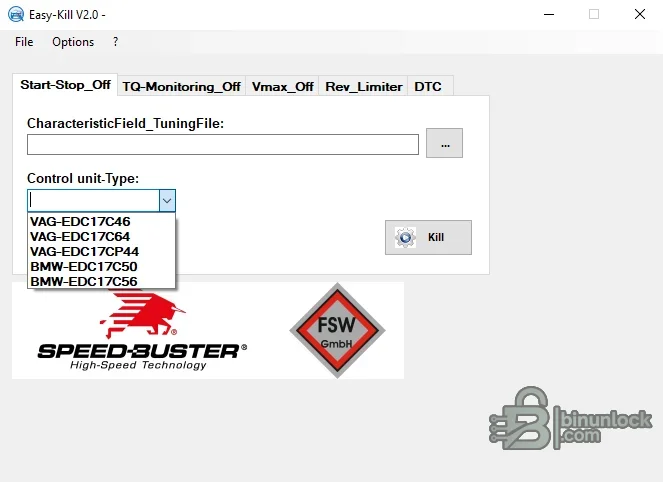
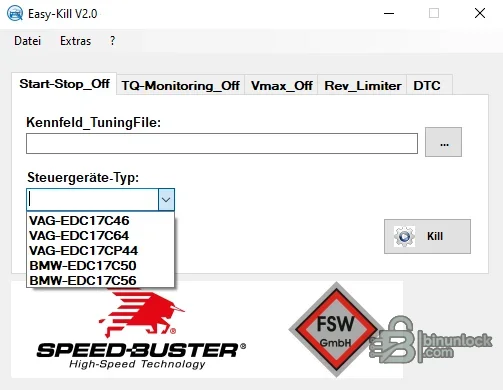
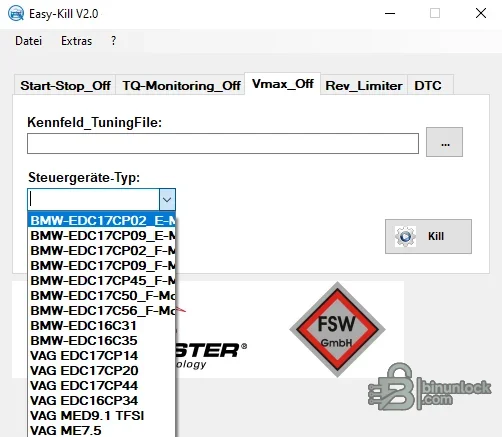
The program separates its operations into Start-Stop, torque-monitoring, maximum-speed, rev-limiter and DTC tabs. Each tab exposes its own controller list, so compatibility must be checked for the exact operation rather than assumed from the product name. The screenshots below are the genuine interface and show the controller selectors supplied by the application.
This is a specialist calibration utility, not a one-click universal solution. Always begin with a verified original read, make changes only on a copy and retain a recovery path through the tool that produced the file.
What the program can edit#
- Start-stop logic: locates the supported switch strategy in selected files and applies the program's predefined change
- Torque monitoring: targets the monitoring-related calibration logic exposed by the matching BMW controller profile
- Maximum speed: applies a profile-specific Vmax change for the controller selected in the interface
- Rev limiter: provides a separate workflow for supported diesel calibration families
- DTC handling: offers a file-based fault-code operation where the application recognizes the binary structure
The utility does not explain every byte it changes and does not provide a map definition. Compare the original and modified files in a binary-diff tool before accepting any result.
Controller coverage shown by the application#
The available choices vary by tab. The captured interface shows the following families:- Start-stop: VAG EDC17C46, EDC17C64 and EDC17CP44; BMW EDC17C50 and EDC17C56
- Torque monitoring: BMW EDC17CP02, EDC17CP09, EDC17CP45, EDC17C41, EDC17C50 and EDC17C56
- Maximum speed: BMW EDC17CP02, EDC17CP09, EDC17CP45, EDC17C50 and EDC17C56 profiles, including entries marked for F-series files; BMW EDC16C31 and EDC16C35; VAG EDC17CP14, EDC17CP20, EDC17CP44 and EDC16CP34; VAG MED9.1 TFSI and ME7.5
- Rev limiter: a VAG EDC15P+ profile is documented for the supplied build
This list describes menu entries, not guaranteed support for every software number within an ECU family. A different flash layout, calibration revision, partial read or tuner-modified file can prevent detection or produce an unsafe раtсh.
Required input and file preparation#
- A complete binary or calibration-area read accepted by the selected profile
- Known vehicle model, engine code, ECU family, Bosch hardware number and software number
- An untouched original file and at least one independent backup
- A checksum-capable editor or programming tool appropriate to the exact ECU
- A stable recovery method for bench, boot or OBD writing if the modified file is rejected
Do not use a file identified only by its extension. Confirm byte size and ECU identifiers, then hash the original before opening a working copy.
Recommended editing workflow#
- Read and identify the ECU with the normal workshop tool.
- Save the original in a read-only case folder and record its SHA-256 hash.
- Choose one Easy Kill tab and the exact controller family shown by the identification data.
- Open a duplicate of the original calibration file.
- Apply only the required operation and save the result under a new name.
- Compare original and modified binaries and record every changed range.
- Run the correct checksum validation for that controller and read method.
- Review diagnostic and emissions consequences before programming.
- Write only with regulated battery support and an available recovery procedure.
- After programming, scan the vehicle, perform required adaptations and verify road behavior in a lawful test environment.
How to validate the output#
The output should retain the same expected file length and the same ECU identification as the source. A useful acceptance check includes:- File size has not changed unexpectedly
- Changed byte ranges are limited and repeatable for the chosen function
- Hardware and software identification strings remain intact
- Checksums are valid according to the writer or a trusted independent checker
- The programming tool recognizes the modified file for the same ECU and protocol
- No unrelated calibration maps or diagnostic tables have changed
If the program reports success but modifies a very large portion of the file, stop. Do not program the result until the reason is understood.
System requirements#
- Windows PC with 32-bit desktop application support
- Windows 7, 8.1, 10 or 11; an isolated virtual machine is recommended for legacy workshop utilities
- .NET Framework desktop runtime and the included Firebird client library in the same application folder
- At least 2 GB RAM and 100 MB free disk space plus room for original, modified and recovery files
- Write permission in a dedicated working directory
- A separate ECU read/write tool; no vehicle interface is included or controlled by this application
The main executable and bundled data-provider library are unsigned. They were inspected statically and were not executed during packaging.
Important limitations#
- Menu presence does not prove compatibility with every software revision
- The program is not an ECU identifier and cannot detect an incorrectly labelled file reliably
- Checksum correction is not documented as part of the workflow
- A partial OBD read may not contain the region the selected operation expects
- Previously modified files can defeat pattern matching or cause overlapping changes
- The DTC tab is not a substitute for diagnosing wiring, sensors, actuators or mechanical faults


