
ECU Reader is a legacy Windows workshop application for reading, backing up and editing selected engine-control-unit EEPROM data through the vehicle diagnostic connector. Its documented functions cover immobilizer PIN retrieval, VIN and mileage records, immobilizer status and EEPROM read/write operations on a defined group of older VAG, Peugeot/Citroën and Opel engine ECUs.
This is hardware-dependent service software, not a generic file calculator and not a universal scan tool. A compatible ECU Reader interface, the correct vehicle connection and stable power are required for live communication. The application should be used only on vehicles and control units you are authorized to service, with a verified original EEPROM backup saved before any write operation.
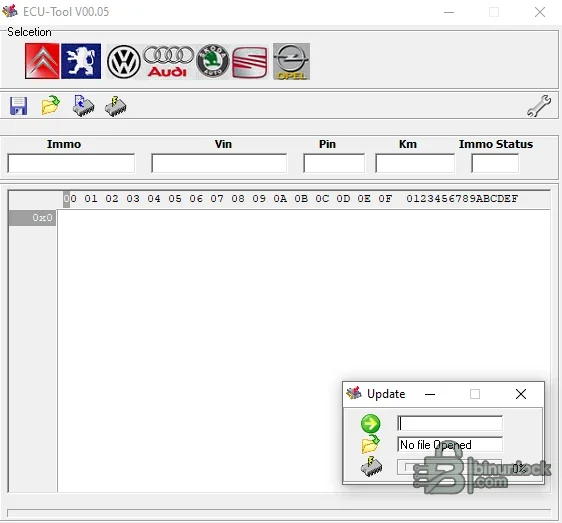
The visible fields do not mean every operation is enabled for every brand. Function availability is determined by the selected ECU protocol and software branch, so identify the controller first and never assume that a button valid for one family is safe for another.
Documented ECU families and representative applications include:
This list is an ECU-family guide, not a promise based solely on model and engine size. Confirm the Bosch part number, VAG hardware/software identifiers, engine code and diagnostic response before starting. Replacement or remapped ECUs can differ from the controller originally fitted to the vehicle.
Do not extrapolate EDC15 EEPROM, mileage or immobilizer-disable functions to every ME7 controller. Verify the exact ME7 subfamily and software, keep a diagnostic scan report, and use a controller-specific bench or boot recovery method if a write-capable operation is required outside the documented scope of this tool.
The service-list function relates to records stored in a compatible engine ECU; it is not a universal BSI, instrument-cluster or maintenance-reset utility. PSA platforms can combine engine ECU, BSI and cluster data, so record all original values and resolve any vehicle-wide inconsistency with the correct factory diagnostic workflow.
Controller label and hardware identity are more reliable than an engine-size assumption. Similar Opel model names can use different Delco, Bosch or Siemens systems, and a controller outside these documented branches should be treated as unsupported.
Before connecting:
A standard fault-code reader is not sufficient for EEPROM programming. If the interface cannot establish a stable session or ECU identification is inconsistent, stop before any write attempt.
The application itself warns that losing communication during EEPROM writing can damage the stored data. A valid backup and a separate recovery plan—bench access, external EEPROM programming or a replacement ECU prepared through an authorized process—should exist before writing.
The supplied executable is unsigned and has no embedded Windows version metadata. It was inspected statically and was not launched during packaging because the source already includes a genuine interface screenshot. Scan the archive and extracted file in your own controlled environment before use.
No source archive wrapper, web shortcut or unrelated installer is included. Legacy online-update components remain part of the original program code; public metadata does not expose third-party source addresses or update credentials.
This is hardware-dependent service software, not a generic file calculator and not a universal scan tool. A compatible ECU Reader interface, the correct vehicle connection and stable power are required for live communication. The application should be used only on vehicles and control units you are authorized to service, with a verified original EEPROM backup saved before any write operation.
Main functions#
The interface organizes its operations by vehicle group and ECU family. Depending on the selected controller, the available functions can include:- Read ECU identification before selecting a service operation
- Read immobilizer PIN from supported engine ECU memory
- Read or repair VIN data where that field is implemented
- Read or repair stored mileage in supported engine ECU records
- Display immobilizer status and, on specifically supported variants, change that status
- Read EEPROM to a file for backup, comparison or authorized repair
- Write EEPROM back to the same compatible ECU after validating the file
- Review or clear stored service-distance entries on supported Peugeot/Citroën EDC15 applications
The visible fields do not mean every operation is enabled for every brand. Function availability is determined by the selected ECU protocol and software branch, so identify the controller first and never assume that a button valid for one family is safe for another.
VAG EDC15 compatibility#
The developer documents OBD-II support for older Volkswagen, Audi, Škoda and SEAT diesel applications using Bosch EDC15. Supported EDC15 functions include EEPROM reading/writing and, according to ECU variant, original ECU mileage, immobilizer PIN and immobilizer-state service operations.Documented ECU families and representative applications include:
- EDC15P / EDC15P+: Audi A2, A3, A4 and A6 1.4/1.9 TDI; Volkswagen Bora, Golf IV, Lupo, New Beetle, Passat, Polo and Sharan with 1.2/1.4/1.9 PD engines; Škoda Fabia and Octavia 1.9 PD
- EDC15VP40 with 29F400: Audi A4, A6 and A8 2.5 TDI V6 Bosch Euro 3 variants and Volkswagen Passat 2.5 V6 applications
- EDC15VP40 with 29F800: later Audi A4, A6 and A8 2.5 TDI V6 Bosch Euro 4 variants and corresponding Passat applications
- EDC15V: Audi A3/A4/A6 1.9 TDI, Volkswagen Bora/Golf IV/New Beetle/Passat/Sharan 1.9 TDI, Škoda Fabia/Octavia 1.9 TDI and Superb 2.5 TDI V6
- EDC15Pa: selected Audi A2 and Volkswagen Polo 1.4 TDI applications
This list is an ECU-family guide, not a promise based solely on model and engine size. Confirm the Bosch part number, VAG hardware/software identifiers, engine code and diagnostic response before starting. Replacement or remapped ECUs can differ from the controller originally fitted to the vehicle.
VAG ME7 support#
The application contains a separate ME7 branch and identifies ME7.1/ME7.5 in its internal interface data. The documented live function for supported VAG ME7 petrol ECUs is immobilizer PIN reading through the diagnostic connector.Do not extrapolate EDC15 EEPROM, mileage or immobilizer-disable functions to every ME7 controller. Verify the exact ME7 subfamily and software, keep a diagnostic scan report, and use a controller-specific bench or boot recovery method if a write-capable operation is required outside the documented scope of this tool.
Peugeot and Citroën EDC15C2 support#
For supported Peugeot and Citroën diesel vehicles using Bosch EDC15C2, the documented feature set includes:- Immobilizer PIN reading and authorized PIN-data repair
- Internal EEPROM read and write through the diagnostic connector
- Reading original mileage stored in the engine ECU
- Erasing or editing stored service-distance entries on compatible controller versions
The service-list function relates to records stored in a compatible engine ECU; it is not a universal BSI, instrument-cluster or maintenance-reset utility. PSA platforms can combine engine ECU, BSI and cluster data, so record all original values and resolve any vehicle-wide inconsistency with the correct factory diagnostic workflow.
Opel Delco and Multec support#
The Opel menu contains branches for Delco/Multec petrol ECUs. The developer documents two principal controller groups:- Delco with Motorola HC11F1 / Multec F: PIN reading or repair plus EEPROM read/write on supported petrol applications
- Delco HSFI-2.1 hybrid: PIN reading on supported petrol applications, including the 1.4-litre and 1.6-litre family indicated by the software
Controller label and hardware identity are more reliable than an engine-size assumption. Similar Opel model names can use different Delco, Bosch or Siemens systems, and a controller outside these documented branches should be treated as unsupported.
Required hardware and vehicle setup#
ECU Reader performs live OBD communication and therefore needs the matching interface used by the original product. The software package contains the application only; it does not turn a generic ELM327 cable into a compatible programmer.Before connecting:
- Identify the exact engine ECU from its physical label and diagnostic identification
- Use a known-compatible ECU Reader adapter and correct OBD/bench lead
- Connect a regulated automotive support supply appropriate for the vehicle and operation
- Disable unnecessary electrical consumers and prevent sleep or hibernation on the PC
- Use a reliable native serial/USB connection; avoid unstable hubs and remote USB forwarding
- Run a complete vehicle scan and save fault codes, VIN, ECU identification and coding
- Confirm that the vehicle is legally owned or that workshop authorization is recorded
A standard fault-code reader is not sufficient for EEPROM programming. If the interface cannot establish a stable session or ECU identification is inconsistent, stop before any write attempt.
Safe EEPROM workflow#
- Select the correct brand and ECU family, then read identification without changing data.
- Read the EEPROM and save at least two copies with vehicle, ECU and date identifiers.
- Compare the backup copies byte-for-byte; inconsistent reads indicate a communication or power problem.
- Record the original PIN, VIN, mileage and immobilizer status shown by the application.
- Make only the authorized change required for the repair and retain the untouched original.
- Validate file size and ECU family before enabling a write operation.
- Maintain stable voltage and do not disconnect the interface until the program reports completion.
- Cycle the ignition only as required, rescan the vehicle and verify starting, immobilizer and fault status.
The application itself warns that losing communication during EEPROM writing can damage the stored data. A valid backup and a separate recovery plan—bench access, external EEPROM programming or a replacement ECU prepared through an authorized process—should exist before writing.
VIN, PIN and mileage handling#
PIN, VIN and mileage values are security- and identity-related workshop data. Use them for legitimate replacement, synchronization, fault recovery and record correction only. Keep the job card, original readings and reason for the change.- A PIN read from the engine ECU may not by itself complete key programming; the vehicle's immobilizer architecture and diagnostic procedure still apply.
- A VIN field can be stored in more than one module. Correcting one ECU does not automatically synchronize the BSI, cluster, gateway or other controllers.
- Mileage can exist in several modules. Never use this tool to misrepresent vehicle history; repair inconsistent data according to applicable law and document the original value.
- An immobilizer-status change can prevent starting or weaken theft protection. Use it only for a documented repair where the exact controller function is supported.
System requirements#
- A Windows PC suitable for a legacy native 32-bit x86 desktop application
- For the least compatibility friction, an isolated Windows XP/Windows 7-era workshop environment; a dedicated virtual machine can be used for file review, but live USB/serial timing must be validated before vehicle communication
- Administrator access may be required for an older interface driver, but do not disable system security globally
- A free and stable COM port presented by the compatible interface
- At least 50 MB free disk space for the program, EEPROM backups, logs and comparison copies
- A display resolution of 800×600 or higher
- No internet connection is required for normal ECU operations; keep the legacy workstation isolated where practical
The supplied executable is unsigned and has no embedded Windows version metadata. It was inspected statically and was not launched during packaging because the source already includes a genuine interface screenshot. Scan the archive and extracted file in your own controlled environment before use.
Package contents and verification#
The cleaned archive contains one native x86 application: ECU READ.exe. The original protected RAR passed a full archive test and exact extraction. The rebuilt encrypted 7z is independently tested and extracted again, with the resulting file hash compared to the clean payload inventory.No source archive wrapper, web shortcut or unrelated installer is included. Legacy online-update components remain part of the original program code; public metadata does not expose third-party source addresses or update credentials.
Troubleshooting#
- No communication: verify battery support, ignition state, interface driver, COM-port assignment and that the selected ECU family matches the physical controller.
- Identification works but PIN/EEPROM read fails: stop repeated attempts, save the diagnostic state and confirm the exact ECU hardware/software revision.
- Two EEPROM reads differ: do not write either file; correct the power, wiring or interface problem and obtain repeatable backups.
- File-size warning: never pad, truncate or substitute a file merely to satisfy the dialog; use an exact read from the same ECU family.
- Write interrupted: do not cycle power randomly. Preserve the last good backup and move to the controller-specific recovery procedure.
- PIN, VIN or mileage field is blank: the selected controller may not expose that item, or communication may be incomplete; do not invent a value.
- Program will not start: use a clean isolated 32-bit-compatible Windows environment and the correct interface driver rather than downloading replacement DLLs from unknown sites.


