
ECUEdit combines ECU diagnostics, data logging, ROM-file work and log analysis for supported Subaru and Mitsubishi vehicles. Its diagnostic modules use Subaru Select Monitor, Mitsubishi MUT and general OBD-II communication, while the editor and viewer can work with firmware binaries, XML descriptions and recorded logs. The package is aimed at experienced diagnostic and calibration users who already have a compatible interface and know the exact ECU family.
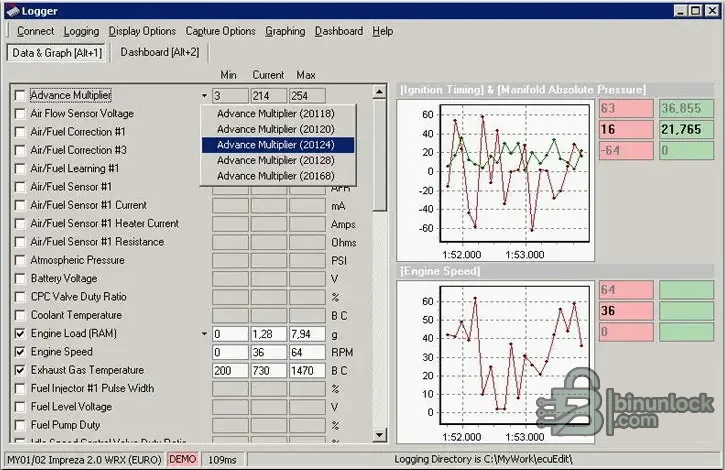
The official manual describes interface-dependent access rather than blanket model coverage. Always confirm the ECU protocol and cable before connecting.
For diagnosis, the program can auto-select an FTDI COM port or use a manually chosen port and baud rate. External sensors supported by the wider application include Innovate, Zeitronix and Tech Edge integrations when their required components are installed.
Do not assume that a binary is supported simply because it opens. A correct XML definition, ROM revision, address layout and checksum strategy are required before editing or flashing.
The main application and included activation utility are unsigned. They were inspected statically and never executed during preparation. Use an isolated workshop machine, scan locally and keep customer logs separate from unrelated data.
Diagnostic and logging functions#
- Subaru diagnostics through SSM II
- Mitsubishi diagnostics through MUT II and MUT III
- General OBD-II diagnostics over ISO 9141, ISO 14230 and CAN where the vehicle and interface support them
- Read and clear diagnostic trouble codes and inspect freeze-frame data
- Select live parameters, capture logs, configure warnings and display graphs or dashboards
- Read ECU memory ranges through the Memory Logger function when supported
The official manual describes interface-dependent access rather than blanket model coverage. Always confirm the ECU protocol and cable before connecting.
Supported interfaces and representative coverage#
The vendor manual lists OpenPort 1.2, 1.3M, 1.2S and 1.3U diagnostic cables. It associates OpenPort 1.2 with Subaru 2.0 Turbo read/write workflows from the early-2000s period, OpenPort 1.2S with Subaru 2.5 Turbo, OpenPort 1.3M with Mitsubishi Lancer Evolution 7–9 and OpenPort 1.3U with the broader supported set. Treat these as representative interface notes, not a guarantee for every market or ECU software.For diagnosis, the program can auto-select an FTDI COM port or use a manually chosen port and baud rate. External sensors supported by the wider application include Innovate, Zeitronix and Tech Edge integrations when their required components are installed.
ROM and map work#
ECUEdit can open ROM files, work with XML-based ECU descriptions, display one-, two- and three-dimensional maps, and launch its flash utility where the installed edition and ECU definition permit. It can convert description folders from Enginuity or EcuFlash formats and includes specific file-size conversion functions documented for Subaru turbo firmware.Do not assume that a binary is supported simply because it opens. A correct XML definition, ROM revision, address layout and checksum strategy are required before editing or flashing.
Log analysis#
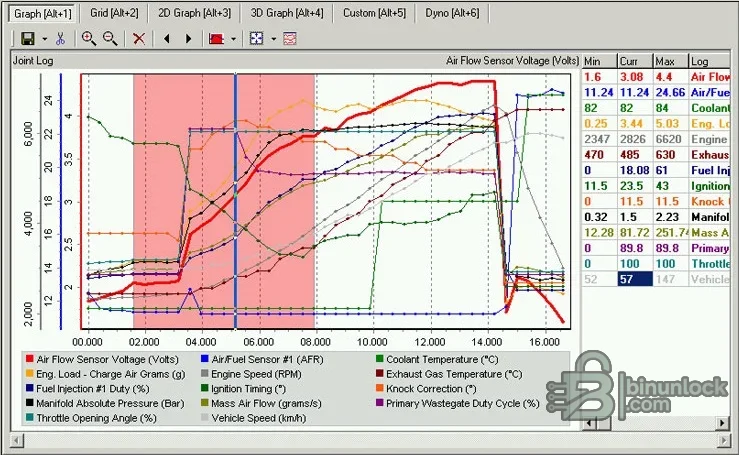
Recorded CSV logs can be viewed as grids, two-dimensional graphs, three-dimensional graphs and table views. The manual documents selection, merging, playback, custom calculated parameters and a power-and-torque estimation tool. Log-derived power figures depend on correct vehicle, gearing, mass and environmental inputs and should not be treated as a calibrated dynamometer result.System requirements#
- Windows desktop capable of running the supplied native application
- Compatible OpenPort or another interface explicitly supported by the selected module
- Correct FTDI or vendor driver and an available COM port where applicable
- Write permission for ROM, XML, log and dashboard files
- Stable vehicle voltage for any diagnostic or flash operation
The main application and included activation utility are unsigned. They were inspected statically and never executed during preparation. Use an isolated workshop machine, scan locally and keep customer logs separate from unrelated data.
Recommended diagnostic workflow#
- Identify the vehicle, ECU, protocol and interface before connecting.
- Install the correct interface driver and verify the port.
- Begin with identification and a small set of low-rate live parameters.
- Record a baseline log before changing warnings, dashboards or calibration data.
- Save the original ROM and XML description before any edit.
- Review changed regions and checksum requirements independently before flashing.
- After a write, verify ECU identification, DTC status and a controlled log before road testing.


