
EDC15P Rev Limiter Editor is a focused binary utility for locating and changing the single-value engine-speed limiter in compatible Bosch EDC15P files. It presents a deliberately small workflow: open a binary, review the detected limiter, enter the required RPM value and save a new file.
The narrow scope is useful when a full map editor would add unnecessary complexity, but it also means the application should be used only on a file whose EDC15P identity and limiter location have been confirmed.
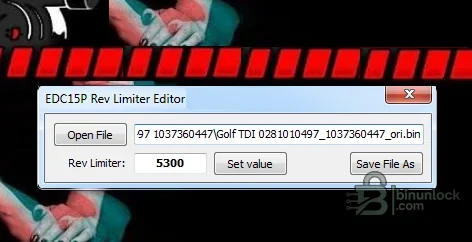
The narrow scope is useful when a full map editor would add unnecessary complexity, but it also means the application should be used only on a file whose EDC15P identity and limiter location have been confirmed.
What this resource is for#
The tool is aimed at VAG diesel calibration work involving the stationary or single-value rev limiter commonly associated with a popcorn or hard-cut effect. It edits the binary file only and does not read or flash an ECU.Confirmed functions#
- Open a compatible EDC15P binary
- Display the detected rev-limiter value
- Set a requested RPM target
- Save the processed file under a new name
- Portable single-application workflow
Supported controllers, files and vehicles#
- Bosch EDC15P diesel firmware used in supported Volkswagen Group applications
- The source screenshot demonstrates a Golf TDI binary, but this does not imply every Golf or TDI calibration is compatible
- File support depends on the exact software layout and presence of the expected limiter pattern
- Other EDC15 variants and later EDC16/EDC17 families are outside the claimed scope
Package contents#
- One portable EDC15P rev-limiter editor executable
- No drivers, flash interface or checksum plugin
- Static audit confirms the product identity; the executable was not launched
System and interface requirements#
- Windows PC or isolated virtual machine
- Verified original EDC15P binary read with appropriate hardware
- Hex comparison tool for reviewing the modified bytes
- Checksum correction in the editor or programming tool when required by the target software
Recommended workshop workflow#
- Confirm the ECU is Bosch EDC15P and record the software number
- Read twice and preserve an immutable original
- Open a copy and compare the displayed limiter with the value expected from the calibration
- Set a conservative, documented target and save to a new file
- Review the byte changes, correct checksums and write only with stable power and a recovery plan
Compatibility limits and responsible use#
- The application does not tune torque, smoke, boost, injection or protection maps
- A changed rev limiter can increase mechanical stress and should not be used to mask an engine fault
- Unsupported binaries may return a wrong location or no useful result
- Road-use legality, emissions rules and noise restrictions remain the operator’s responsibility
Troubleshooting#
- If the displayed value is implausible, close the file without saving and verify the ECU family
- If the output differs in many regions, do not program it
- If the engine behavior is incorrect after a write, restore the original file before diagnosing further


