
ELMConfig is a Windows workshop utility for supported Ford-platform and related Mazda module configuration and diagnostics through a compatible ELM327-style interface. The supplied screen exposes adapter connection, HS-CAN selection, vehicle identification, battery voltage, live parameter graphs and stored or pending diagnostic trouble-code controls.
This is not a generic one-click coding program. Configuration blocks and firmware files must match the exact vehicle platform, module part number and network branch. A wrong central configuration value or interrupted write can disable features or leave a module offline, so the safest use is to read, save and document the original state before changing a single option.
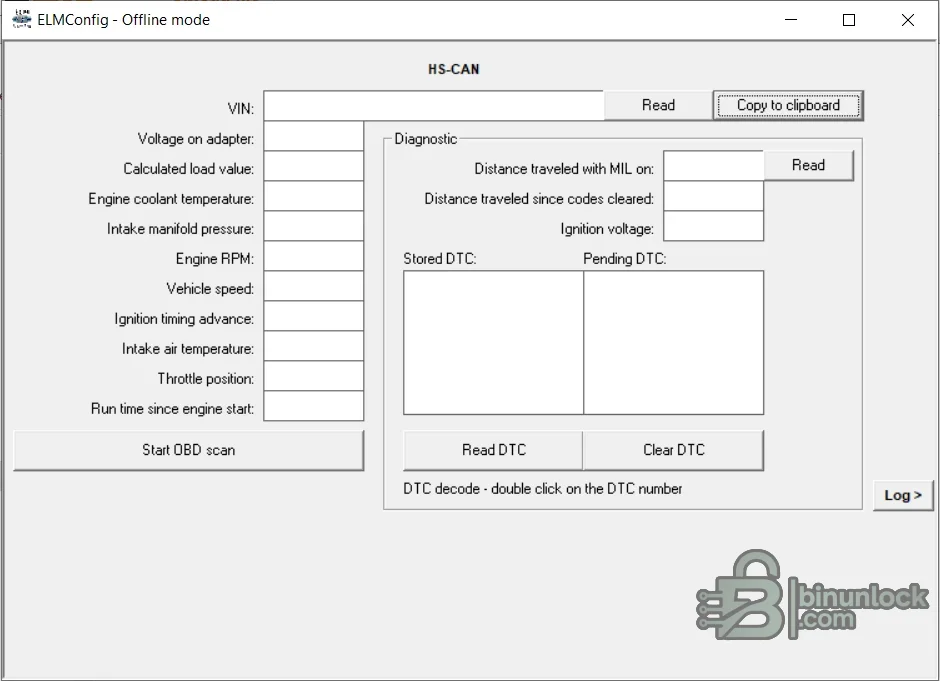
The package and interface are intended for Ford and Mazda vehicle platforms supported by this legacy ELMConfig build. The included VBF filenames identify Ford engineering-number families, but a filename in the data folder is not a complete vehicle compatibility list. Related Lincoln or Mercury platforms may share networks and modules, while newer architectures and gateway-protected vehicles may require different tools.
The clean package retains the application, its data directory with eleven VBF files, Microsoft ActiveX controls and the runtime libraries needed by the legacy interface. The executable is unsigned; several Microsoft controls carry valid signatures while other bundled legacy libraries do not. No driver installer is added, so the correct adapter driver must be installed separately.
VBF files are calibration or firmware containers, not universal updates. Never choose one solely by a similar filename. Before programming, confirm the full Ford engineering number, hardware level, calibration dependency, bootloader requirements and whether the module can be recovered on the bench. Configuration changes and firmware programming are separate risk levels.
The software does not replace Ford or Mazda factory service information and it should not be used as the sole authority for as-built values. Keep the vehicle on supported power, never program through an unstable wireless adapter, and do not publish VINs, keys, security codes or customer configuration files.
This is not a generic one-click coding program. Configuration blocks and firmware files must match the exact vehicle platform, module part number and network branch. A wrong central configuration value or interrupted write can disable features or leave a module offline, so the safest use is to read, save and document the original state before changing a single option.
Confirmed diagnostic and configuration functions#
- Connect through a serial ELM-compatible adapter
- Select the relevant HS-CAN or MS-CAN network where supported by the adapter and vehicle
- Read vehicle and module identification data
- View selected live parameters and graph values
- Read stored and pending diagnostic trouble codes
- Clear codes after repair
- Read and write supported module configuration data
- Use the included VBF data files only for the exact matching module workflow
Supported vehicle context#
The package and interface are intended for Ford and Mazda vehicle platforms supported by this legacy ELMConfig build. The included VBF filenames identify Ford engineering-number families, but a filename in the data folder is not a complete vehicle compatibility list. Related Lincoln or Mercury platforms may share networks and modules, while newer architectures and gateway-protected vehicles may require different tools.
- Confirm model generation, build date and market
- Record every module engineering number and calibration identifier
- Verify whether the target module is on HS-CAN or MS-CAN
- Do not infer support from the presence of an OBD connector alone
Interface and computer requirements#
- Windows computer with a reliable USB serial driver and administrator access for legacy ActiveX components
- Quality ELM327-compatible USB adapter with a proven HS-CAN/MS-CAN switch or automatic network support
- Stable COM port assignment and no competing diagnostic application
- Vehicle battery support supply appropriate for coding work
- USB power-management and sleep disabled during a write
Package contents#
The clean package retains the application, its data directory with eleven VBF files, Microsoft ActiveX controls and the runtime libraries needed by the legacy interface. The executable is unsigned; several Microsoft controls carry valid signatures while other bundled legacy libraries do not. No driver installer is added, so the correct adapter driver must be installed separately.
Safe module workflow#
- Identify the vehicle, module address, hardware number, software number and current configuration.
- Connect a known-good adapter with the ignition and battery voltage stable.
- Read and save the original configuration, then store a second copy outside the working folder.
- Change only one documented parameter at a time and keep a written record.
- Write only when the selected module and network are confirmed and recovery access is available.
- Cycle ignition as instructed, rescan every network and verify the affected vehicle function.
Firmware and VBF cautions#
VBF files are calibration or firmware containers, not universal updates. Never choose one solely by a similar filename. Before programming, confirm the full Ford engineering number, hardware level, calibration dependency, bootloader requirements and whether the module can be recovered on the bench. Configuration changes and firmware programming are separate risk levels.
Troubleshooting connection problems#
- No COM port: install the correct USB-serial driver and reconnect the adapter
- Adapter responds but module does not: verify HS/MS switch position and the target network
- Voltage reads incorrectly: stop and inspect adapter wiring and vehicle grounds
- Read succeeds but write fails: do not retry repeatedly; preserve logs and establish recovery
- ActiveX error: use an isolated compatible Windows environment and register only the supplied trusted controls
- DTC returns after clearing: diagnose the circuit rather than treating code deletion as a repair
Compatibility and safety limits#
The software does not replace Ford or Mazda factory service information and it should not be used as the sole authority for as-built values. Keep the vehicle on supported power, never program through an unstable wireless adapter, and do not publish VINs, keys, security codes or customer configuration files.


