
EvoScan is a Windows diagnostic and tuning data logger focused on Mitsubishi MUT and Subaru SSM communication, with additional generic OBD-II and CAN logging modes. It records live ECU parameters, displays gauges and graphs, reads diagnostic trouble codes and supports selected actuator operations through a compatible vehicle interface.
The application is most useful when diagnosing an intermittent fault or validating a calibration under load: a technician can select only the relevant channels, capture them to a log and review the relationship between RPM, airflow, boost, ignition, knock, fuel trims, temperatures and throttle data. It is a logger and diagnostic front end; ECU map editing normally belongs to a separate tool such as EcuFlash.
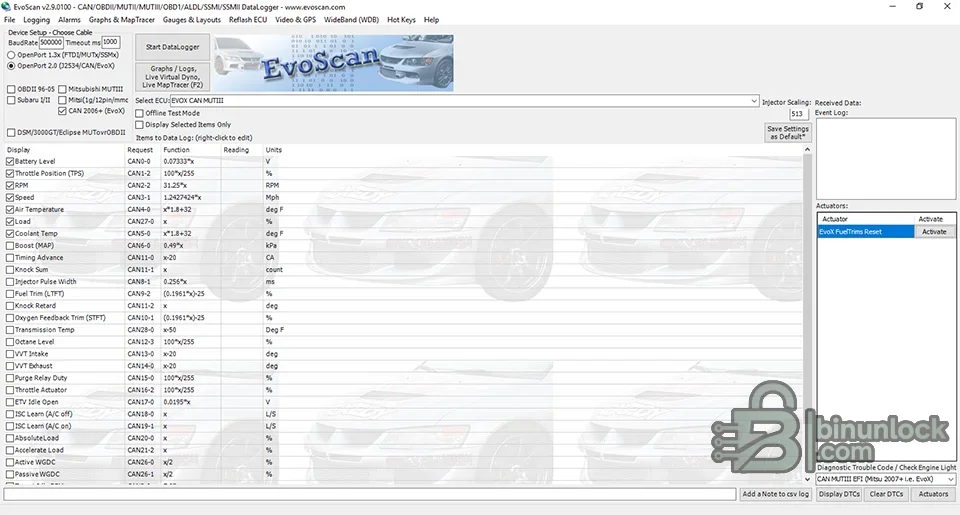
The main preview is the genuine application screen. It shows protocol and cable selection, a long configurable parameter list, live event logging, actuator controls, DTC buttons, graphs, virtual dyno and MapTracer functions.
Available channels and actions depend on the exact ECU definition, protocol, interface and vehicle. Never assume that a displayed actuator is safe to command on every model.
Model year alone is not enough. Confirm connector type, ECU protocol, region, cable revision and definition file before a workshop session.
Install the correct FTDI or J2534 driver for the physical interface. A cable that appears in Windows Device Manager is not proof that it supports the selected vehicle protocol.
Channel names can differ across definitions. Validate units and scaling against known physical conditions before making tuning decisions.
The included package is a legacy installer set. Test it in an isolated workshop PC or virtual machine before relying on it for a vehicle session.
No OpenPort cable, driver subscription, EcuFlash installation or vendor license is included. Obtain those through their legitimate channels.
The application is most useful when diagnosing an intermittent fault or validating a calibration under load: a technician can select only the relevant channels, capture them to a log and review the relationship between RPM, airflow, boost, ignition, knock, fuel trims, temperatures and throttle data. It is a logger and diagnostic front end; ECU map editing normally belongs to a separate tool such as EcuFlash.
The main preview is the genuine application screen. It shows protocol and cable selection, a long configurable parameter list, live event logging, actuator controls, DTC buttons, graphs, virtual dyno and MapTracer functions.
Core diagnostic and logging functions#
- Configurable live-data channels with names, requests, readings and engineering units
- High-speed logging for supported Mitsubishi MUT and CAN controllers
- CSV log recording for spreadsheet or specialist analysis
- Graph and log playback, virtual dyno tools and live MapTracer views
- Alarm thresholds with visual or sound notification
- Diagnostic trouble-code display and clearing where supported
- Selected actuator commands, including items exposed in the right-hand actuator panel
- Custom gauge layouts, hot keys and wideband integration options
Available channels and actions depend on the exact ECU definition, protocol, interface and vehicle. Never assume that a displayed actuator is safe to command on every model.
Supported vehicle groups#
The official EvoScan compatibility material centers on:- Mitsubishi: Lancer Evolution generations, Ralliart, DSM, Eclipse and 3000GT platforms, plus additional Mitsubishi models supported by MUT or generic OBD-II definitions
- Subaru: selected older and newer vehicles using Subaru Select Monitor modes and compatible OpenPort hardware
- Generic OBD-II: vehicles with a standard 16-pin diagnostic connector and supported parameter IDs
- Legacy connectors: older Mitsubishi 12-pin and Subaru 9-pin applications require the correct dedicated cable or adapter
Model year alone is not enough. Confirm connector type, ECU protocol, region, cable revision and definition file before a workshop session.
Interfaces and protocols#
The supplied interface exposes choices for OpenPort 1.3-series FTDI/MUT/SSM modes, OpenPort 2.0 J2534/CAN operation, generic OBD-II, Mitsubishi MUT-III, Subaru modes and legacy DSM/3000GT/Eclipse logging. Official guidance notes that some older logging modes are faster with a compatible 1.3-series cable, while specific Mitsubishi reflash workflows require OpenPort 2.0.Install the correct FTDI or J2534 driver for the physical interface. A cable that appears in Windows Device Manager is not proof that it supports the selected vehicle protocol.
Recommended setup workflow#
- Install the required interface driver and confirm the assigned COM port or J2534 device.
- Connect stable battery support when the session will be long or will include actuator testing.
- Select the exact cable family, vehicle protocol and ECU definition.
- Begin with a small channel set such as RPM, load, battery voltage and coolant temperature.
- Confirm plausible live values at key-on before starting the engine.
- Add only the channels required for the diagnostic question; excessive polling can reduce sample rate.
- Record a short baseline log before changing a calibration or component.
- Name the log with vehicle, date, ECU ID and test condition, then preserve the raw CSV.
Useful channels for calibration validation#
- Engine speed, calculated load and throttle position
- Mass airflow, manifold pressure and requested/actual boost
- Ignition timing, knock sum or correction channels supported by the ECU
- Injector pulse width, fuel trims and wideband air-fuel ratio when configured correctly
- Coolant, intake-air and exhaust-related temperatures
- Vehicle speed, gear and clutch or neutral-switch status where available
- Battery voltage during cranking, idle and high electrical load
Channel names can differ across definitions. Validate units and scaling against known physical conditions before making tuning decisions.
System requirements#
Official EvoScan material supports Windows XP, 7, 8, 8.1, 10 and 11 and requires .NET Framework 2.0 or newer. A practical workshop setup should include:- Windows laptop with a reliable USB port and administrator access for driver installation
- At least 2 GB RAM and 500 MB free space for the program, definitions and logs
- Compatible OpenPort or vehicle-specific logging cable
- Correct FTDI or J2534 driver for that cable
- A stable vehicle battery and charger appropriate to the test
- Licensed software access where required by the vendor
The included package is a legacy installer set. Test it in an isolated workshop PC or virtual machine before relying on it for a vehicle session.
Package contents#
The cleaned package preserves the installer bootstrapper, the main MSI package and three useful PDF guides covering gauge layouts, MapTracer and power graphing. A small registry file and its related install note were excluded because they represented an unofficial registration path rather than functional documentation.No OpenPort cable, driver subscription, EcuFlash installation or vendor license is included. Obtain those through their legitimate channels.
Troubleshooting#
- No connection: verify ignition state, cable driver, COM/J2534 selection, connector type and protocol.
- Values remain zero: choose a definition matching the ECU and test a minimal group of known channels.
- Logging is slow: reduce the number of requested parameters and verify the interface mode.
- Values are implausible: check scaling, units and regional decimal settings before interpreting the log.
- DTC functions fail: generic OBD-II and manufacturer-specific modes do not expose identical services.
- Actuator test is unavailable: the selected ECU definition or protocol may not support it; do not force a different profile.
- Installer fails on a modern PC: use compatibility mode or a clean legacy Windows VM with the required .NET runtime.


