
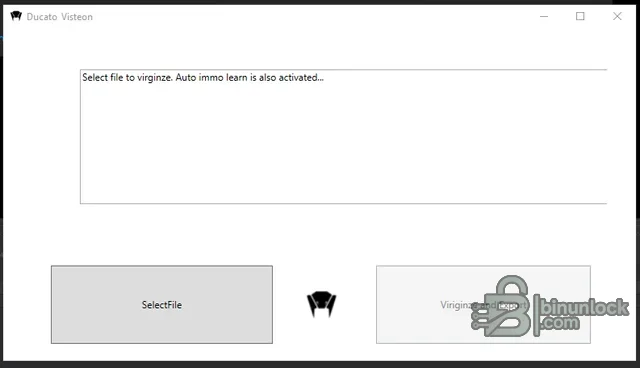
Fiat Ducato Visteon DCU-102 Virginizer is an offline binary-file utility for preparing a compatible used engine ECU for an authorized replacement and immobilizer synchronization job. The program opens an already read DCU-102 file, validates the input, reports whether the immobilizer region appears original or already virginized, and exports a separate working file with the auto-learn state enabled.
It does not connect to the van, read the ECU, flash the result or perform diagnostics. The technician remains responsible for identifying the exact controller, obtaining a complete repeatable read, programming the edited file with supported equipment and confirming the synchronization procedure on the vehicle.
Known DCU-102 references include Visteon/Ford-style hardware numbers beginning with 6C1U and Fiat/PSA numeric identifiers such as the 9661256980 family. These are examples for controller identification, not a complete whitelist. Compare every label, processor and full file length with a trusted read-tool protocol before using the calculator.
The supplied software performs its own file-size check and refuses data it does not recognize. That is an important guard, but it does not prove that the file belongs to the target vehicle or that the read is complete. Never pad, truncate or rename a dump merely to make it pass the size check.
The tool does not provide immobilizer-off functionality, ECU cloning, checksum tuning, VIN editing, calibration changes or fault-code removal. It is designed around a virgin/auto-sync replacement workflow and should not be presented as a universal DCU-102 editor.
No flashing interface, cable, driver, pinout or programming manual is included. Choose the read mode by ECU hardware and tool documentation, not by filename or vehicle model alone.
If the edited controller does not synchronize, do not repeat writes blindly. Recheck the BSI/body-computer state, key authorization, ECU identifiers, supply voltage, CAN communication and whether the vehicle actually uses the supported DCU-102 generation.
The application is framework-dependent rather than self-contained. Its runtime configuration requests Microsoft.WindowsDesktop.App 5.0, while the executable host is 64-bit. Microsoft has ended support for that runtime generation, so install it only in a controlled legacy workstation or isolated virtual machine and do not expose that system unnecessarily to the internet.
Both PE files are unsigned. They were inspected statically and were not executed during packaging; no malware-clean claim is made. Scan the archive with current security tools and use an isolated workshop environment before opening it.
Successful file export is not the end of the job. Final acceptance requires a verified write, correct auto-learning behavior, matching ECU/body identifiers, a complete diagnostic scan and a controlled start/run test following the vehicle manufacturer's procedure.
It does not connect to the van, read the ECU, flash the result or perform diagnostics. The technician remains responsible for identifying the exact controller, obtaining a complete repeatable read, programming the edited file with supported equipment and confirming the synchronization procedure on the vehicle.
Target ECU and vehicle context#
The intended controller is the Visteon DCU-102 diesel ECU used in the third-generation Fiat Ducato platform. Application lists commonly associate it with Ducato 250-series 2.2 Multijet variants around the 2006–2010 period, including the 74 kW/100 PS configuration. DCU-102 units also appear in related Peugeot Boxer and Citroën Jumper applications, but this particular utility identifies itself as a Ducato tool; cross-brand use must be confirmed from the exact hardware and software numbers rather than assumed.Known DCU-102 references include Visteon/Ford-style hardware numbers beginning with 6C1U and Fiat/PSA numeric identifiers such as the 9661256980 family. These are examples for controller identification, not a complete whitelist. Compare every label, processor and full file length with a trusted read-tool protocol before using the calculator.
Processor and file-layout considerations#
Workshop and programming references identify ST10F275/ST10F276 variants in this ECU family. Depending on the programmer and read mode, a complete read may include or omit an additional reserved/register area, so two files from the same family can differ in length. Published repair cases commonly mention 832 KiB and 896 KiB layouts for ST10F276 reads.The supplied software performs its own file-size check and refuses data it does not recognize. That is an important guard, but it does not prove that the file belongs to the target vehicle or that the read is complete. Never pad, truncate or rename a dump merely to make it pass the size check.
What the utility does#
- Opens a local BIN or HEX file selected by the technician
- Checks whether the file length matches the layouts implemented by the program
- Reports whether the relevant data appears virgin or not virgin
- Prepares the supported immobilizer state for automatic learning on a compatible vehicle
- Exports the modified result as a new binary file
The tool does not provide immobilizer-off functionality, ECU cloning, checksum tuning, VIN editing, calibration changes or fault-code removal. It is designed around a virgin/auto-sync replacement workflow and should not be presented as a universal DCU-102 editor.
Required workshop hardware#
- A bench, boot or BDM-capable programmer with an explicit Visteon DCU-102 protocol
- The correct pinout, regulated power supply and breakout/adapter arrangement for the ECU
- A stable full read of the original or donor controller, including the correct processor region
- Vehicle diagnostics capable of checking ECU, body computer and immobilizer status after installation
- A battery support unit for any vehicle-side programming or synchronization procedure
No flashing interface, cable, driver, pinout or programming manual is included. Choose the read mode by ECU hardware and tool documentation, not by filename or vehicle model alone.
Recommended replacement workflow#
- Record the VIN, engine, model year, ECU hardware number, software number and donor-unit history.
- Read the donor ECU at least twice using the same verified protocol and compare both files byte for byte.
- Keep the untouched original and donor reads in a protected backup location.
- Open a copy in the virginizer and confirm that the program accepts the exact size and identifies the current state.
- Export to a new filename, then compare the modified areas with the source and a known-good reference for that hardware.
- Program and verify the working file with the external tool before fitting or powering the ECU in the vehicle.
- Follow the appropriate Fiat/PSA immobilizer learning procedure, scan all related modules and confirm normal starting and fault-free operation.
If the edited controller does not synchronize, do not repeat writes blindly. Recheck the BSI/body-computer state, key authorization, ECU identifiers, supply voltage, CAN communication and whether the vehicle actually uses the supported DCU-102 generation.
System requirements#
- 64-bit Windows desktop capable of launching a Windows Presentation Foundation application
- Microsoft Windows Desktop Runtime for the .NET 5 family
- Read/write access to a local folder for source, working and verified BIN files
- All four runtime files from the cleaned package kept together in one directory
The application is framework-dependent rather than self-contained. Its runtime configuration requests Microsoft.WindowsDesktop.App 5.0, while the executable host is 64-bit. Microsoft has ended support for that runtime generation, so install it only in a controlled legacy workstation or isolated virtual machine and do not expose that system unnecessarily to the internet.
Package contents and cleanup#
The publication package preserves the executable host, managed application library, dependency manifest and runtime configuration required to launch the tool. A development PDB containing a builder workstation path was excluded because it is not needed at runtime and exposes irrelevant personal build metadata. The original source archive remains preserved separately in the audit trail.Both PE files are unsigned. They were inspected statically and were not executed during packaging; no malware-clean claim is made. Scan the archive with current security tools and use an isolated workshop environment before opening it.
Compatibility limits and responsible use#
Virginizing changes security-related ECU data. Use it only for a documented replacement on a vehicle you are authorized to repair. Do not rely on generic part-family similarity, do not overwrite the only recoverable donor file, and do not publish customer dumps or immobilizer data.Successful file export is not the end of the job. Final acceptance requires a verified write, correct auto-learning behavior, matching ECU/body identifiers, a complete diagnostic scan and a controlled start/run test following the vehicle manufacturer's procedure.


