
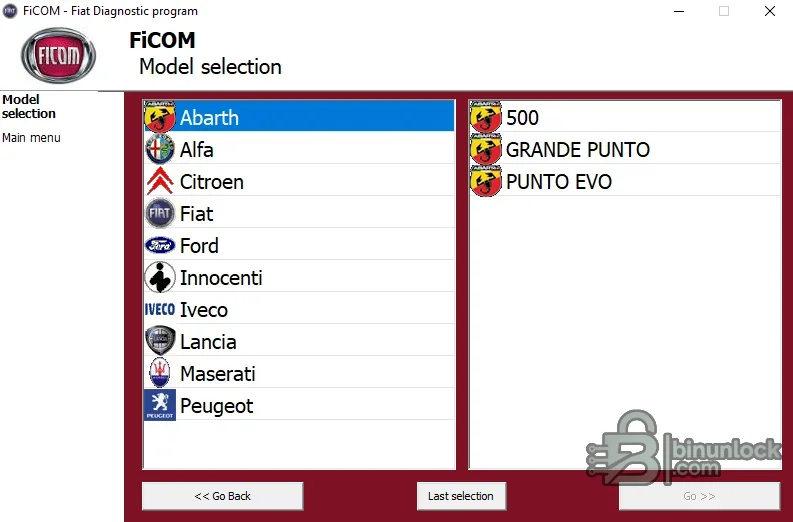
FiCOM is a dedicated diagnostic application for Fiat-group vehicles, developed around manufacturer-specific control-unit access rather than only generic emission OBD. Its main menu provides manual ECU selection, an automatic vehicle scan, special diagnostic functions and OBD connector-location guidance. The supplied model selector includes Fiat, Abarth, Alfa Romeo, Lancia, Iveco and additional related entries.
The application requires compatible FiCOM hardware and drivers. Coverage is controller-specific: a brand or model appearing in the selector does not guarantee every ECU or active test, and functions should be confirmed against the exact vehicle year, engine, transmission and module.
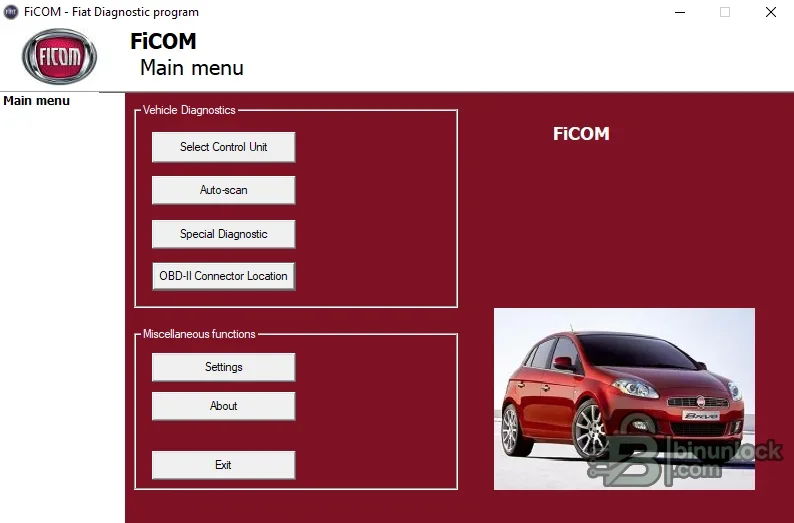
The application requires compatible FiCOM hardware and drivers. Coverage is controller-specific: a brand or model appearing in the selector does not guarantee every ECU or active test, and functions should be confirmed against the exact vehicle year, engine, transmission and module.
What this resource is for#
Use FiCOM for a structured pre-repair scan, controller identification, fault-code diagnosis, live-data review and supported service operations on compatible Fiat-group platforms. It can provide deeper access than a generic EOBD reader when the dedicated interface and vehicle-specific definition are available.Confirmed functions#
- Automatically scan the vehicle for responding control units
- Select a control unit manually when a targeted session is needed
- Read and clear supported manufacturer and generic diagnostic trouble codes
- Display identification data and live parameters exposed by a controller
- Run supported actuator tests, adaptations or service routines with appropriate precautions
- Show OBD-II connector-location guidance
- Store diagnostic findings for comparison before and after repair
Supported vehicles, controllers and files#
- SECONS identifies FiCOM as its diagnostic product for Fiat, Alfa Romeo and Lancia
- The supplied selector also displays Abarth, light Iveco, Maserati, Innocenti and selected related platforms
- Displayed entries include additional Citroën, Ford and Peugeot branches, but availability must be confirmed inside the exact build
- Engine, transmission, ABS, airbag, body, climate and other module access varies by model and year
- No claim is made that one interface or build covers every listed vehicle
Package contents#
- Single FiCOM setup executable
- No separate vehicle firmware or raw ECU-file collection
- Two original application screenshots documenting menus and model selection
- Installer fully tested as archive content and inspected statically without execution
System, hardware and interface requirements#
- Windows diagnostic laptop with available USB port
- Compatible SECONS FiCOM diagnostic interface and its correct driver
- Vehicle-specific adapter when a non-standard connector is required
- Stable battery support during active tests, adaptations and coding
- Service information for interpreting values and completing the repair safely
Recommended workshop workflow#
- Confirm VIN, model year, engine and transmission before connection
- Connect the interface with ignition off, then follow the application’s ignition prompts
- Run an automatic scan and save the initial module/fault inventory
- Enter the affected ECU, verify identification and compare live values with service data
- Perform only the required test or adaptation after the underlying fault is repaired
- Run a final scan and document cleared, remaining and newly introduced codes
Compatibility limits and responsible use#
- A generic ELM327 adapter is not a substitute for the dedicated interface
- Fault descriptions do not prove which component has failed
- Actuator and coding functions can create unsafe behavior when prerequisites are ignored
- Coverage depends on vehicle architecture and the installed database
- Do not erase faults before capturing freeze-frame and identification data
Troubleshooting#
- Interface not found: check the correct driver, USB cable and selected communication port
- No ECU response: verify ignition, battery voltage, connector pins and manual ECU selection
- Auto-scan misses one module: try the exact model and controller branch rather than assuming absence
- Live values freeze: inspect network condition and interface power before reconnecting
- Adaptation fails: confirm prerequisites, module fault state and security access requirements


