
GM Calibration Checksum Corrector is an offline Windows utility for recalculating checksums in compatible General Motors calibration files stored as raw binary data. It is designed around segmented calibration layouts: when a supported segment has been modified, the checksum belonging to that segment must be updated before the file is considered internally consistent.
The workflow is intentionally controlled. You open a calibration BIN, ask the application to calculate and correct the recognized segment checksums, then save the result as a separate modified file. The tool does not communicate with a vehicle, identify every GM controller automatically or flash an ECM/TCM.
The supplied preview shows the actual program window and its complete four-step control path: open the calibration, calculate/correct, and save a modified copy.
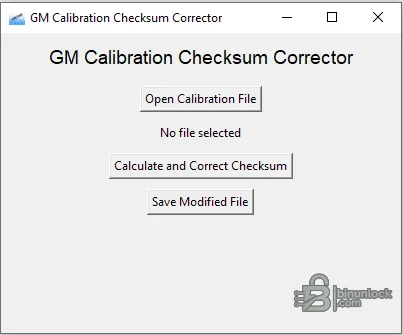
It is intended for calibration data, not for arbitrary firmware. The author explicitly states that files must be binary and that each segment has its own checksum. A file that opens successfully may still use a layout the program does not understand.
The utility is not a CVN-matching service and it does not make an aftermarket calibration identical to a factory file. A corrected internal checksum only proves that the implemented arithmetic is consistent with the data; it does not restore GM's original Calibration Verification Number or regulatory approval.
Changing a map normally changes the data and therefore can change the verification result even after the file's required internal checksum has been corrected. This resource must not be represented as a way to conceal unauthorized tuning or evade inspection.
Use it only when the calibration was obtained from a workflow known to produce a compatible segmented GM BIN. Record:
Do not assume coverage for a newer E39, E41, E46, E67, E78, E80, E82, E90, E92, E98, T43, T76, T87 or other controller merely because it is GM. Different controller generations use different containers, segment tables, signatures and checksum algorithms.
Renaming a proprietary tune file to BIN does not convert its content. Export or obtain the proper raw calibration through an authorized tool and verify its size before checksum processing.
If the utility reports no recognizable segments or produces broad unexplained changes, stop. Do not flash the output simply because it was saved without an error dialog.
Keep a report containing the original hash, edited-pre-checksum hash, corrected-output hash and exact tool release. This makes the work reproducible and provides a recovery trail.
A correct checksum cannot compensate for an incompatible operating system, wrong segment address, corrupted read or unsafe calibration values. Integrity and compatibility are separate gates.
The package carries its Python runtime and GUI dependencies in the internal application directory, so a separate Python installation is not required. No internet connection or vehicle interface is used by the checksum calculator itself.
The original archive, bundled ZIP component and all extracted files passed integrity checks. The main executable and runtime libraries were inspected statically; the application was not launched during packaging because the source included a genuine screenshot. The main executable is unsigned, while standard Microsoft/Python runtime components retain their original signatures where present.
The workflow is intentionally controlled. You open a calibration BIN, ask the application to calculate and correct the recognized segment checksums, then save the result as a separate modified file. The tool does not communicate with a vehicle, identify every GM controller automatically or flash an ECM/TCM.
The supplied preview shows the actual program window and its complete four-step control path: open the calibration, calculate/correct, and save a modified copy.
What the utility changes#
A segmented GM calibration can contain several independent sections, each with its own identifier, address range and integrity value. Editing data inside one section changes the bytes used by its checksum calculation. This tool attempts to locate the supported sections, calculate their expected values and write corrected checksum bytes into the output file.It is intended for calibration data, not for arbitrary firmware. The author explicitly states that files must be binary and that each segment has its own checksum. A file that opens successfully may still use a layout the program does not understand.
Typical use cases#
- Repairing segment checksums after an authorized calibration edit
- Preparing a working copy for comparison with the original BIN
- Checking whether a modified segment produces different integrity bytes
- Separating checksum repair from the map-editing step
- Validating a calibration before it is handed to the appropriate programming tool
The utility is not a CVN-matching service and it does not make an aftermarket calibration identical to a factory file. A corrected internal checksum only proves that the implemented arithmetic is consistent with the data; it does not restore GM's original Calibration Verification Number or regulatory approval.
Calibration checksum versus CVN#
These terms are related but should not be confused:- Internal segment checksum: a value stored in or associated with a calibration section so the controller can detect corruption
- Calibration Verification Number: a value reported by supported OBD diagnostics and used to identify the calibration content
- Calibration ID: an identifier for the software/calibration release
Changing a map normally changes the data and therefore can change the verification result even after the file's required internal checksum has been corrected. This resource must not be represented as a way to conceal unauthorized tuning or evade inspection.
Vehicle and controller coverage#
The publisher of this utility does not provide a definitive list of supported Chevrolet, GMC, Cadillac, Buick, Opel/Vauxhall, Holden, Saturn or other GM models and controllers. Compatibility must therefore be treated as file-layout based, not vehicle-name based.Use it only when the calibration was obtained from a workflow known to produce a compatible segmented GM BIN. Record:
- Vehicle make, model, year, engine and transmission
- Controller type and service number
- Hardware and operating-system numbers
- Calibration IDs and segment names
- Original read tool and read mode
- Exact input size and SHA-256
Do not assume coverage for a newer E39, E41, E46, E67, E78, E80, E82, E90, E92, E98, T43, T76, T87 or other controller merely because it is GM. Different controller generations use different containers, segment tables, signatures and checksum algorithms.
Input-file requirements#
- Raw binary calibration data rather than HP Tuners, EFILive, SPS, DPS, Intel HEX or proprietary container formats
- A complete, untruncated file from a known read operation
- A layout supported by the application's segment parser
- A working copy; the only original must never be selected as the save target
- Sufficient provenance to identify the ECU/TCM and software release
Renaming a proprietary tune file to BIN does not convert its content. Export or obtain the proper raw calibration through an authorized tool and verify its size before checksum processing.
Safe checksum-correction workflow#
- Read the controller with a tool and method documented for the exact module.
- Repeat the read and compare the files byte-for-byte.
- Store one untouched original and record its SHA-256.
- Make calibration changes only in a separate working file.
- Open that working BIN in the checksum corrector.
- Run Calculate and Correct Checksum.
- Save to a new filename; never overwrite the verified original.
- Compare input and output in a hex editor and identify every changed range.
- Re-open the output in the calibration editor and any second checksum validator available.
- Write only with stable power and a recovery-capable programming method.
- Read the controller back and compare the calibration after programming.
If the utility reports no recognizable segments or produces broad unexplained changes, stop. Do not flash the output simply because it was saved without an error dialog.
How to review the binary diff#
A checksum correction should normally alter a small number of integrity bytes associated with the edited segment. Review the diff for:- Changes outside the expected checksum fields
- Unexpected file-size changes
- Large zero-filled or repeated ranges
- Modified bootloader, operating-system or EEPROM regions
- Segment boundaries that do not match the calibration definition
- Differences in unedited calibration sections
Keep a report containing the original hash, edited-pre-checksum hash, corrected-output hash and exact tool release. This makes the work reproducible and provides a recovery trail.
Why an incorrect checksum matters#
Many control modules continuously or periodically test software and calibration integrity. A mismatch can cause programming refusal, DTC P0601/P0602-type faults, a no-start condition, limited operation or a module that requires recovery programming. The exact behavior depends on the controller and write tool.A correct checksum cannot compensate for an incompatible operating system, wrong segment address, corrupted read or unsafe calibration values. Integrity and compatibility are separate gates.
System requirements#
- 64-bit Windows 10 or Windows 11; the main bundled application is an x64 executable
- 2 GHz processor and 2 GB RAM
- At least 250 MB free storage for the application, source and comparison copies
- Write access to the working directory
- A hex editor/binary comparison utility
- A suitable GM calibration editor and definition for the exact software
- A licensed, recovery-capable read/write tool for any vehicle programming
The package carries its Python runtime and GUI dependencies in the internal application directory, so a separate Python installation is not required. No internet connection or vehicle interface is used by the checksum calculator itself.
Package contents#
The cleaned archive contains the checksum application and its complete bundled runtime/dependency tree. A separate XDF Address Adjuster found beside it in the source archive is intentionally excluded because it is a different product and would make this resource ambiguous.The original archive, bundled ZIP component and all extracted files passed integrity checks. The main executable and runtime libraries were inspected statically; the application was not launched during packaging because the source included a genuine screenshot. The main executable is unsigned, while standard Microsoft/Python runtime components retain their original signatures where present.
Limitations and troubleshooting#
- File will not open: verify that it is a raw BIN rather than a proprietary tuning container.
- No checksum is changed: the layout may be unsupported or the recognized segments may already be correct. Validate with a second tool.
- Many bytes change: do not flash; compare against the original and confirm the selected file.
- Output is rejected by the flasher: the write tool may require its own container, signature, metadata or checksum process.
- Controller reports P0601/P0602 after writing: restore the verified original using the documented recovery path and re-check all segments.
- CVN no longer matches factory data: internal checksum correction does not restore the factory calibration identity.
- The program fails to start: use 64-bit Windows and keep the complete internal dependency folder beside the executable.
- Security software flags the executable: quarantine it, verify the pinned hash and obtain an independent scan before use.


