
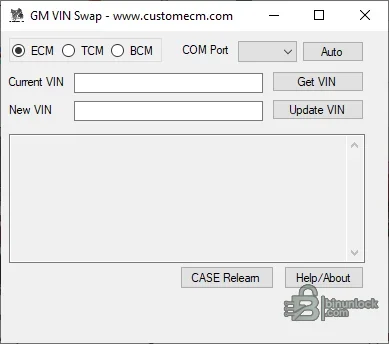
GM VIN Change App is a focused Windows diagnostic utility for reading and updating VIN data in selected General Motors OBD-II modules during legitimate replacement, retrofit or identity-repair work. The supplied screen provides ECM, TCM and BCM modes, COM-port selection, current and replacement VIN fields, Get VIN and Update VIN controls, plus a CASE relearn action where the connected controller supports it.
VIN storage is not identical across every GM architecture or module. Changing one visible field may not perform security setup, configuration, theft relearn or software programming required by an OEM replacement procedure.
VIN storage is not identical across every GM architecture or module. Changing one visible field may not perform security setup, configuration, theft relearn or software programming required by an OEM replacement procedure.
What this resource is for#
Use the application when a known supported GM controller contains the donor vehicle VIN after an authorized module replacement. The safe objective is to restore the correct identity while preserving the original module data and then complete all OEM setup, security and diagnostic validation steps.Confirmed functions#
- Connect through a compatible ELM327 serial interface or supported J2534 pass-through
- Select ECM, TCM or BCM workflow from the visible interface
- Read the current VIN before any write
- Enter and write the verified replacement VIN to a supported module
- Request CASE relearn for compatible powertrain workflows
- Keep current and intended VIN values visible for technician verification
Supported vehicles, controllers and files#
- Common target classes include ECM, TCM and BCM as shown by the supplied build
- Public documentation for the application family also discusses EBCM, EPS and IPC coverage on supported vehicles
- ELM327 and J2534 compatibility varies by adapter firmware, driver and required GM network pins
- Many pre-Global-B GM OBD-II applications may be supported, but vehicle, year and module must be checked individually
- Global B or VIP modules are not claimed as supported and generally require authenticated OEM processes
Package contents#
- Single native Windows application renamed neutrally in the publication package
- Original screenshot documenting the available controller and VIN controls
- No calibration files, interface drivers, SPS subscription or OEM security credentials
- Executable is unsigned and its embedded generic driver metadata is not treated as reliable product-version evidence
System, hardware and interface requirements#
- Windows PC with the correct bitness and driver for the chosen adapter
- Quality ELM327 with required GM network support or a compatible J2534 device
- Stable battery support and reliable USB connection
- Exact VIN verified from vehicle documentation and network scan
- OEM diagnostic access for configuration, security learn or programming required after identity repair
Recommended workshop workflow#
- Perform a complete vehicle scan and record VIN data from every communicating module
- Confirm the donor module is compatible by service number, hardware, software and calibration
- Back up EEPROM or flash where the module and equipment permit
- Read the current VIN with the app and compare it with the documented vehicle VIN
- Write once under stable voltage and cycle ignition only when instructed
- Complete OEM setup or CASE/security relearn as required, then rescan and confirm network-wide identity consistency
Compatibility limits and responsible use#
- A file that opens successfully is not automatically compatible with the target controller, vehicle or hardware revision.
- Preserve a verified original read and compare byte length, identifiers and modified ranges before any write.
- Security, identity, emissions and anti-theft functions must be used only on property the technician is authorized to service and where the change is lawful.
- The supplied application does not replace OEM service information, stable power, a compatible interface or a tested recovery route.
- An unsigned legacy executable should be isolated and independently scanned before use; no malware-free claim is made.
- Global B modules and authenticated serial-data operations are outside the proven scope
- VIN correction alone does not remove theft lock or configure a used module
Troubleshooting#
- Adapter not listed: install the vendor driver and verify COM or J2534 registration
- VIN cannot be read: confirm module selection, ignition state, GMLAN/CAN support and adapter wiring
- Write is rejected: stop and verify controller family and security prerequisites
- CASE relearn fails: diagnose crank-sensor, temperature and OEM enable conditions separately
- Different modules report different VINs: document the network and use OEM diagnostics rather than rewriting modules blindly


