
H&S Tuner Unlocker Bundle is a collection of offline Windows calculators for service work on legacy H&S Performance diesel programmers. The included utilities cover Ford, Dodge/Ram and GM-oriented code workflows, including VIN-lock reset, tuner-product unlock and selected transmission-tune authorization fields shown by the original applications.
These programs do not connect to a truck or automatically inspect a tuner. The technician must read the required root/unlock code and device information from the physical H&S unit, verify ownership and select the calculator that matches the tuner generation and the vehicle to which it is currently locked. A generated value is not proof that the device is safe to reset or compatible with another truck.
The source package also contained an old H&S Updater with dormant vendor and Java-related network references. It was excluded from the cleaned archive because it is not required for offline code calculation and obsolete update-server contact would add unnecessary risk. Use a separately verified SD-card or firmware procedure if a tuner genuinely requires an update.
The bundle is not presented as coverage for every H&S device or firmware. If the physical menu does not expose the fields expected by the selected calculator, do not guess.
Common legacy H&S application families include Ford 6.0L, 6.4L and early 6.7L Power Stroke platforms, but actual support depends on the tuner's loaded firmware and hardware. The Ford calculator in this package provides a code transformation only; it does not load calibration files, restore an ECM or validate that a tuner has been returned to stock.
Before a device reset, record the current vehicle, VIN, ECM/TCM identifiers, tune status and any transmission software. Confirm that the truck is safely returned to a legal stock or documented calibration state where required. Removing a tuner while its programming remains installed can leave both the truck and device in an uncertain state.
Use the GM calculator only when the H&S device menu and service documentation match its expected input. Do not infer support from a truck badge or engine displacement alone. Capture the device serial, root code, locked-vehicle family, ECM/TCM part numbers and installed-state information before calculation.
Do not post full VINs, serial numbers, root codes or customer details in the public discussion. Those values can be device-specific and should remain in the technician's private service record.
Follow the laws applicable to the vehicle's registration and use. For road vehicles, restore and retain compliant emissions equipment and approved calibrations. A VIN reset should never be used to conceal a tuner's history, unauthorized programming or a device obtained without clear title.
Use a dedicated workshop computer or disposable VM and scan the package with current security tools. Do not disable endpoint protection globally for unsigned legacy software.
Static inspection is not a malware-clean guarantee. Use these tools only for hardware you own or are authorized to service, keep tuner and vehicle identity evidence private, and preserve a complete before/after record. If the device state is uncertain, a controlled professional recovery is safer than repeated code attempts.
These programs do not connect to a truck or automatically inspect a tuner. The technician must read the required root/unlock code and device information from the physical H&S unit, verify ownership and select the calculator that matches the tuner generation and the vehicle to which it is currently locked. A generated value is not proof that the device is safe to reset or compatible with another truck.
Utilities included in the cleaned bundle#
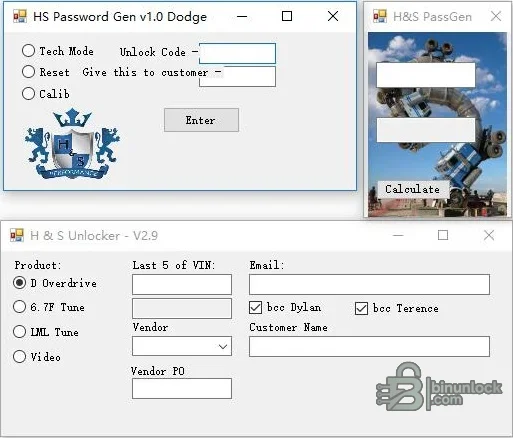
- Dodge 6.7 password generator: interface modes for technician use, reset and calibration-related code handling
- Ford H&S PassGen: a two-field calculator intended for the corresponding Ford/H&S code workflow
- GM utility: separate executable supplied for GM-oriented tuner service
- Transmission/tune unlock utility: fields for product selection, last five VIN characters, vendor/customer details and related authorization data
The source package also contained an old H&S Updater with dormant vendor and Java-related network references. It was excluded from the cleaned archive because it is not required for offline code calculation and obsolete update-server contact would add unnecessary risk. Use a separately verified SD-card or firmware procedure if a tuner genuinely requires an update.
H&S device families and compatibility boundaries#
H&S documentation and current unlock-service references describe VIN-lock or reset-code workflows for devices such as Mini Maxx, XRT Pro and Black Maxx. Device generation matters: original units, later V2 hardware, street/race firmware and custom MCC configurations can use different code formats and procedures.- Confirm the exact product name, hardware revision, serial number and software/tuning version on the device's Show Settings screen
- Record the truck family to which the tuner is currently locked, not only the vehicle on which it will be used next
- Distinguish a VIN-lock reset from a feature, transmission, video or calibration unlock; they are not interchangeable
- Do not use a code intended for a numeric root value on an alphanumeric-code generation
- Stop if the tuner has no serial number, shows corrupt settings, reboots unexpectedly or does not match the expected menu flow
The bundle is not presented as coverage for every H&S device or firmware. If the physical menu does not expose the fields expected by the selected calculator, do not guess.
Ford Power Stroke context#
Original Mini Maxx manuals document Ford Power Stroke applications and show that the device's settings page contains vehicle, VIN, ECM/TCM part numbers, serial number, hardware/software information, tuning version and tune status. Those values should be photographed before any reset.Common legacy H&S application families include Ford 6.0L, 6.4L and early 6.7L Power Stroke platforms, but actual support depends on the tuner's loaded firmware and hardware. The Ford calculator in this package provides a code transformation only; it does not load calibration files, restore an ECM or validate that a tuner has been returned to stock.
Dodge/Ram Cummins context#
The package contains a dedicated Dodge 6.7 utility and a second program whose filename references Dodge, 6.7 and transmission/tune functions. H&S manuals and product references commonly associate legacy devices with 5.9L and 6.7L Cummins applications, including 48RE/68RFE transmission-related options on supported configurations.Before a device reset, record the current vehicle, VIN, ECM/TCM identifiers, tune status and any transmission software. Confirm that the truck is safely returned to a legal stock or documented calibration state where required. Removing a tuner while its programming remains installed can leave both the truck and device in an uncertain state.
GM Duramax context#
The included GM executable is separate from the Ford and Dodge calculators and has no embedded product-version metadata. Legacy H&S Mini Maxx documentation lists GM 6.6L Duramax applications such as LMM-era trucks, while later products and firmware can differ substantially.Use the GM calculator only when the H&S device menu and service documentation match its expected input. Do not infer support from a truck badge or engine displacement alone. Capture the device serial, root code, locked-vehicle family, ECM/TCM part numbers and installed-state information before calculation.
Root codes, VIN data and reset records#
Current H&S reset services distinguish numeric and alphanumeric root codes and warn that some combinations are not supported. The lower application in the supplied screenshot requests the final five VIN characters together with product and vendor/customer fields; those fields must come from the authorized job record, not invented data.- Photograph every Show Settings page and record the complete tuner identity before changing anything.
- Verify that the device is legitimately owned and not tied to a stolen or unidentified vehicle.
- Confirm the current locked-vehicle family and whether the tuner was returned to stock correctly.
- Select the matching executable and mode; keep Ford, Dodge/Ram and GM workflows separate.
- Enter only the root/unlock/VIN information requested by that exact interface.
- Save the generated value and the input evidence in the repair order before entering it on the device.
- Follow the device's documented reset flow and stop if the menus or warning text differ.
- After reset, verify serial number, application, firmware and stock-state information before connecting to another vehicle.
Do not post full VINs, serial numbers, root codes or customer details in the public discussion. Those values can be device-specific and should remain in the technician's private service record.
Avoiding a bricked or unusable tuner#
Unlock-service documentation warns that certain Mini Maxx units with missing serial information or particular alphanumeric code behavior may fail after unlocking. A calculator cannot assess corrupted firmware, damaged storage, counterfeit hardware or a partially completed previous flash.- Use stable USB power or the device's approved vehicle power source throughout the documented procedure
- Back up the microSD card byte-for-byte before replacing or updating files
- Do not remove power while the device is resetting, writing or rebuilding storage
- Do not mix files from different device generations or arbitrary internet firmware packages
- If the device shows
N/Afor serial number or inconsistent hardware data, stop and seek a specialist recovery service - Keep the original truck available until its stock state and the tuner's release are both verified
Emissions and legal use#
Some legacy diesel tuners were sold with performance or emissions-related features. This resource is limited to ownership-verified device recovery and code calculation; it does not include calibration files and should not be used to defeat emissions controls, inspection systems or road-safety requirements.Follow the laws applicable to the vehicle's registration and use. For road vehicles, restore and retain compliant emissions equipment and approved calibrations. A VIN reset should never be used to conceal a tuner's history, unauthorized programming or a device obtained without clear title.
System requirements#
- 32-bit or 64-bit Windows computer capable of running legacy x86 desktop applications
- Windows 7 is the most period-appropriate target; Windows 10/11 may require legacy .NET Framework components and compatibility settings
- Approximately 20 MB of storage for the utilities and private service records
- Standard keyboard/mouse desktop session; no vehicle interface is needed for the calculators themselves
- Physical access to the H&S tuner and its Show Settings/root-code screens
- A microSD reader and verified backup workflow if device storage will be serviced separately
- No internet connection is required by the four retained offline calculators
Use a dedicated workshop computer or disposable VM and scan the package with current security tools. Do not disable endpoint protection globally for unsigned legacy software.
Troubleshooting#
- Generated code is rejected: verify the exact device generation, numeric/alphanumeric format, locked-vehicle family and selected calculator/mode
- Required fields are unclear: return to Show Settings and the original device manual; do not substitute another truck's VIN or part numbers
- Tuner is still married to the previous truck: confirm whether that vehicle was returned to stock and use the proper VIN-reset process rather than a feature unlock
- Device has no serial or black-screens: stop code attempts and use a qualified hardware/firmware recovery service
- Windows blocks an executable: independently scan it and use an isolated legacy environment; do not whitelist the entire downloads folder
- Updater is missing from the cleaned package: this is intentional; obtain firmware only from a verified, device-specific source after backing up the microSD card
Package audit and responsible use#
The source RAR was fully tested and extracted. All five original executables were inspected statically and were unsigned. The cleaned package retains the four offline calculator/unlock utilities and omits only the obsolete network-capable updater. None of the programs was executed during packaging because the original image already provides genuine views of the Dodge password generator, H&S PassGen and multi-product unlock window.Static inspection is not a malware-clean guarantee. Use these tools only for hardware you own or are authorized to service, keep tuner and vehicle identity evidence private, and preserve a complete before/after record. If the device state is uncertain, a controlled professional recovery is safer than repeated code attempts.


