
HCIP Dashboard Calculator is an offline reference and calculation utility for locating and encoding mileage data in supported instrument-cluster, body-module and related memory dumps. After the operator selects a manufacturer and an exact model/controller profile, the program identifies the relevant EEPROM or MCU family, shows where the odometer value is stored and calculates the byte pattern for an authorized repair value.
The software does not connect to a vehicle, read a chip or write a dump by itself. It must be used with a suitable EEPROM/MCU programmer, a verified original read and a hex editor or programmer software that preserves the complete binary. Its database spans passenger cars, light commercial vehicles, trucks, motorcycles and ATVs, but compatibility is tied to the exact dashboard supplier, memory device, model year and software profile—not merely the vehicle badge.
This is a pattern database and calculator, not automatic dump recognition. The user must select the correct profile and verify that its file size, memory device and original encoding match the physical module.
Chip organization matters. A 93Cxx device read as 8-bit data can look different from the same device read as 16-bit words. Confirm the programmer setting, byte order and file length against a known-good read before applying any calculated bytes.
The exact profile name shown by the application is authoritative for this package. A visually identical cluster can use another EEPROM or software revision, so confirm the manufacturer label and memory identity after opening the module.
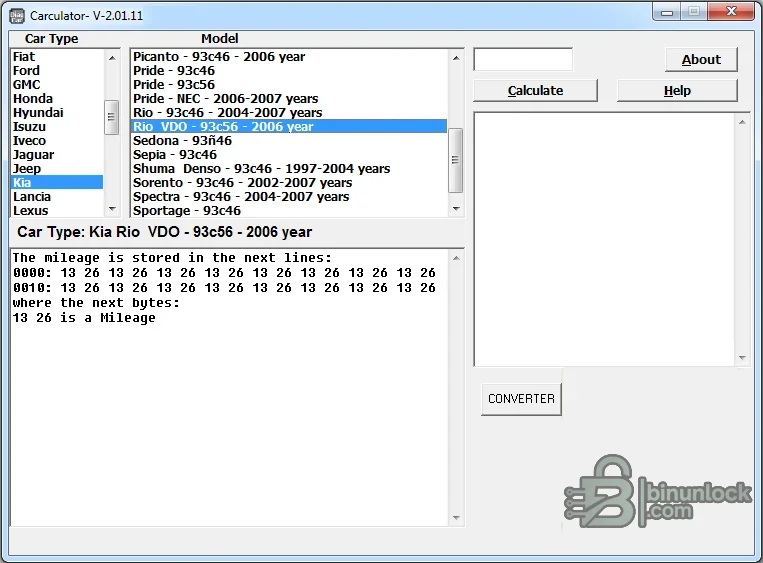
The screenshot demonstrates a Kia Rio VDO profile using a 93C56 memory and shows repeated example bytes. That is a useful illustration of the workflow, but those bytes must never be reused for another model or dump.
Some profiles refer to a body-control module rather than the visible cluster, and some require multiple modules to remain consistent. Read every named module before repair and record which dump corresponds to which unit.
These entries use the same file-based workflow but can have different units, wheel-size dependencies or instrument-replacement procedures. Confirm the service manual and legal recordkeeping requirements for the specific vehicle class.
An unstable or misorganized read makes any calculated result unsafe. If repeat reads differ, resolve power, clip, desoldering or programmer configuration problems first.
The built-in converter can assist with miles/kilometres conversion, but workshop records should retain the original unit and value. Rounding and display resolution can differ between cluster families.
Official consumer-safety guidance treats intentional odometer alteration as fraud and emphasizes accurate mileage disclosure. Laws differ by country, so verify the rules that apply to the vehicle and workshop.
The executable is unsigned. It was examined statically and was not launched during packaging because a genuine source screenshot was supplied. Scan it again in your own isolated environment before use.
The source contains no nested archive or pointer wrapper. No web shortcut or unrelated installer is included in the publication package.
The software does not connect to a vehicle, read a chip or write a dump by itself. It must be used with a suitable EEPROM/MCU programmer, a verified original read and a hex editor or programmer software that preserves the complete binary. Its database spans passenger cars, light commercial vehicles, trucks, motorcycles and ATVs, but compatibility is tied to the exact dashboard supplier, memory device, model year and software profile—not merely the vehicle badge.
What the calculator does#
The main window has separate lists for vehicle make and profile, an input field for the desired recorded distance, a calculation panel and a large help area. Selecting a profile exposes controller-specific information such as:- Vehicle model, year range and instrument-cluster manufacturer
- EEPROM or MCU family used by that profile
- Offsets or repeated byte sequences that contain the stored distance
- Whether the example is in miles or kilometres
- The calculated replacement byte sequence for the entered value
- Notes for paired modules such as dashboard plus BSI, BCM, CAS, EWS or lighting module
This is a pattern database and calculator, not automatic dump recognition. The user must select the correct profile and verify that its file size, memory device and original encoding match the physical module.
Supported memory and processor families#
The internal database contains profiles for many common serial EEPROMs and dashboard microcontrollers. Representative technologies visible in the program include:- Microwire EEPROM: 93C46, 93C56, 93C66, 93C76 and 93C86 variants
- I²C EEPROM: 24C01, 24C02, 24C04, 24C08, 24C16 and 24C32
- SPI EEPROM: 95020, 95040, 95080, 95128, 95160 and related devices
- Special cluster memory: M35080 family entries used in selected BMW instrument clusters
- Motorola/Freescale MCU: HC05, HC08, HC11, HC12 and multiple 9S12 derivatives
- NEC, TMS and other embedded controllers: profile-specific entries where the mileage is stored inside an MCU rather than a separate EEPROM
Chip organization matters. A 93Cxx device read as 8-bit data can look different from the same device read as 16-bit words. Confirm the programmer setting, byte order and file length against a known-good read before applying any calculated bytes.
European vehicle coverage#
The database includes extensive European dashboard and body-module profiles. Representative coverage visible inside the application includes:- Audi and Volkswagen Group: Audi 100, A2, A3, A4, A6 and A8; Volkswagen Bora, Caddy, Golf, Passat and related SEAT/Škoda applications using VDO, Motometer, Jaeger and other clusters
- BMW: E30/E32/E34/E36/E38/E39-era EEPROM clusters, selected E46 dashboard/LCM/EWS sets, M35080-based clusters and later E60/E63/E65 dashboard/CAS combinations
- Mercedes-Benz: A-Class, C-Class/W202 and related VDO/Motometer profiles, CLK, G-Class and selected Sprinter/tachograph data patterns
- Peugeot and Citroën: 106/107/206/207/306/405/406/607 families plus Berlingo, C1, C2, C3, C4, C5, C6, C8, Jumper, Jumpy, Xantia and Xsara profiles; several entries explicitly combine dashboard and BSI data
- Fiat, Alfa Romeo and Lancia: selected Punto, Panda, Bravo/Brava/Marea, JTD ECU references, Alfa 145/146/147/156/159/166 and multiple Lancia clusters
- Ford and Opel: Fiesta, Focus, Mondeo, Transit, Galaxy and commercial-vehicle profiles; Astra, Antara and other Opel/GM dashboard families
- Volvo, Jaguar and Land Rover: S70, S80, V40, V70, XC90, Jaguar S-Type/X-Type and selected Defender, Discovery and Freelander clusters
The exact profile name shown by the application is authoritative for this package. A visually identical cluster can use another EEPROM or software revision, so confirm the manufacturer label and memory identity after opening the module.
Asian vehicle coverage#
Representative Asian applications in the database include:- Toyota and Lexus: Camry, Corolla, Avalon, Avensis, Auris, 4Runner, FJ Cruiser, Fortuner, Previa, Vios and selected Lexus profiles using Denso, Yazaki, VDO and Sagem clusters
- Honda and Acura: Accord, Civic, City, CR-V, Jazz/Fit, Odyssey, Pilot, S2000, MDX, RDX, RL, RSX and TSX variants
- Nissan and Infiniti: Almera, Altima, Frontier/Navara, Skyline, 350Z and other Kansei or VDO-based profiles
- Hyundai and Kia: Accent, Elantra, Getz, Santa Fe, Sonata, Starex, Tucson, Picanto, Rio, Pride, Sorento, Sportage, Carens, Carnival and Cee'd entries
- Mazda, Mitsubishi, Subaru and Suzuki: Mazda 3/6-family entries, Mitsubishi cluster families, Subaru Forester/Impreza/Legacy and Suzuki Swift, Grand Vitara and Wagon R profiles
- Isuzu: D-Max, Rodeo/Trooper, NQR, Elf, Pickup and other dashboard EEPROM variants
The screenshot demonstrates a Kia Rio VDO profile using a 93C56 memory and shows repeated example bytes. That is a useful illustration of the workflow, but those bytes must never be reused for another model or dump.
North American vehicle coverage#
The application also contains numerous North American dashboard and body-control profiles:- Ford, Lincoln and Mercury: F-Series, Super Duty, Explorer, Expedition, Escape, Mustang, Ranger, Windstar, Navigator and Town Car families using HC11/HC12/9S12 or serial EEPROM storage
- Chevrolet and GMC: Silverado, Tahoe, Suburban, Trailblazer, Colorado, Impala, Malibu, Corvette, Express/Savana and related BCM/dashboard profiles
- Cadillac, Buick, Pontiac and Hummer: CTS, DTS, DeVille, Escalade, Seville, SRX and selected platform-related applications
- Chrysler, Dodge and Jeep: 300/300C, Neon, PT Cruiser, Voyager, Charger, Durango, Ram, Wrangler, Cherokee and Grand Cherokee variants
Some profiles refer to a body-control module rather than the visible cluster, and some require multiple modules to remain consistent. Read every named module before repair and record which dump corresponds to which unit.
Motorcycle, ATV and specialty profiles#
The database is not limited to passenger cars. It contains profile notes for motorcycles and ATVs from Honda, Kawasaki, Suzuki, Yamaha, KTM, Harley-Davidson, Cagiva, Piaggio and others, as well as selected snowmobile, tachograph and commercial-vehicle applications.These entries use the same file-based workflow but can have different units, wheel-size dependencies or instrument-replacement procedures. Confirm the service manual and legal recordkeeping requirements for the specific vehicle class.
Preparing a reliable source dump#
- Record the displayed mileage, VIN, module part number, supplier, hardware/software identifiers and vehicle history before disassembly.
- Identify the exact EEPROM or MCU on the board; do not infer it solely from the vehicle model.
- Read the device at the correct voltage and organization using a suitable programmer.
- Save at least two independent reads and compare their SHA-256 hashes or byte content.
- Keep the original dump read-only and make all experiments on a duplicate.
- Check the file size and known fixed areas against the profile selected in HCIP Dashboard Calculator.
- If the profile references several modules, obtain and label every required dump before changing any one of them.
An unstable or misorganized read makes any calculated result unsafe. If repeat reads differ, resolve power, clip, desoldering or programmer configuration problems first.
Calculation and editing workflow#
- Choose the manufacturer and exact controller/model entry.
- Read the help pane and confirm the memory type, year range and module combination.
- Enter the lawful repair mileage in the unit expected by that profile.
- Run the calculation and record the displayed offsets and byte sequence.
- Open a working copy of the original dump in a hex editor or programmer application.
- Change only the bytes required by the verified profile, preserving all other data and file length.
- Save under a new filename and compare the edited file with the original to review every changed offset.
- Write and verify the memory, reinstall the module, then perform a full diagnostic scan and consistency check.
The built-in converter can assist with miles/kilometres conversion, but workshop records should retain the original unit and value. Rounding and display resolution can differ between cluster families.
Legal and recordkeeping requirements#
Odometer alteration intended to misrepresent a vehicle's travelled distance is illegal in many jurisdictions. The tool should be used only for legitimate repair or replacement where the displayed value is restored consistently with the documented vehicle history.- Keep a dated work order, original display photograph, original dump and edited dump
- Record why the cluster or module was repaired or replaced
- Preserve invoices, inspection records and diagnostic reports that support the actual distance
- Follow local disclosure and door-label requirements if the original value cannot be restored
- Never advertise a corrected display as proof of actual mileage without supporting records
- Check every module that stores distance so the repair does not create a hidden discrepancy
Official consumer-safety guidance treats intentional odometer alteration as fraud and emphasizes accurate mileage disclosure. Laws differ by country, so verify the rules that apply to the vehicle and workshop.
System requirements#
- A Windows PC capable of running a legacy native 32-bit Visual Basic desktop application
- Microsoft Visual Basic 6 runtime (MSVBVM60) available from a trusted Windows component source
- Windows XP or Windows 7 compatibility mode is the safest baseline; use an isolated VM for older software on a modern workstation
- At least 50 MB free for the application, plus secure storage for original and edited dumps
- A display resolution of 1024×768 or higher for the model, help and calculation panels
- A separate EEPROM/MCU programmer and appropriate adapters for the target memory
- A hex editor or programmer application capable of preserving exact binary length
- No vehicle interface or internet connection is required by the calculator itself
The executable is unsigned. It was examined statically and was not launched during packaging because a genuine source screenshot was supplied. Scan it again in your own isolated environment before use.
Package contents and verification#
The cleaned package contains one application file, dash calculator.exe, preserved from the fully tested source archive. Its embedded metadata identifies the program as Carculator/Tacho Calc from NetworX. The final encrypted 7z is independently tested and extracted, and the resulting executable is matched to the clean-payload hash.The source contains no nested archive or pointer wrapper. No web shortcut or unrelated installer is included in the publication package.
Troubleshooting#
- Application does not start: install the trusted VB6 runtime or use an isolated compatible 32-bit Windows environment.
- Vehicle is absent: do not choose a similar name; identify the cluster and memory, then use another verified reference.
- Several profiles share the same model: match year, cluster supplier, EEPROM/MCU and file size before calculating.
- Calculated bytes are not present: check byte order, 8-bit/16-bit EEPROM organization and whether the dump came from the correct module.
- Two reads differ: stop and fix the programmer connection; neither file is a reliable source.
- Vehicle shows inconsistent distance after repair: restore the original dump and audit every module named by the selected profile.
- Result differs slightly after unit conversion: verify miles/kilometres selection and the cluster's rounding resolution.
- Security software raises an alert: quarantine the file, verify its SHA-256 identity and obtain an independent scan before deciding whether to use it.


