
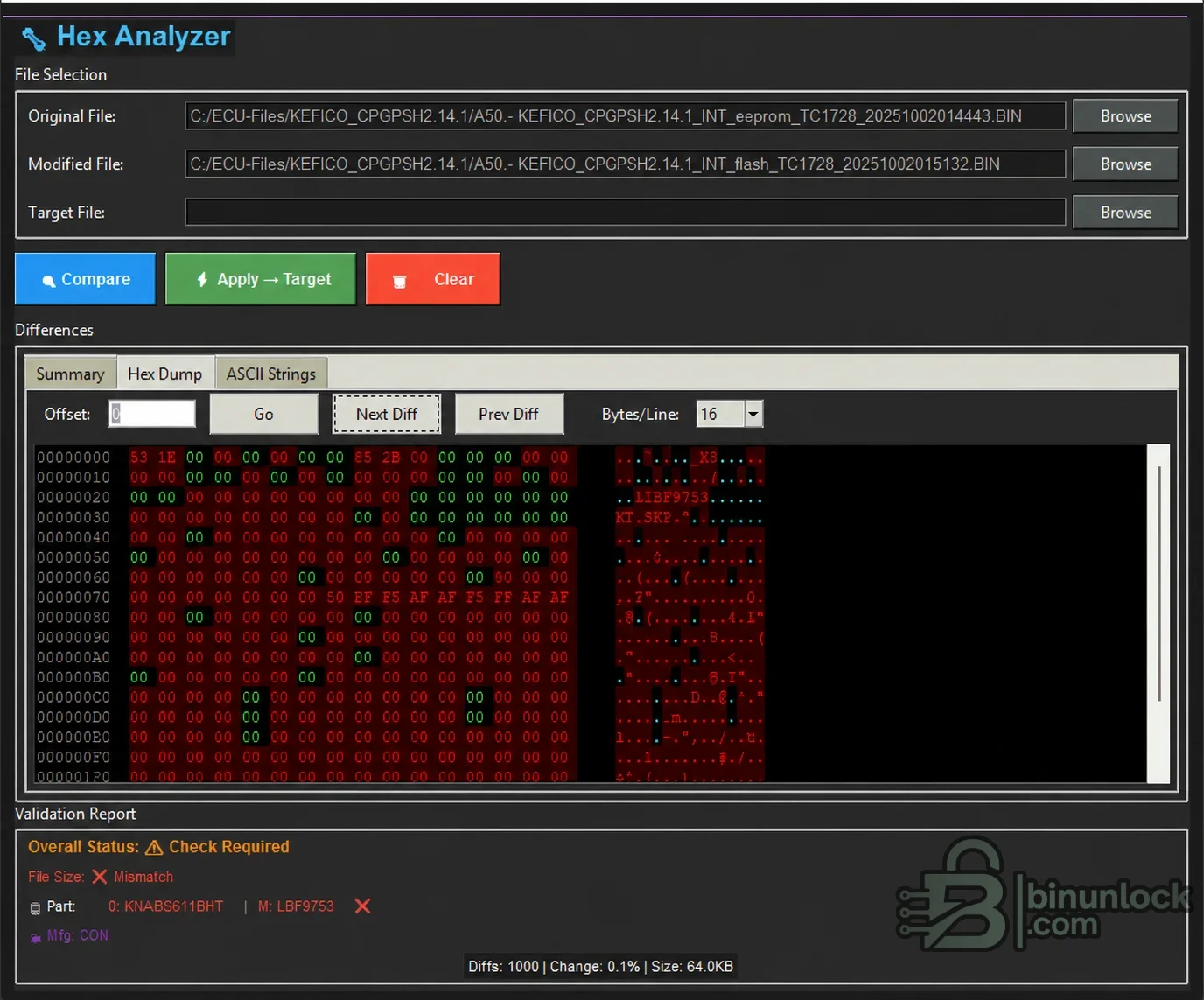
Hex Advance Analyzer is a Windows desktop comparator for calibration specialists who need to understand exactly how a modified ECU read differs from its original counterpart. It combines a summary check, a byte-level hexadecimal view and readable ASCII output in one workflow, helping the user spot incompatible identifiers or file sizes before any changes are copied into a separate target file.
This is a file-analysis tool rather than a vehicle communication program. It does not read an ECU through OBD, boot or bench mode and it does not replace the flashing software used with the vehicle. Its role is to inspect binary data already obtained with suitable reading equipment.
Use matching hardware numbers, software numbers, part numbers, memory area and file length as the primary decision points. Identifier detection depends on how a particular controller stores readable data, so an empty identifier field does not automatically mean that two files match. Encrypted slave files, proprietary containers and compressed project formats must be converted to the correct plain binary form before comparison.
The package is portable and contains a single executable rather than an installer. No additional vehicle driver or communication interface is included because the program performs offline file comparison only.
Always retain a recoverable original read, use stable power during programming and verify the final output with tools appropriate to the exact ECU. Never copy differences across unrelated software versions or part numbers, and never program a result that has not passed an independent checksum and controller-specific validation.
What the analyzer is designed to do#
The utility works with three clearly separated inputs: an original file, a modified file and an optional target file. The original and modified files are compared first. A target should only be introduced after the comparison result has been reviewed and the controller identity is known to be compatible.This is a file-analysis tool rather than a vehicle communication program. It does not read an ECU through OBD, boot or bench mode and it does not replace the flashing software used with the vehicle. Its role is to inspect binary data already obtained with suitable reading equipment.
Comparison and validation features#
- Compare original and modified ECU binaries side by side
- Show the number and percentage of changed bytes
- Navigate directly to the next or previous difference
- Review offsets in a hexadecimal dump with color-highlighted changes
- Inspect readable text through a separate ASCII Strings tab
- Check file-size agreement before a target operation
- Display available part, manufacturer, hardware or software identifiers when they can be detected in the file
- Apply the detected modification set to a separate target file after compatibility has been established
ECU families, vehicles and file compatibility#
The package does not advertise a fixed vehicle, engine or ECU list. It is intended for raw controller files where the original and modified reads belong to the same ECU family and calibration lineage. Typical inputs may come from Bosch, Continental, Delphi, Denso, Magneti Marelli, Siemens or other controllers, but a brand name alone is not proof of compatibility.Use matching hardware numbers, software numbers, part numbers, memory area and file length as the primary decision points. Identifier detection depends on how a particular controller stores readable data, so an empty identifier field does not automatically mean that two files match. Encrypted slave files, proprietary containers and compressed project formats must be converted to the correct plain binary form before comparison.
Recommended comparison workflow#
- Keep the untouched ECU read as a write-protected workshop master.
- Load the verified original and the modified file, then run Compare.
- Review the summary, file size, identifiers, difference count and highlighted byte ranges.
- Investigate any mismatch before proceeding; do not assume that a similar filename identifies the same software.
- If a third target file is used, confirm that its ECU hardware and software identity matches the validated source.
- Save the resulting file under a new name and perform an independent checksum and structure check.
System requirements#
- 64-bit Windows desktop environment; the supplied executable is a native x64 application
- Local access to plain ECU binary files and write permission for the output folder
- Free storage for the original, modified, target and backup copies
- A separate ECU reader or programmer appropriate for the controller being serviced
- Checksum correction software when required by the specific ECU family
The package is portable and contains a single executable rather than an installer. No additional vehicle driver or communication interface is included because the program performs offline file comparison only.
Important limitations and safe use#
A green or matching result is a useful screening step, not a guarantee that a calibration is safe for the engine or vehicle. The program cannot verify tuning quality, torque-model consistency, emissions compliance, checksums, signatures, anti-tuning protection or whether a modified map is suitable for the installed hardware.Always retain a recoverable original read, use stable power during programming and verify the final output with tools appropriate to the exact ECU. Never copy differences across unrelated software versions or part numbers, and never program a result that has not passed an independent checksum and controller-specific validation.


