
IAW Scan is an open-source Windows diagnostic application for older Fiat-group petrol vehicles equipped with selected Magneti Marelli IAW engine-control units. It communicates through the vehicle's legacy ISO K-line, identifies the ECU, reads live engine values and diagnostic faults, provides controller-specific tests and can record operating data for later analysis.
The software is aimed at pre-EOBD Fiat, Lancia and Alfa Romeo applications that often use a three-pin diagnostic connector and are not handled correctly by a generic modern OBD-II reader. It requires a compatible KKL interface and the correct Fiat three-pin adapter; it does not work through an ELM327 Bluetooth adapter simply because that adapter fits an OBD socket.
Coverage is determined by the exact Magneti Marelli ECU family and engine application, not just the vehicle model. Confirm the controller label and choose the matching profile before connecting. The package includes the newer successor application rather than relying on the older duplicate build also found in the source archive.
The family suffix matters. Do not select a generic IAW entry for later IAW 59F, 5AF, 5NF, 4AF or CAN-based systems unless that exact controller is explicitly present in the program.
Model names are orientation, not an automatic connection guarantee. These vehicles were sold with different engines, markets and ECU revisions. Read the Magneti Marelli label and compare the ECU family before choosing a profile.
Use the ECU identification returned after connection to validate the selection. Similar engine displacement or a shared model platform does not prove that the diagnostic protocol and parameter table are the same.
Not every tab or test is available on every ECU. Never run an actuator or reset function until its effect on the selected controller is understood.
Use graphs and logs to compare cold start, warm idle and controlled throttle operation. Parameter names and scaling are controller-specific; compare implausible readings with wiring diagrams and direct measurements rather than replacing a sensor from one value alone.
Many supported vehicles use Fiat's older three-pin diagnostic connector. In that case, add an OBD-II-to-Fiat three-pin adapter that routes K-line correctly and provides the required external power and ground connections. Verify the adapter wiring before use; inexpensive cables can be pinned differently or use a counterfeit USB-serial chipset.
This application is for K-line communication. A generic ELM327, CAN-only interface, Wi-Fi adapter or Bluetooth dongle is not a substitute for a correctly wired KKL connection.
Use a stable vehicle battery. Voltage drop during communication can create false disconnects and can be hazardous during active tests.
Actuator tests can move the idle-air controller, energize injectors or operate other outputs depending on the ECU profile. Run tests only with adequate ventilation, the vehicle secured, fuel and ignition hazards controlled, and the service procedure available. Do not perform a reset merely to see what it does.
Correlation is more useful than a single snapshot. For example, compare throttle angle, MAP, injection time, ignition advance and engine speed during the same event. If the interface loses communication, resolve COM-port latency, adapter wiring and compatible-mode settings before trusting an incomplete log.
The application files are unsigned managed x86 assemblies. They were inspected statically and not executed during packaging because genuine source screenshots were supplied. Scan the archive independently before connecting it to a vehicle.
A recorded session log, duplicate copy of the graph library, nested self-copy and the older predecessor build were excluded from the publication payload. The source RAR and both nested ZIP files passed full tests and exact extraction before this cleanup. The rebuilt encrypted 7z is independently tested and extracted again against the pinned seven-file inventory.
The software is aimed at pre-EOBD Fiat, Lancia and Alfa Romeo applications that often use a three-pin diagnostic connector and are not handled correctly by a generic modern OBD-II reader. It requires a compatible KKL interface and the correct Fiat three-pin adapter; it does not work through an ELM327 Bluetooth adapter simply because that adapter fits an OBD socket.
Coverage is determined by the exact Magneti Marelli ECU family and engine application, not just the vehicle model. Confirm the controller label and choose the matching profile before connecting. The package includes the newer successor application rather than relying on the older duplicate build also found in the source archive.
Supported Magneti Marelli ECU families#
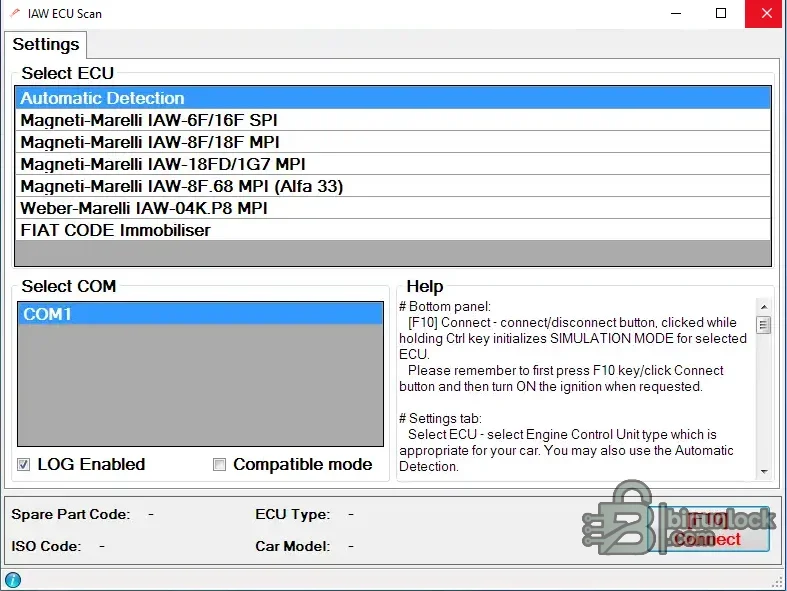
The official project documentation and the included ECU selector identify these controller groups:- IAW-6F / IAW-16F SPI: early single-point injection controllers used by several small Fiat FIRE-family engines
- IAW-8F / IAW-18F MPI: multipoint-injection variants used across Punto, Palio/Siena and related applications
- IAW-18FD / IAW-1G7 MPI: later profiles with additional parameter and lambda support where the ECU implements it
- IAW-8F.68 MPI: experimental Alfa Romeo 33 profile exposed by the selector
- IAW-04K.P8 MPI: selected two-litre Fiat, Lancia and Alfa Romeo applications
- Fiat CODE immobilizer: a separate diagnostic selection shown by the application; availability depends on the connected system
- Automatic detection: attempts to identify a supported ECU after the correct interface and ignition sequence are established
The family suffix matters. Do not select a generic IAW entry for later IAW 59F, 5AF, 5NF, 4AF or CAN-based systems unless that exact controller is explicitly present in the program.
Verified Fiat vehicle coverage#
The project's published support list names these representative Fiat applications:- Cinquecento: 900 and 1.1 Sporting
- Seicento: 900 and 1.1 SPI
- Panda: 1.0 and 1.1 legacy applications using a supported IAW family
- Punto: Punto 55, 60, 75 and 85
- Palio / Siena: 1.0, 1.2 and 1.4 variants listed by the project
- Tipo / Tempra: 1.6 and selected 2.0 applications
- Fiat Coupé: selected 2.0 petrol management using IAW-04K.P8
Model names are orientation, not an automatic connection guarantee. These vehicles were sold with different engines, markets and ECU revisions. Read the Magneti Marelli label and compare the ECU family before choosing a profile.
Verified Lancia and Alfa Romeo coverage#
Representative non-Fiat applications documented by the project include:- Lancia Delta / Dedra: selected 1.8 and 2.0 petrol variants
- Lancia Y: selected 1.2 applications
- Alfa Romeo 145 / 146: selected 1.3 Boxer applications
- Alfa Romeo 155: selected 2.0 applications
- Alfa Romeo 33: experimental support for an early IAW-8F.68 profile
Use the ECU identification returned after connection to validate the selection. Similar engine displacement or a shared model platform does not prove that the diagnostic protocol and parameter table are the same.
Diagnostic functions#
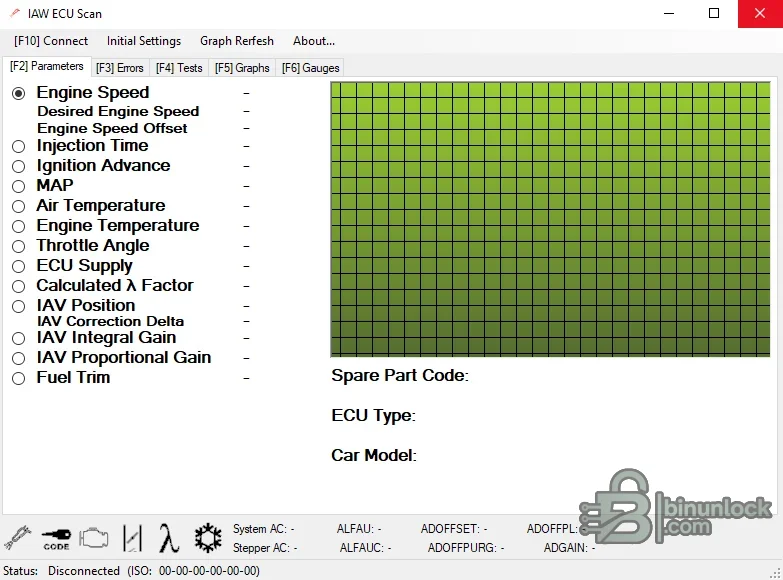
The interface is organized into Parameters, Errors, Tests, Graphs and Gauges. Functions vary by controller, but the application is designed to provide:- ECU identification, spare-part code and detected vehicle/model information
- Reading and clearing controller-specific fault records
- Live-data monitoring and graphing
- Dynamic CSV log recording for later review
- Available actuator or component tests exposed by the selected ECU profile
- ECU-specific adaptation functions, including trimmer and stepper autocalibration reset on supported x6F/x8F profiles
- Connection-loss detection and optional reinitialization
- Compatible timing mode for interfaces or computers that require an added inter-message delay
- Simulation mode for learning the interface without communicating with a vehicle
Not every tab or test is available on every ECU. Never run an actuator or reset function until its effect on the selected controller is understood.
Live engine parameters#
The supplied parameter screen shows channels such as:- Engine speed, desired engine speed and engine-speed offset
- Injection time and ignition advance
- Manifold absolute pressure (MAP)
- Intake-air and engine-coolant temperature
- Throttle angle and ECU supply voltage
- Calculated lambda factor and lambda voltage where supported
- Idle-air valve position, correction delta, integral gain and proportional gain
- Fuel trim and profile-specific status values
Use graphs and logs to compare cold start, warm idle and controlled throttle operation. Parameter names and scaling are controller-specific; compare implausible readings with wiring diagrams and direct measurements rather than replacing a sensor from one value alone.
Required diagnostic interface#
The project specifies a generic ISO-KKL interface, commonly sold as a VAG-COM 409.1 KKL cable. Either a traditional RS-232 interface or a USB model can be used. For USB, an FTDI FT232-based cable is the project's recommended baseline.Many supported vehicles use Fiat's older three-pin diagnostic connector. In that case, add an OBD-II-to-Fiat three-pin adapter that routes K-line correctly and provides the required external power and ground connections. Verify the adapter wiring before use; inexpensive cables can be pinned differently or use a counterfeit USB-serial chipset.
This application is for K-line communication. A generic ELM327, CAN-only interface, Wi-Fi adapter or Bluetooth dongle is not a substitute for a correctly wired KKL connection.
Connection workflow#
- Identify the ECU label, vehicle engine and diagnostic connector before attaching any interface.
- Install the trusted USB-serial driver and confirm that the KKL cable appears as a Windows COM port.
- Connect the Fiat three-pin adapter where required, observing the adapter's power and ground instructions.
- Open Initial Settings, select the correct COM port and exact ECU family, or choose automatic detection only within the supported range.
- Press Connect first, then switch the ignition on when the application requests it.
- Wait for ECU type, spare-part code and car-model fields to populate before opening faults or tests.
- Save an initial fault report and live-data log before clearing anything.
- Disconnect through the software before switching off ignition or unplugging the interface.
Use a stable vehicle battery. Voltage drop during communication can create false disconnects and can be hazardous during active tests.
Reading faults and running tests safely#
Record each fault code, description, status and operating symptom before clearing it. A cleared fault can remove useful evidence without fixing the circuit. After repair, repeat the same operating conditions and verify that the code does not return.Actuator tests can move the idle-air controller, energize injectors or operate other outputs depending on the ECU profile. Run tests only with adequate ventilation, the vehicle secured, fuel and ignition hazards controlled, and the service procedure available. Do not perform a reset merely to see what it does.
Logging and graph interpretation#
Enable logging before a repeatable test drive or stationary diagnostic sequence. Keep the test short and annotate engine temperature, load and symptoms. The included ZedGraph component displays selected channels, while the CSV log can be reviewed in a spreadsheet or plotting tool.Correlation is more useful than a single snapshot. For example, compare throttle angle, MAP, injection time, ignition advance and engine speed during the same event. If the interface loses communication, resolve COM-port latency, adapter wiring and compatible-mode settings before trusting an incomplete log.
System requirements#
- A Windows x86 or x64 PC capable of running a legacy 32-bit .NET desktop application
- Microsoft .NET Framework 2.0 runtime; on Windows 10/11 this is normally provided by enabling the .NET Framework 3.5 Windows feature
- Windows 2000 through Windows 7 are the original documented targets; use an isolated maintained workstation or VM for legacy operating systems
- Windows 10/11 may run the application with the legacy framework enabled, but serial-driver and timing compatibility must be tested
- 1 GHz processor, 1 GB RAM and at least 100 MB free disk space
- 1024×768 or higher display resolution
- One available COM port or USB port with a correctly installed KKL USB-serial driver
- ISO-KKL/VAG-COM 409.1 interface, preferably FTDI-based for USB
- OBD-II-to-Fiat three-pin adapter for vehicles without a standard 16-pin diagnostic socket
- Stable 12-volt vehicle supply and safe workshop ventilation
The application files are unsigned managed x86 assemblies. They were inspected statically and not executed during packaging because genuine source screenshots were supplied. Scan the archive independently before connecting it to a vehicle.
Package contents and cleanup#
The cleaned package contains the complete successor application from the fully tested nested distribution:- IES_2.exe — main diagnostic application
- IES_2.exe.config — default COM, logging and compatibility settings
- ZedGraph.dll — graphing component required by the application
- Dutch and Polish resource assemblies — optional interface translations
- readme.txt — original support summary and change history
- license.txt — genuine open-source license retained with the program
A recorded session log, duplicate copy of the graph library, nested self-copy and the older predecessor build were excluded from the publication payload. The source RAR and both nested ZIP files passed full tests and exact extraction before this cleanup. The rebuilt encrypted 7z is independently tested and extracted again against the pinned seven-file inventory.
Limitations#
- The utility targets specific legacy IAW K-line controllers, not every Fiat-group ECU
- It is not a universal OBD-II scanner and does not support modern CAN or UDS systems
- Vehicle model alone is insufficient; the exact IAW family must match
- Fault descriptions and parameter availability vary by ECU profile
- The application does not flash firmware, edit maps, clone immobilizer data or program keys
- Automatic detection cannot compensate for incorrect adapter wiring or an unsupported controller
- Legacy USB drivers and timing can behave differently on modern Windows systems
Troubleshooting#
- No COM port appears: install the authentic cable-chipset driver, reconnect the interface and verify it in Windows Device Manager.
- ECU does not respond: confirm the exact IAW family, K-line pin, adapter power/ground, ignition sequence and selected COM port.
- Connection drops repeatedly: use a stable battery supply, close other serial applications and try the program's compatible timing mode.
- Values are blank or implausible: verify the ECU profile and compare the same parameter with direct measurements or service data.
- Fault clearing fails: repair the active circuit first, cycle ignition as required and reconnect before repeating the operation.
- Graphs do not update: select supported parameters, reduce simultaneous channels and confirm that the connection status remains active.
- Application will not start: enable the trusted .NET Framework 3.5 Windows feature and test in an isolated compatible Windows environment.
- Language resources behave incorrectly: return Windows display culture to English or move only the optional language folder, leaving the executable and graph library together.


