
IronFelix is an offline checksum inspection and correction utility for binary files from a defined group of Bosch and Sagem petrol engine control units. It identifies a compatible dump by file size and internal signatures, reports the ECU family, counts the checksum regions found, shows how many are invalid and can correct the recognized regions before a new file is saved.
This is a file-processing tool, not an ECU reader or flasher. It does not connect to the vehicle, choose a protocol or write through OBD, bench or boot mode. You first obtain a complete and repeatable ECU read with appropriate hardware, work on a copy, correct the checksum only after the controller and file layout are confirmed, and then use a separate supported tool for writing and recovery.
The supplied interface screenshot is from the exact source package. It shows the program's module list and the dedicated counters for all, bad and fixed checksums.
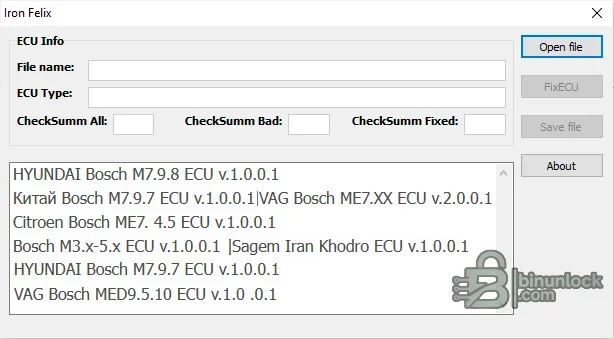
The original file is opened read-only. The save dialog can create a new output or overwrite a path you deliberately select, so the safe workflow is to keep the original immutable and save the result under a new name.
The main program also accepts 32,768- and 65,536-byte inputs, but none of the supplied modules should be assumed to support an arbitrary file merely because its size is accepted. Recognition additionally depends on ECU-family signatures and checksum structures. If the log says the dump is unknown, stop and identify the file instead of renaming, padding or forcing it through another module.
Compatibility is determined by the ECU hardware, software and exact flash layout—not by the badge alone. Hyundai and Kia used several Bosch, Kefico and Siemens controller generations on the same model names, and the included modules accept only their exact fixed file sizes. Match the label and OEM/Bosch numbers, compare the software ID and confirm the read size before correction.
Treat the module label as a family hint only. The binary must still pass the tool's internal recognition, and the vehicle's ECU part number and read method must be recorded with the job.
Do not generalize that list to every engine or model year. Similar vehicles can carry ME7.4.4, ME7.4.9, Magneti Marelli or another ECU. Confirm the Bosch and PSA numbers on the controller and verify that the file is a complete, correctly ordered read.
ME7-family controllers appear across many older Volkswagen, Audi, SEAT and Škoda petrol applications, including naturally aspirated and turbocharged engines. This broad family name is not a promise of universal VAG coverage: ME7.1, ME7.1.1, ME7.5 and manufacturer-specific derivatives can use different flash sizes, address maps and security structures. Record the full Bosch number, VAG part number, engine code, software ID and read-tool mode for each file.
MED9.1, MED9.5.10 and later MED17 controllers are not interchangeable. Check the exact controller type and memory layout before using this module, especially when a reading tool supplies separate maps, processor flash or reconstructed virtual files.
The Sagem module is labelled Iran Khodro and expects an 851,968-byte image. It is relevant to selected Iran Khodro/Samand-era petrol-controller files, including Sagem systems encountered with XU7-family applications. The label does not prove support for every Sagem SL96, S2000 or later IKCO ECU. Use the ECU casing label, processor/memory identity and file signature as the deciding evidence.
A file with the right byte count can still belong to a different ECU. Conversely, a supported ECU read can be rejected if the read tool omits regions, rearranges blocks or adds a proprietary header.
Checksum correction proves only that the recognized mathematical integrity fields match the current binary contents. It does not prove that calibration values are safe, that the file belongs to the vehicle or that immobilizer, emissions and coding data are correct.
Zero bad checksums can be a valid result and does not require a repair. A surprisingly high number, an unexpected ECU family or a zero count on a supposedly supported modified file deserves investigation before saving or flashing. Different software revisions within one controller family can contain different checksum regions.
No diagnostic interface, driver or internet connection is required to inspect a local binary in IronFelix. Hardware and drivers are required only for the separate read/write tool used before and after checksum work.
The source archive passed full integrity testing and exact extraction. Every executable and DLL was inventoried and inspected statically; the supplied native x86 binaries are unsigned and were not executed during packaging because a genuine source screenshot was available. The publication archive is rebuilt with encrypted headers, then independently tested and extracted against the pinned clean-file inventory.
This is a file-processing tool, not an ECU reader or flasher. It does not connect to the vehicle, choose a protocol or write through OBD, bench or boot mode. You first obtain a complete and repeatable ECU read with appropriate hardware, work on a copy, correct the checksum only after the controller and file layout are confirmed, and then use a separate supported tool for writing and recovery.
The supplied interface screenshot is from the exact source package. It shows the program's module list and the dedicated counters for all, bad and fixed checksums.
What the calculator does#
- Opens
.bin,.ori,.mоdor another raw binary file - Rejects file sizes outside the application's fixed input-size list
- Loads each supplied ECU-family module and checks binary signatures until one recognizes the file
- Displays the selected filename and detected ECU type
- Counts the checksum regions available in the dump
- Reports the number of checksum regions that do not match
- Corrects recognized checksum data in the program's memory buffer
- Shows how many regions were fixed
- Saves the corrected buffer to a user-selected output file
The original file is opened read-only. The save dialog can create a new output or overwrite a path you deliberately select, so the safe workflow is to keep the original immutable and save the result under a new name.
Included ECU-family modules#
The package contains the main application and eight checksum modules. Their labels and accepted full-file sizes are taken directly from the supplied binaries and matching source code:- Hyundai Bosch M7.9.7: 524,288-byte file
- Hyundai Bosch M7.9.8: 786,432- or 851,968-byte file
- China Bosch M7.9.7: 1,048,576-byte file
- Citroën Bosch ME7.4.5: 851,968-byte file
- Bosch M3.x–M5.x: 131,072- or 262,144-byte file
- Sagem Iran Khodro: 851,968-byte file
- VAG Bosch ME7.x: 524,288- or 1,048,576-byte file
- VAG Bosch MED9.5 / MED9.5.10: 2,097,152-byte file
The main program also accepts 32,768- and 65,536-byte inputs, but none of the supplied modules should be assumed to support an arbitrary file merely because its size is accepted. Recognition additionally depends on ECU-family signatures and checksum structures. If the log says the dump is unknown, stop and identify the file instead of renaming, padding or forcing it through another module.
Hyundai and Kia Bosch M7.9.7 / M7.9.8 applications#
The dedicated M7.9.7 and M7.9.8 modules target older Bosch/Kefico petrol-controller layouts used in selected Hyundai and Kia vehicles. Contemporary tool catalogs associate M7.9.8 with applications such as Kia Ceed, ProCeed, Cerato and Rio, together with related Hyundai platforms; M7.9.7 appears in selected earlier Hyundai/Kia petrol systems.Compatibility is determined by the ECU hardware, software and exact flash layout—not by the badge alone. Hyundai and Kia used several Bosch, Kefico and Siemens controller generations on the same model names, and the included modules accept only their exact fixed file sizes. Match the label and OEM/Bosch numbers, compare the software ID and confirm the read size before correction.
Chinese-market Bosch M7.9.7 files#
A separate 1 MiB module is labelled China Bosch M7.9.7. That family is commonly associated with selected Chinese-market petrol applications, including Chery-era M7.9.7/ME7.9.7 systems such as Fora/A5 variants, but this program is not a vehicle database. Other Chinese vehicles may use a similar controller name with a different memory layout, processor, calibration size or checksum strategy.Treat the module label as a family hint only. The binary must still pass the tool's internal recognition, and the vehicle's ECU part number and read method must be recorded with the job.
Citroën and Peugeot Bosch ME7.4.5 files#
The PSA module is specifically labelled Citroën Bosch ME7.4.5 and expects an 851,968-byte image. ME7.4.5 is found in selected Citroën and Peugeot petrol applications, particularly 1.6-litre variants. Representative catalog matches include Peugeot 206, 307 and 1007 and Citroën C2, C3, C4 and Berlingo configurations, with engine identifiers such as NFU, N6A or N6B appearing in application data.Do not generalize that list to every engine or model year. Similar vehicles can carry ME7.4.4, ME7.4.9, Magneti Marelli or another ECU. Confirm the Bosch and PSA numbers on the controller and verify that the file is a complete, correctly ordered read.
Volkswagen Group Bosch ME7.x files#
The VAG ME7.x module recognizes 512 KiB and 1 MiB images and contains logic for several old and newer ME7 checksum layouts. Its source handles multiple checksum zones and, for recognized variants, additional CRC, hash or signature structures rather than applying one simple sum to every file.ME7-family controllers appear across many older Volkswagen, Audi, SEAT and Škoda petrol applications, including naturally aspirated and turbocharged engines. This broad family name is not a promise of universal VAG coverage: ME7.1, ME7.1.1, ME7.5 and manufacturer-specific derivatives can use different flash sizes, address maps and security structures. Record the full Bosch number, VAG part number, engine code, software ID and read-tool mode for each file.
VAG Bosch MED9.5.10 files#
The MED9.5 module expects a 2 MiB image. Bosch and current compatibility catalogs associate MED9.5.10 with selected Volkswagen Group FSI applications, including Audi A3 8P/8PA 1.6 FSI and 2.0 FSI variants and related Volkswagen Golf-family applications. Examples include engine codes such as BLP, BLF, AXW, BLX, BLY, BLR, BVY and BVZ, depending on model and market.MED9.1, MED9.5.10 and later MED17 controllers are not interchangeable. Check the exact controller type and memory layout before using this module, especially when a reading tool supplies separate maps, processor flash or reconstructed virtual files.
Bosch M3.x–M5.x and Sagem Iran Khodro files#
The legacy Bosch M3.x–M5.x module accepts 128 KiB or 256 KiB files. These controller generations span numerous older European petrol applications, so there is no safe model-level universal list; recognition must come from the actual dump and ECU identification.The Sagem module is labelled Iran Khodro and expects an 851,968-byte image. It is relevant to selected Iran Khodro/Samand-era petrol-controller files, including Sagem systems encountered with XU7-family applications. The label does not prove support for every Sagem SL96, S2000 or later IKCO ECU. Use the ECU casing label, processor/memory identity and file signature as the deciding evidence.
Input-file requirements#
A suitable file should be a raw, complete image in the exact layout expected by the module. Before opening it:- Read the ECU at least twice and compare the reads byte-for-byte
- Record the vehicle, engine code, ECU manufacturer, Bosch/OEM numbers and hardware/software IDs
- Confirm whether the tool produced full flash, calibration-only, virtual read or a container with a header
- Remove no headers and add no padding unless the read-tool documentation explicitly requires that conversion
- Keep a write-protected original and calculate its SHA-256
- Use a second known-good original from the exact software only for comparison, never as a blind substitute
A file with the right byte count can still belong to a different ECU. Conversely, a supported ECU read can be rejected if the read tool omits regions, rearranges blocks or adds a proprietary header.
Checksum review and correction workflow#
- Copy the verified original binary into an isolated working folder.
- Open the copy and confirm that the detected ECU type matches the physical controller.
- Record the CheckSumm All and CheckSumm Bad values before making changes.
- If the ECU is unknown or the reported family is unexpected, close the program and investigate the file.
- Run FixECU only on a working copy.
- Confirm that the CheckSumm Fixed count is plausible and that no unexpected regions changed.
- Save to a new filename rather than overwriting the original.
- Compare the original and corrected files in a hex editor and record every changed offset.
- Validate the output with an independent checksum-capable tool or the exact flashing platform.
- Write only with stable power, the correct protocol and a tested recovery method.
- Read the ECU again after writing and verify identification, DTC status and normal operation.
Checksum correction proves only that the recognized mathematical integrity fields match the current binary contents. It does not prove that calibration values are safe, that the file belongs to the vehicle or that immobilizer, emissions and coding data are correct.
Understanding the counters#
CheckSumm All is the number of checksum structures found by the selected module. CheckSumm Bad is the number that failed validation when the file was opened. After correction, CheckSumm Fixed reports how many invalid structures the module changed.Zero bad checksums can be a valid result and does not require a repair. A surprisingly high number, an unexpected ECU family or a zero count on a supposedly supported modified file deserves investigation before saving or flashing. Different software revisions within one controller family can contain different checksum regions.
System requirements#
- Windows PC with 32-bit x86 application support; 64-bit Windows requires WOW64
- Windows 7-era compatibility is the safest baseline; Windows 10/11 can be used in an isolated VM if the native desktop application does not start normally
- 1 GHz processor or faster and at least 1 GB RAM
- At least 100 MB free for the program, working files and comparison copies
- A display resolution of 800×600 or higher
- Write permission to a dedicated working folder
- The included GNU runtime and GMP DLLs kept in the supplied folder structure
- A separate ECU reader/flasher appropriate to the exact controller
- A stable bench supply or vehicle battery support unit for any later write operation
- A hex editor and independent checksum-capable validation method are strongly recommended
No diagnostic interface, driver or internet connection is required to inspect a local binary in IronFelix. Hardware and drivers are required only for the separate read/write tool used before and after checksum work.
Package contents#
The cleaned archive preserves the complete application tree: the main IronFelix.exe, two required runtime libraries, eight ECU-family checksum modules and the accompanying C++ source tree. Repository housekeeping files are omitted, while the functional binaries, module sources, headers and project files remain available for technical review.The source archive passed full integrity testing and exact extraction. Every executable and DLL was inventoried and inspected statically; the supplied native x86 binaries are unsigned and were not executed during packaging because a genuine source screenshot was available. The publication archive is rebuilt with encrypted headers, then independently tested and extracted against the pinned clean-file inventory.
Limitations and safety notes#
- Only the eight included checksum modules are available; this is not a universal Bosch calculator
- Recognition depends on file size and internal signatures, not just the filename or vehicle model
- The program cannot read, identify through OBD, flash or recover an ECU
- A virtual or calibration-only read may be unsuitable even when its extension is
.bin - Unsigned legacy native binaries should be scanned independently and used in an isolated Windows environment
- Always preserve the untouched original and a recovery path
- Do not use checksum correction to conceal unresolved emissions, safety or hardware faults
- Do not flash a file merely because the program reports zero bad checksums
Troubleshooting#
- Wrong file size: confirm the read mode, expected controller memory and whether the tool added a header or returned calibration-only data.
- I don't know this dump: the file failed all supplied module checks; verify ECU identity and do not force a similarly named family.
- No modules appear: keep the
Modulesdirectory next to the runtime path and preserve all included DLLs. - The application does not start: run it from its complete folder in a clean Windows VM and confirm that the included runtime libraries are present.
- A checksum remains bad after correction: close without writing, restore the original and validate the file with an independent tool.
- The fixed count is unexpected: compare changed offsets and confirm the exact ECU software before flashing.
- The output file will overwrite an existing file: cancel and choose a new filename; keep the original immutable.
- Security software flags a binary: quarantine it, confirm the pinned hash and obtain an independent scan before deciding whether to run it.


