
Magneti Marelli Vision is a professional motorsport ECU monitor and setup environment built for live access to controller calculations and vehicle calibration data. Its configurable workspace combines acquisition channels, diagnostics, maps, virtual channels, potentiometers, driver controls and setup pages so an engineer can observe ECU behavior and organize calibration work in one interface.
The package includes the application installer, a compiled help system, a getting-started guide and the full user manual. It is a calibration front end, not a universal flash cable: communication still requires compatible Magneti Marelli hardware, the correct project/configuration file and an ECU supported by that environment.
The package includes the application installer, a compiled help system, a getting-started guide and the full user manual. It is a calibration front end, not a universal flash cable: communication still requires compatible Magneti Marelli hardware, the correct project/configuration file and an ECU supported by that environment.
What this resource is for#
Use Vision when a matching Magneti Marelli motorsport project and communication setup are available. It is suitable for bench or vehicle calibration sessions where the operator must monitor internal channels, adjust exposed parameters, compare maps and record how the ECU reacts under controlled operating conditions.Confirmed functions#
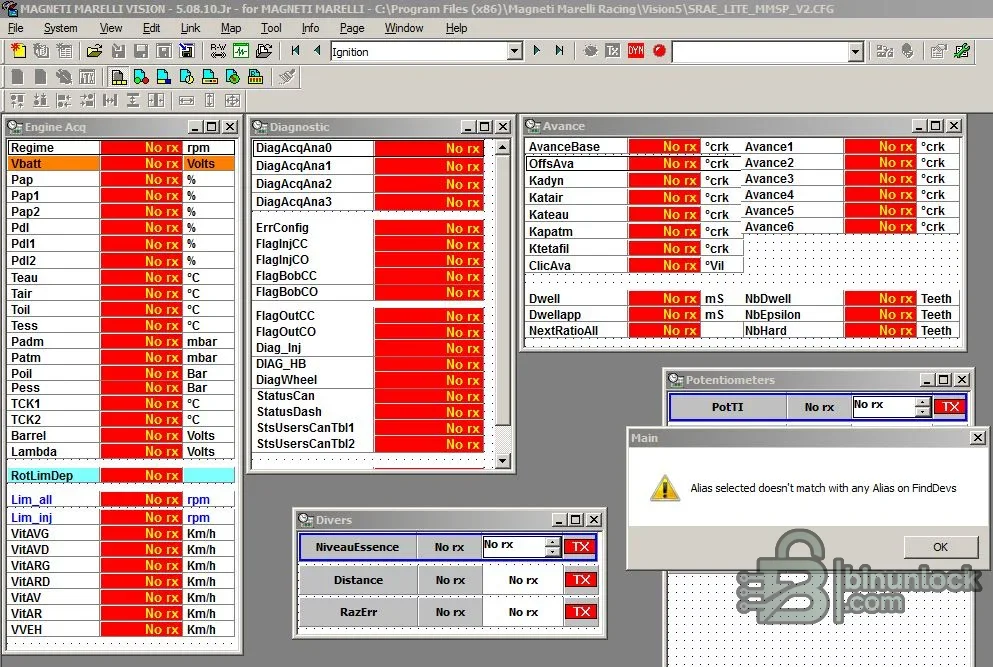
- Display live acquisition values such as engine speed, pressures, temperatures, lambda and vehicle speed
- Arrange diagnostics, ignition advance, injection, driver and potentiometer data in movable pages
- Open and edit calibration maps and setup parameters exposed by the loaded ECU project
- Create virtual channels, work points and links for analysis and calibration workflows
- Support dyno-oriented monitoring and data upload functions described by the supplied manual
Supported controllers, files and vehicles#
- Magneti Marelli motorsport ECUs for which a valid Vision project/configuration and communication interface are available
- The supplied screenshot shows a racing ECU layout with engine acquisition, diagnostic flags, advance, dwell and driver channels
- Compatibility is determined by ECU family, firmware, project definition and interface—not simply by vehicle make
- No claim is made for standard road-car Marelli ECUs that lack a matching Vision definition
Package contents#
- Application installer
- Getting-started PDF and full user manual
- Compiled Vision help library
- A source marker binding this packaged build to the version field
- All executable content was inspected statically and never launched during preparation
System and interface requirements#
- Windows workstation or isolated engineering laptop
- Compatible Magneti Marelli ECU communication hardware and drivers
- Correct Vision project/configuration file for the target controller
- Stable vehicle or bench power, safe dyno procedures and an independent recovery path
- Basic calibration knowledge, because displayed channels and map values are not self-validating
Recommended workshop workflow#
- Record the ECU hardware, firmware and project identity before connecting
- Load the matching project and confirm that channel names and units are plausible
- Begin with monitoring only; verify RPM, voltage, temperatures and pressure channels against independent instruments
- Save the original calibration and create a separate working revision before changing any map
- Apply small documented changes, log the result and restore the baseline immediately if behavior is abnormal
Compatibility limits and responsible use#
- The application does not supply a universal vehicle interface or projects for every Marelli ECU
- A project can open while still being wrong for the connected firmware revision
- Real-time calibration on a running engine can cause immediate mechanical damage when limits are misunderstood
- Road legality, emissions compliance and motorsport rules remain the operator’s responsibility
Troubleshooting#
- No RX values: check interface drivers, ECU power, link selection, project alias and communication settings
- Wrong units or implausible channels: stop and verify the project definition before editing
- Missing map or page: confirm that the loaded configuration exposes that item and that the correct user level is selected
- Connection drops: improve bench power and grounding before attempting another calibration session


