
MAN Offline Programming Set combines a file editor for supported MAN end-of-line programming data with a separate immobilizer calculator. The editor exposes vehicle and powertrain identifiers such as chassis ID, VIN, engine type, engine number, vehicle type and language fields, plus controller and EOL pages.
The workflow is entirely file based. It is intended to prepare or inspect data used in a compatible MAN service environment; it does not replace MAN-cats communication hardware, diagnostic authorization or a validated programming procedure.
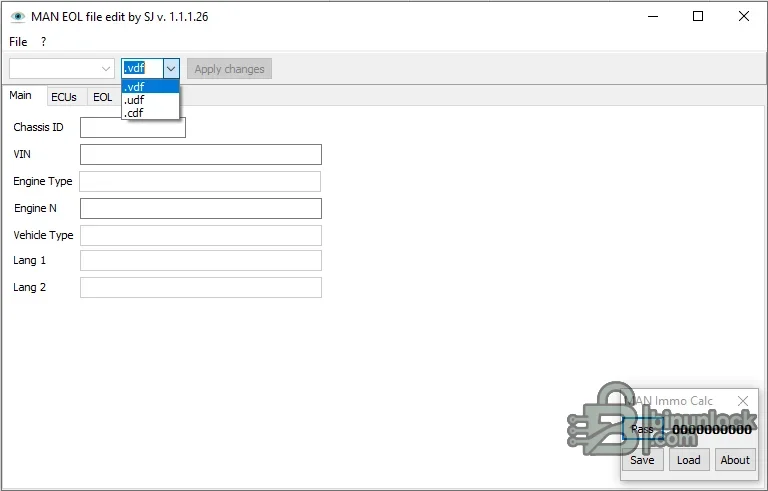
The workflow is entirely file based. It is intended to prepare or inspect data used in a compatible MAN service environment; it does not replace MAN-cats communication hardware, diagnostic authorization or a validated programming procedure.
What this resource is for#
The set is useful when replacing or configuring a supported controller and the technician needs to review EOL data offline before using the normal diagnostic/programming system. The compact immobilizer calculator is supplied as a separate application for supported calculation tasks.Confirmed functions#
- Open supported VDF, UDF and CDF file types
- Review and edit chassis, VIN, engine and vehicle identity fields
- Navigate ECU and EOL sections in the editor
- Apply changes to a new working file
- Load and save values in the companion MAN immobilizer calculator
Supported controllers, files and vehicles#
- MAN files recognized by the editor’s VDF, UDF and CDF parsers
- Controller and EOL data used in compatible MAN offline programming workflows
- Compatibility depends on the source file structure and the MAN service software generation that created it
- No all-truck or all-controller claim is made
Package contents#
- MAN EOL file editor extracted from the verified inner archive
- MAN immobilizer calculator extracted from the same verified inner archive
- Offline programming video guide
- Redundant wrapper archive, screenshots and Thumbs.db were excluded from the clean package
System and interface requirements#
- Windows workshop PC or isolated virtual machine
- Compatible MAN diagnostic/programming environment for later vehicle work
- Original VDF, UDF or CDF file and a documented source module
- Stable truck power supply and supported communication interface when applying changes
Recommended workshop workflow#
- Copy the original programming file and record its hash
- Open the copy and verify VIN, chassis and engine fields against the vehicle
- Change only the required field and save to a new filename
- Compare the output against the original and document every edited field
- Use the manufacturer workflow and recovery precautions when importing or programming the result
Compatibility limits and responsible use#
- The editor does not confirm that a file belongs to a particular truck
- Incorrect EOL or immobilizer data can prevent module communication or vehicle starting
- Online functions, dealer authorization and hardware licensing are outside this package
- Do not use the calculator to bypass ownership or security checks
Troubleshooting#
- If a file type is not accepted, confirm the extension and the service system that exported it
- If fields are blank or shifted, stop because the file layout may be unsupported
- If programming fails, restore the original file through the approved MAN recovery process


