
MazdaMeter is Windows workshop software for servicing supported Mazda instrument clusters through the dedicated MazdaMeter adapter and the vehicle diagnostic connector. It provides model-specific routines for reading and writing dashboard EEPROM data, displaying the stored odometer value and recording an authorized replacement value after a documented cluster repair or replacement.
This is not a generic ELM327 diagnostic application and the software alone cannot communicate with a vehicle. Use it only with compatible MazdaMeter hardware, a stable workshop computer and a verified instrument-cluster service procedure; the exact vehicle year, cluster part number and software variant must be confirmed before any write operation.
The application does not identify an unknown cluster automatically. Selecting the wrong model or variant can produce an invalid reading or write data at the wrong location, so visual vehicle similarity is not enough.
Published product information also describes Mazda 3, Mazda 6, CX-5 and CX-7 dashboard coverage, but model year alone is not a compatibility guarantee. Regional names such as Mazda3/Axela and Mazda6/Atenza, facelift changes, market-specific clusters and replacement units can differ. Match the cluster manufacturer and part number, compare the original EEPROM size and confirm that the requested routine appears in the application before proceeding.
Do not use a generic USB-to-serial lead or ELM327 interface merely because it creates a COM port. Protocol timing, pin routing and hardware identification are part of the dedicated tool.
Keeping the legacy build separate makes rollback possible without confusing it with the primary application. Do not rename or flash the firmware file unless the exact adapter procedure specifically calls for it.
Windows 10 and 11 are not listed in the bundled driver notes. They may require compatibility settings or a separately verified driver, so a dedicated Windows 7/8-era workshop laptop is the conservative choice. Never disable driver-signature or endpoint-security controls globally just to force an old package to install.
Mileage data is legally regulated in many jurisdictions. Use correction functions only for lawful cluster replacement, data restoration or another documented repair, and preserve both the previous and resulting readings. This resource must not be used to conceal a vehicle's actual history.
For a replacement cluster, first compare the hardware and label identifiers and retain dumps from both the original and donor units. If the original read is unstable, unexpectedly blank, a different size on repeated reads or full of a single byte pattern, stop and check power, adapter connection and model selection before writing. A successful progress bar does not prove that the resulting data is logically valid.
All three executable files are legacy unsigned x86 programs. They were inspected statically and were not executed during packaging because the source already included a clean, genuine application screenshot. Static inspection is not a malware-clean guarantee: scan the archive with current tools, use an isolated workshop computer and keep the vehicle disconnected until the environment and adapter are verified.
This is not a generic ELM327 diagnostic application and the software alone cannot communicate with a vehicle. Use it only with compatible MazdaMeter hardware, a stable workshop computer and a verified instrument-cluster service procedure; the exact vehicle year, cluster part number and software variant must be confirmed before any write operation.
Main instrument-cluster functions#
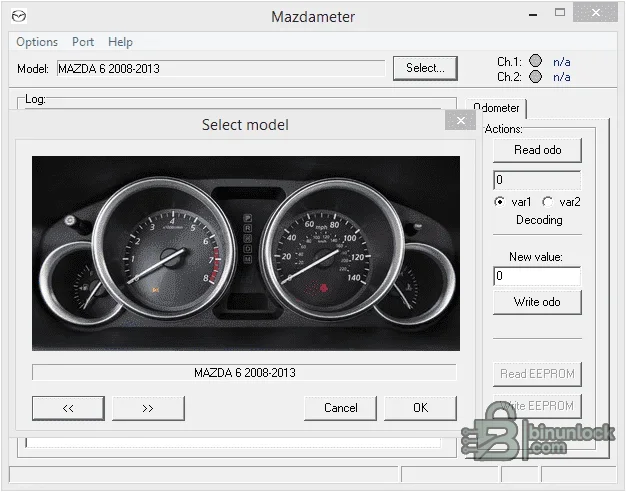
The original interface exposes separate controls for Read odo, Write odo, Read EEPROM and Write EEPROM. A model-selection dialog loads the routine for the chosen Mazda platform, while the Port menu is used to select the virtual COM connection presented by the USB adapter.- Read the current distance value from a supported dashboard
- Enter and write a replacement value during legitimate cluster service
- Read the instrument-cluster EEPROM before modification
- Restore a known-good EEPROM backup to the same compatible cluster
- Select between built-in platform variants where the same model year uses different cluster electronics
The application does not identify an unknown cluster automatically. Selecting the wrong model or variant can produce an invalid reading or write data at the wrong location, so visual vehicle similarity is not enough.
Supported Mazda models and years#
The retained application contains explicit model identifiers for the following dashboard families:- Mazda 3: 2010–2013, with two selectable variants
- Mazda 3: 2014, with two selectable variants
- Mazda 6: 2008–2013
- Mazda 6 / CX-5 family: 2014-era Mazda 6 and 2013-era CX-5 routines, with two selectable variants
- Mazda CX-7: 2010–2013
Published product information also describes Mazda 3, Mazda 6, CX-5 and CX-7 dashboard coverage, but model year alone is not a compatibility guarantee. Regional names such as Mazda3/Axela and Mazda6/Atenza, facelift changes, market-specific clusters and replacement units can differ. Match the cluster manufacturer and part number, compare the original EEPROM size and confirm that the requested routine appears in the application before proceeding.
Required MazdaMeter adapter and connection#
Vehicle communication is performed through a dedicated MazdaMeter interface connected to the diagnostic link connector. The supplied STMicroelectronics Virtual COM Port package is included for the USB serial side of the adapter; it is not a substitute for the MazdaMeter hardware.- Install the appropriate virtual COM driver for the workshop PC.
- Connect the MazdaMeter adapter and confirm that Windows creates a stable COM port without a warning icon.
- Open the software and select that port from the Port menu.
- Connect the adapter to the vehicle diagnostic connector with ignition and battery state set according to the service procedure.
- Choose the exact model, year group and variant, then perform a read operation before attempting any write.
Do not use a generic USB-to-serial lead or ELM327 interface merely because it creates a COM port. Protocol timing, pin routing and hardware identification are part of the dedicated tool.
Package contents#
The publication package was rebuilt from the real files inside all three source wrappers rather than redistributing nested RAR and ZIP containers. It contains:- The current MazdaMeter x86 desktop application
- A legacy MazdaMeter application retained for older adapter/workshop compatibility
- The matching legacy adapter firmware file supplied beside that application
- The STMicroelectronics Virtual COM Port setup program
- The original VCP readme and operating-system selection notes
Keeping the legacy build separate makes rollback possible without confusing it with the primary application. Do not rename or flash the firmware file unless the exact adapter procedure specifically calls for it.
System requirements#
- A Windows PC capable of running legacy 32-bit desktop software
- The bundled driver documentation explicitly covers Windows 98 SE, 2000, XP, Vista, 7 and 8.x, with x86/x64 driver paths where supplied
- A real USB port and a compatible MazdaMeter adapter that appears as a virtual COM port
- Administrator rights for the VCP driver installation
- Approximately 20 MB free for the unpacked applications, driver and service evidence
- A stable 12-volt vehicle power supply or approved battery support unit during EEPROM writes
- Offline storage for the original EEPROM dump, job notes and before/after screenshots
Windows 10 and 11 are not listed in the bundled driver notes. They may require compatibility settings or a separately verified driver, so a dedicated Windows 7/8-era workshop laptop is the conservative choice. Never disable driver-signature or endpoint-security controls globally just to force an old package to install.
Safe EEPROM and odometer service workflow#
- Record the VIN, cluster part number, displayed distance, customer authorization and reason for repair in the private job file.
- Maintain stable vehicle voltage and disable sleep, USB power saving and automatic restart on the workshop PC.
- Select the exact model/variant and read the odometer without writing anything.
- Read the EEPROM at least twice and compare the two saved files byte-for-byte.
- Store an untouched original dump under a read-only name and calculate its SHA-256 hash.
- If replacing a cluster, document the donor part number and verify electronic compatibility before transferring data.
- Write only the value or verified dump required by the repair; never experiment on the sole original copy.
- Cycle ignition only when the documented procedure permits it, then reread and verify the resulting value and warning-lamp state.
- Keep the original dump and repair record with the vehicle history.
Mileage data is legally regulated in many jurisdictions. Use correction functions only for lawful cluster replacement, data restoration or another documented repair, and preserve both the previous and resulting readings. This resource must not be used to conceal a vehicle's actual history.
Cluster replacement and EEPROM recovery notes#
An EEPROM backup can contain more than the visible distance value. Depending on the cluster, it may also hold configuration, identifiers, service data and checksums. A file from another vehicle should not be treated as a universal template, even if the dashboard enclosure looks identical.For a replacement cluster, first compare the hardware and label identifiers and retain dumps from both the original and donor units. If the original read is unstable, unexpectedly blank, a different size on repeated reads or full of a single byte pattern, stop and check power, adapter connection and model selection before writing. A successful progress bar does not prove that the resulting data is logically valid.
Troubleshooting#
- No COM port appears: check Device Manager, reinstall the matching VCP driver architecture, try a direct USB port and avoid unpowered hubs
- Port opens but the tool does not communicate: close other serial applications, verify the dedicated adapter and DLC connection, ignition state and selected COM number
- Read value is implausible: stop before writing and recheck the model-year group, variant and cluster part number
- EEPROM reads differ: correct voltage or communication instability and obtain two identical reads before continuing
- Write controls remain unavailable: confirm that a valid read completed and that the selected routine supports the requested operation
- Application will not start on a modern PC: use an isolated compatible Windows installation instead of altering system-wide security settings
- Adapter firmware is requested: verify the exact hardware revision and preserve its current firmware before using the supplied legacy FWU file
Package verification and security notes#
The source archive and every nested archive were fully tested and extracted. The cleaned package contains six real files rather than the original nested wrappers, and the final encrypted 7z is independently extracted again to confirm an identical file tree. The primary and legacy applications report distinct file versions; the current release is selected in the dedicated resource version field.All three executable files are legacy unsigned x86 programs. They were inspected statically and were not executed during packaging because the source already included a clean, genuine application screenshot. Static inspection is not a malware-clean guarantee: scan the archive with current tools, use an isolated workshop computer and keep the vehicle disconnected until the environment and adapter are verified.


