
MDscan is a focused Windows utility for reading mileage-related information from supported vehicle control units through a J2534 PassThru interface. Its built-in vehicle tree covers selected Opel, Chevrolet and Renault platforms, making it useful when a workshop needs to compare the dashboard indication with a distance value retained in another ECU during diagnostics, used-cluster checks or documented vehicle-history verification.
The application is intentionally narrow: its main action is Read Info. It is not presented as a full-system fault-code scanner, ECU flasher or mileage-writing tool, and it does not guarantee that every module or software revision within a listed model will respond. Treat the result as one diagnostic data point and verify it against the cluster, service records and other control units.
Different controllers can store distance with different update intervals, rounding or replacement history. A mismatch does not by itself prove tampering: module replacement, interrupted programming, differing units, a repaired cluster or a controller that records only selected operating data can all require further investigation.
The separate Corsa D entries are important: choose the routine that matches the vehicle electronics rather than testing both blindly. For Astra, Vectra and Zafira families, engine ECU, BCM, ABS and instrument-cluster generations vary by engine, model year and market. MDscan does not expose a complete ECU part-number table in its main window, so confirm communication non-destructively and record the exact control-unit identification returned by the vehicle.
Chevrolet vehicles sold under different regional brands can share GM platforms while using different controller software. Do not infer compatibility with Aveo, Orlando, Captiva or another GM model merely because a J2534 adapter communicates with it; those names are not present in this application's selection tree.
Logan and Duster vehicles can be branded Renault or Dacia depending on the market, but the software labels them under Renault. Coverage should be matched by generation and electronic architecture, not badge alone. The combined Fluence/Megane entry indicates a shared routine; it does not imply support for every engine ECU or all facelift years.
The current M&D diagnostic ecosystem documents GM modules such as BCM, ABS, instrument panel and various engine ECUs, but those broader commercial modules are not bundled here. This resource contains only the single Read ECU Odo executable and should be evaluated by what its own interface actually offers.
The manufacturer currently documents tested use of professional PassThru interfaces such as Scanmatik and DiaLink in its related software. Other correctly implemented J2534 devices may appear, but appearance in the list is not proof that their CAN/K-line timing and DLL are compatible with this legacy reader. Use a genuine interface with a matching vendor driver and avoid running two diagnostic programs against the same DLL simultaneously.
Because this is an unsigned legacy x86 executable, a dedicated workshop laptop or disposable VM is preferable. A VM must have reliable direct USB pass-through; intermittent adapter detachment can invalidate a diagnostic session.
Keep VINs and customer mileage evidence out of public posts. When requesting help, provide only a redacted controller part number, vehicle configuration, adapter model, DLL/API versions and exact error text.
Static inspection is not a malware-clean guarantee. Use the reader only on vehicles you own or are authorized to diagnose, retain an auditable service record and follow local odometer-disclosure laws. The tool should support honest diagnosis and cluster-replacement verification, not conceal or falsify vehicle history.
The application is intentionally narrow: its main action is Read Info. It is not presented as a full-system fault-code scanner, ECU flasher or mileage-writing tool, and it does not guarantee that every module or software revision within a listed model will respond. Treat the result as one diagnostic data point and verify it against the cluster, service records and other control units.
What MDscan reads#
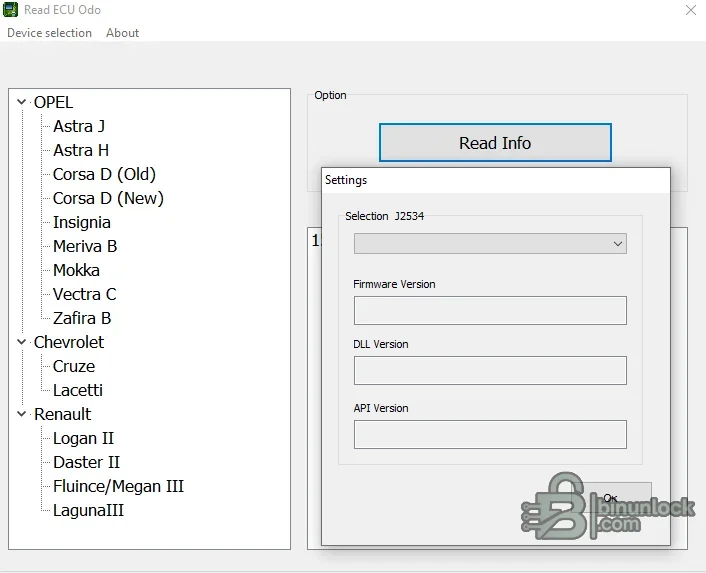
The executable identifies itself internally as a Read ECU Odo application. After the technician chooses a vehicle entry and a configured J2534 device, the program requests information from the corresponding platform routine and displays the returned result.- Reads mileage-related ECU information on supported vehicle/platform combinations
- Provides separate selections for model generations that use different electronic architectures
- Uses a standard J2534 device-selection dialog showing firmware, DLL and API version fields
- Helps compare ECU-stored distance with the instrument-cluster display during legitimate diagnostics
- Offers a compact single-purpose workflow without calibration-writing or broad scan-tool functions
Different controllers can store distance with different update intervals, rounding or replacement history. A mismatch does not by itself prove tampering: module replacement, interrupted programming, differing units, a repaired cluster or a controller that records only selected operating data can all require further investigation.
Supported Opel models#
The application interface contains the following Opel entries:- Astra J
- Astra H
- Corsa D — separate Old and New selections
- Insignia
- Meriva B
- Mokka
- Vectra C
- Zafira B
The separate Corsa D entries are important: choose the routine that matches the vehicle electronics rather than testing both blindly. For Astra, Vectra and Zafira families, engine ECU, BCM, ABS and instrument-cluster generations vary by engine, model year and market. MDscan does not expose a complete ECU part-number table in its main window, so confirm communication non-destructively and record the exact control-unit identification returned by the vehicle.
Supported Chevrolet models#
The built-in Chevrolet branch lists:- Cruze
- Lacetti
Chevrolet vehicles sold under different regional brands can share GM platforms while using different controller software. Do not infer compatibility with Aveo, Orlando, Captiva or another GM model merely because a J2534 adapter communicates with it; those names are not present in this application's selection tree.
Supported Renault and Dacia-platform models#
The Renault branch contains:- Logan II
- Duster II
- Fluence / Megane III
- Laguna III
Logan and Duster vehicles can be branded Renault or Dacia depending on the market, but the software labels them under Renault. Coverage should be matched by generation and electronic architecture, not badge alone. The combined Fluence/Megane entry indicates a shared routine; it does not imply support for every engine ECU or all facelift years.
ECU and module context#
The app name and window title identify an ECU-odometer read workflow, while the selected model determines the communication routine. Modern vehicles can retain distance or operating counters in several places, including the instrument panel, engine ECU, BCM, ABS/ESP, transmission or other modules; MDscan should only be assumed to address the controller selected by its built-in routine.- Use Read Info first and save the returned controller identity together with the distance value
- Compare results in the same unit—kilometres versus miles can create an apparent mismatch
- Check whether the ECU or cluster has been replaced and whether adaptation was documented
- Where possible, corroborate with a second diagnostic tool and manufacturer service history
- Do not write, reset or reprogram another module in an attempt to force values to agree
The current M&D diagnostic ecosystem documents GM modules such as BCM, ABS, instrument panel and various engine ECUs, but those broader commercial modules are not bundled here. This resource contains only the single Read ECU Odo executable and should be evaluated by what its own interface actually offers.
J2534 PassThru interface requirements#
Open Device selection before connecting to a car. A correctly installed interface should appear in the J2534 selector and expose its firmware version, vendor DLL version and API version. If the list is empty, the Windows driver or J2534 registration is missing even if the adapter appears in Device Manager.The manufacturer currently documents tested use of professional PassThru interfaces such as Scanmatik and DiaLink in its related software. Other correctly implemented J2534 devices may appear, but appearance in the list is not proof that their CAN/K-line timing and DLL are compatible with this legacy reader. Use a genuine interface with a matching vendor driver and avoid running two diagnostic programs against the same DLL simultaneously.
System requirements#
- Windows workshop PC with support for legacy 32-bit desktop applications
- Windows 10 or later is the current manufacturer baseline for the broader M&D platform
- Intel Core i5-class processor or equivalent and 8 GB RAM as a conservative workshop baseline
- At least 5 GB free storage for J2534 drivers, logs and diagnostic evidence, although this utility itself is small
- Installed manufacturer J2534 driver/DLL for the selected PassThru adapter
- A stable USB connection without hubs or aggressive power-saving
- A supported Opel, Chevrolet or Renault/Dacia-platform vehicle and access to its diagnostic connector
- Battery support appropriate for an ignition-on diagnostic session
Because this is an unsigned legacy x86 executable, a dedicated workshop laptop or disposable VM is preferable. A VM must have reliable direct USB pass-through; intermittent adapter detachment can invalidate a diagnostic session.
Recommended reading workflow#
- Record the VIN, model year, engine, transmission, dashboard value and known module-replacement history in the private job file.
- Connect an approved battery support unit and keep the laptop on external power.
- Install the exact J2534 vendor package and confirm that its own diagnostic test recognizes the adapter.
- Launch MDscan, open Device selection and verify the expected adapter, firmware, DLL and API information.
- Choose the exact make/model/generation entry; use the Old/New split where provided.
- Run Read Info without starting any other diagnostic application.
- Save a screenshot or written record of the controller identification, returned distance and unit.
- Repeat the read after cycling ignition only if the vehicle procedure allows it, then compare results.
- Corroborate discrepancies with the cluster, service records and another module/tool before drawing a conclusion.
Keep VINs and customer mileage evidence out of public posts. When requesting help, provide only a redacted controller part number, vehicle configuration, adapter model, DLL/API versions and exact error text.
Troubleshooting#
- J2534 list is empty: reinstall the adapter's correct x86/x64 driver package, then confirm its PassThru DLL registration
- Firmware/DLL/API fields are blank: close the app, reconnect the adapter directly, run the vendor self-test and reopen MDscan
- Vehicle does not respond: verify ignition state, diagnostic-connector power, model-generation selection and adapter protocol support
- Corsa D gives no data: confirm whether the vehicle matches the Old or New electronics entry instead of repeatedly polling both
- Distance is zero or implausible: check units, controller identity and module replacement history; do not treat one failed decode as a real value
- Result differs from the cluster: repeat the non-writing read, compare another module and review documented repairs before making a finding
- Application is blocked by Windows: scan it independently and use an isolated environment; do not disable endpoint protection globally
Package audit and responsible use#
The source RAR was fully tested and extracted to one real executable. The program reports matching file and product versions in its PE metadata and identifies itself as ReadECU_v1 from M&D Tool. It is an unsigned 32-bit Windows application; it was statically inspected and not executed during packaging because the source already supplied a genuine screenshot showing the complete model tree and J2534 settings dialog.Static inspection is not a malware-clean guarantee. Use the reader only on vehicles you own or are authorized to diagnose, retain an auditable service record and follow local odometer-disclosure laws. The tool should support honest diagnosis and cluster-replacement verification, not conceal or falsify vehicle history.


