
Mercedes and VAG Immobilizer Tool is a portable dump-file utility for authorized immobilizer and key-data repair. Its interface can open and save memory dumps, display data in hexadecimal form, expose supported key slots, create a key record and apply the program's unlock operation. The work is performed on files already read from a vehicle module; the package does not include an EEPROM programmer, diagnostic interface, pinout database or automatic vehicle detector.
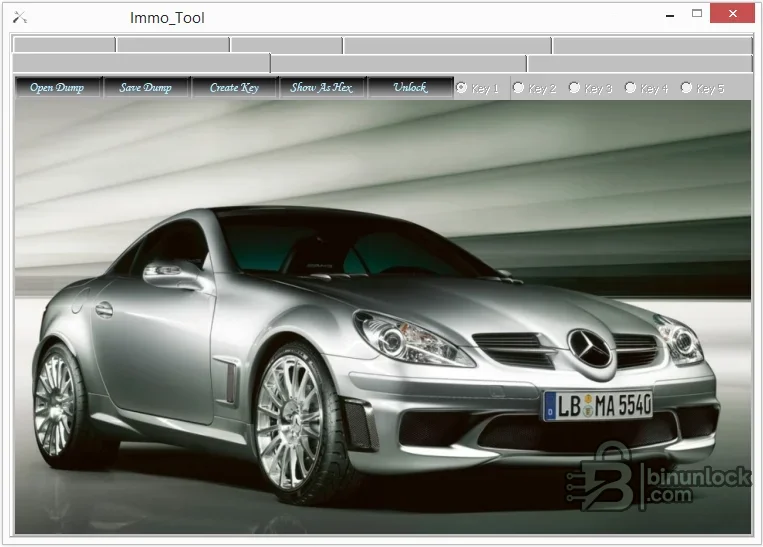
The application name refers broadly to Mercedes and VAG, but the supplied package does not contain a model-by-model ECU, immobilizer, EEPROM or MCU list. For that reason this resource does not claim universal compatibility with either brand group.
Mercedes and VAG vehicles use multiple generations of immobilizer architecture, with different transponders, key-slot structures and cryptographic procedures. Match the module family to a trusted locksmith or workshop reference. If the exact hardware and memory layout cannot be identified, stop rather than testing write files on the vehicle.
The program does not communicate over OBD and cannot read the module directly. The only executable in the package is unsigned and carries no embedded version metadata. Use an isolated workshop machine and scan the file locally before use.
Never overwrite the only original dump. If the modified file changes unrelated regions, has a different length or cannot be independently explained, do not write it.
The utility also cannot determine whether a used module is legally transferable or whether component protection, online authorization or additional adaptation is required after writing.
For a useful support post, share brand, model, production year, module part number, memory marking, programmer, exact byte count and a hash of the dump. Do not upload the full immobilizer file, VIN, PIN, key data or personal customer details.
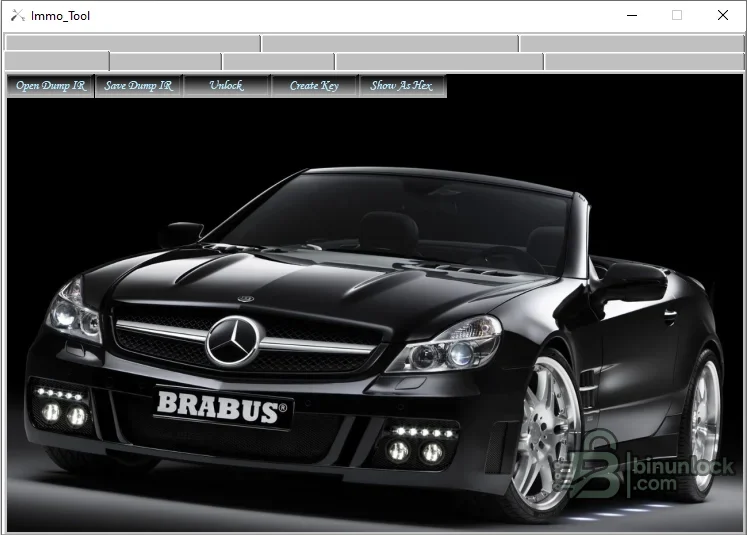
Confirmed functions in the supplied interface#
- Open a dump and save a working copy
- Open and save the separate infrared-oriented dump path shown by the second workspace
- Display loaded data as hexadecimal values
- Select one of the available key positions where the file layout supports them
- Create key data through the matching workflow
- Apply the tool's unlock operation to a supported dump
The application name refers broadly to Mercedes and VAG, but the supplied package does not contain a model-by-model ECU, immobilizer, EEPROM or MCU list. For that reason this resource does not claim universal compatibility with either brand group.
How to establish compatibility#
Identify the immobilizer, steering-lock, dashboard, key module or infrared receiver by part number and memory device before opening a file. Record the programmer selection, read voltage, byte order and exact dump size. A file being accepted by the program is not proof that it came from the right module or that its checksums and security regions are valid.Mercedes and VAG vehicles use multiple generations of immobilizer architecture, with different transponders, key-slot structures and cryptographic procedures. Match the module family to a trusted locksmith or workshop reference. If the exact hardware and memory layout cannot be identified, stop rather than testing write files on the vehicle.
Required equipment#
- Windows computer capable of running a legacy native portable application
- EEPROM or MCU programmer that explicitly supports the fitted memory device
- Correct adapter, pinout, voltage and in-circuit or removed-device method
- A compatible key or transponder programming tool for any subsequent hardware step
- Hex viewer or comparison software for independently reviewing changes
The program does not communicate over OBD and cannot read the module directly. The only executable in the package is unsigned and carries no embedded version metadata. Use an isolated workshop machine and scan the file locally before use.
Recommended dump workflow#
- Verify ownership and record the vehicle, module and memory identities.
- Read the original device at least twice and compare both files byte for byte.
- Store an untouched backup outside the working directory.
- Open a copy in the tool and confirm that the layout and controls are plausible for the module.
- Use hexadecimal view to record the original key slots or security region before calculating.
- Generate or unlock only the working copy, save it under a new name and compare every changed range.
- Program and verify with the correct external hardware, then follow the vehicle-specific synchronization procedure.
Never overwrite the only original dump. If the modified file changes unrelated regions, has a different length or cannot be independently explained, do not write it.
What the package does not provide#
There is no supported-vehicle database, wiring diagram, pinout library, transponder catalogue, automatic checksum report or guided OBD procedure. The background vehicle images in the interface are presentation elements rather than compatibility evidence. Exact support must come from the file structure and module documentation.The utility also cannot determine whether a used module is legally transferable or whether component protection, online authorization or additional adaptation is required after writing.
Troubleshooting#
If a dump will not open, confirm raw-versus-container format, file length, byte order and programmer settings. If key slots appear empty or nonsensical, do not create data until the correct module and memory are confirmed. An unlock result that does not change the expected region can indicate an unsupported layout or an already-unlocked state.For a useful support post, share brand, model, production year, module part number, memory marking, programmer, exact byte count and a hash of the dump. Do not upload the full immobilizer file, VIN, PIN, key data or personal customer details.


