
Mercedes-Benz ECU Renew Tool is an offline dump editor for preparing selected used engine-control units for legitimate replacement and subsequent vehicle personalization. It opens an EEPROM, flash or MCU read from a supported Bosch or Siemens controller, applies the controller-specific renew pattern and saves a modified file that can be written back with an external programmer.
Renewing a dump does not by itself code the ECU to the vehicle. The workshop must first identify and back up the exact control unit, validate the edited file, write it safely, then perform the appropriate Mercedes-Benz initial-startup or personalization procedure with compatible diagnostic equipment. The original dump must remain available for recovery.
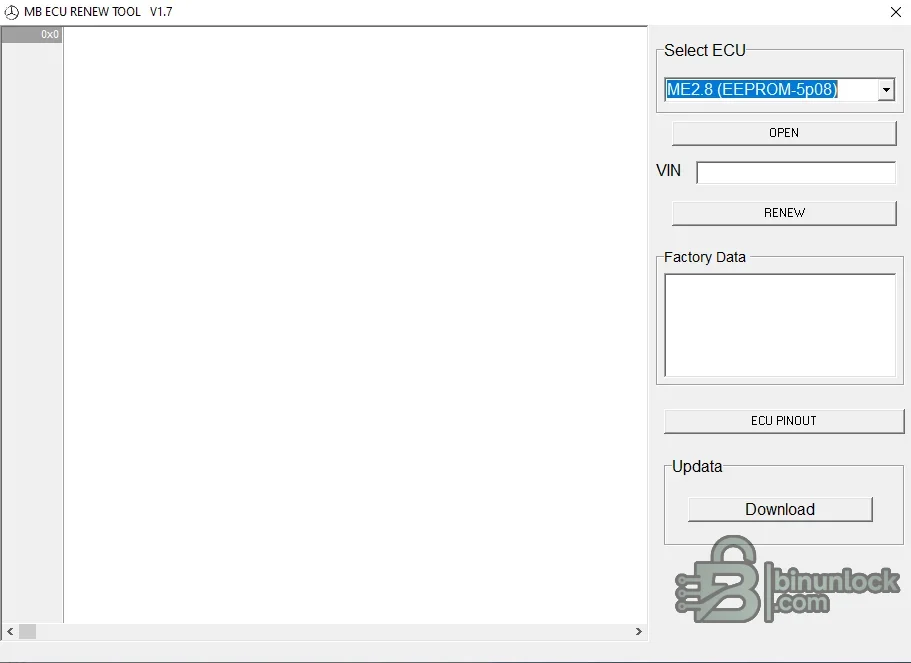
The application is file-based. It does not read an ECU through OBD, flash the controller, calculate keys or complete immobilizer pairing. Its role is limited to producing a renewed working copy from a compatible source dump.
Common vehicle associations include late-1990s and 2000s Mercedes petrol platforms: C-Class, E-Class, S-Class, CLK, CLS, SL, SLK, ML, GL and G-Class applications using M111, M112, M113, M271, M272 or M273-era management. These model associations are orientation only. Mercedes used multiple ECU generations within the same chassis and engine family, so the Bosch/Siemens number and memory type—not the model name—must decide compatibility.
These entries are commonly associated with OM611, OM612, OM613, OM646 and OM628-era diesel systems used across C-Class, E-Class, S-Class, M-Class and light-commercial applications. An A-number in the menu is not enough to identify every physical ECU. Confirm the full Mercedes part number, Bosch number, connector layout, engine code and original diagnostic identification.
Do not rename a different memory dump to make it appear compatible. File size, storage device and ECU family must all agree. If an ECU contains both flash and EEPROM, use the data type explicitly requested by the menu.
A donor ECU should also be hardware- and software-compatible with the vehicle. Renewal cannot correct an incompatible output stage, communication protocol or calibration.
If repeated reads differ, stop. A renewal algorithm cannot repair a corrupt or incorrectly organized source dump.
Legacy workflows often reference STAR/DAS; later platforms may require Xentry and online or security-authorized procedures. The correct process depends on chassis, drive-authorization generation and diagnostic access.
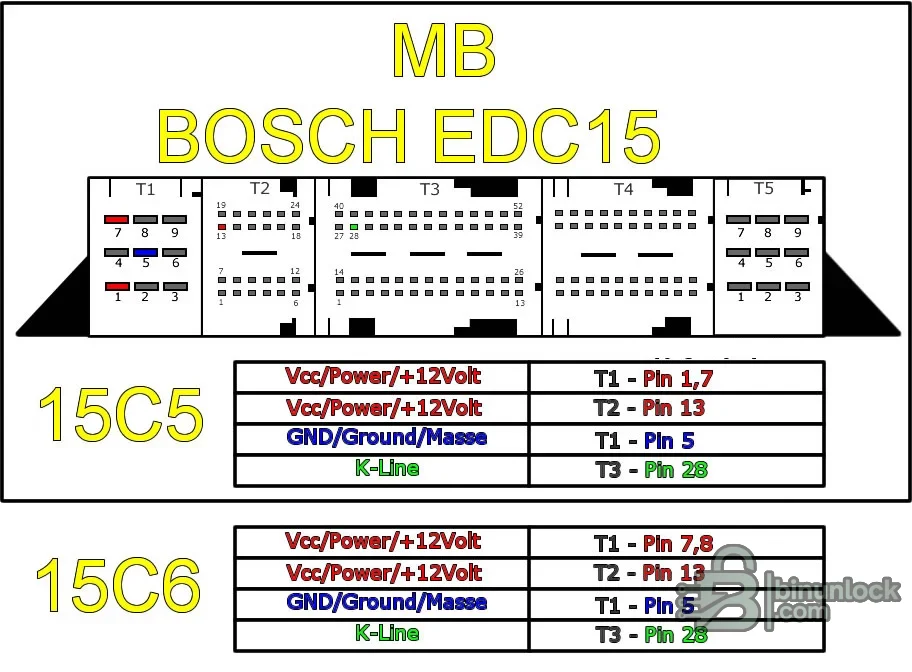
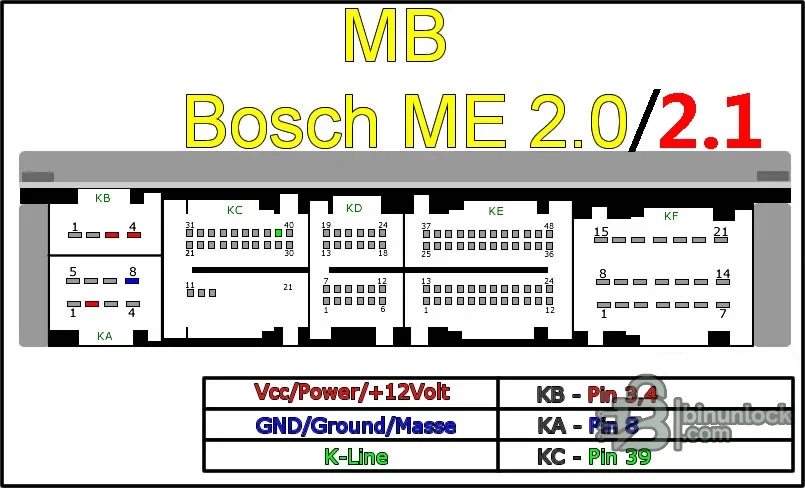
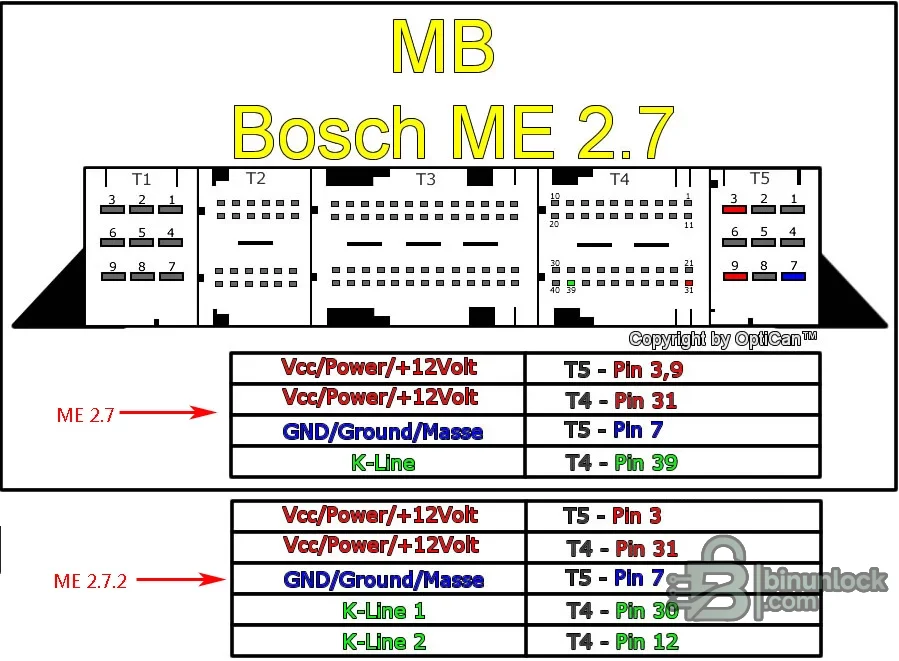
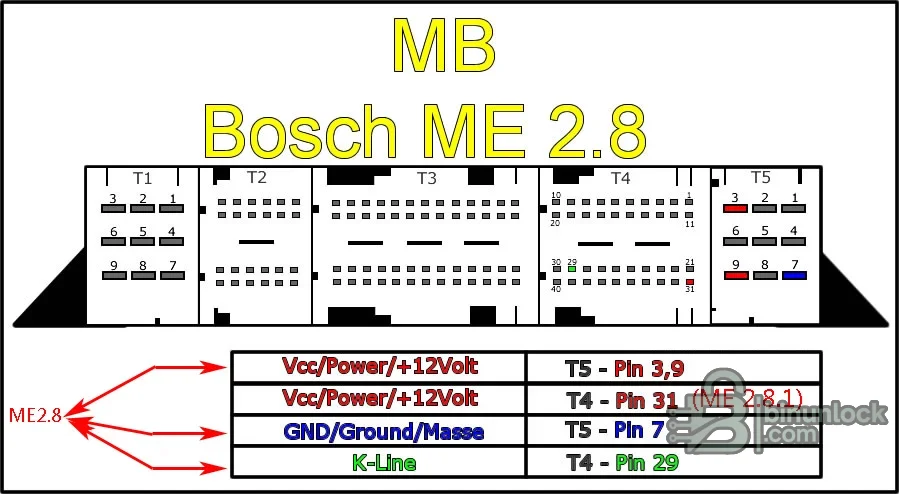
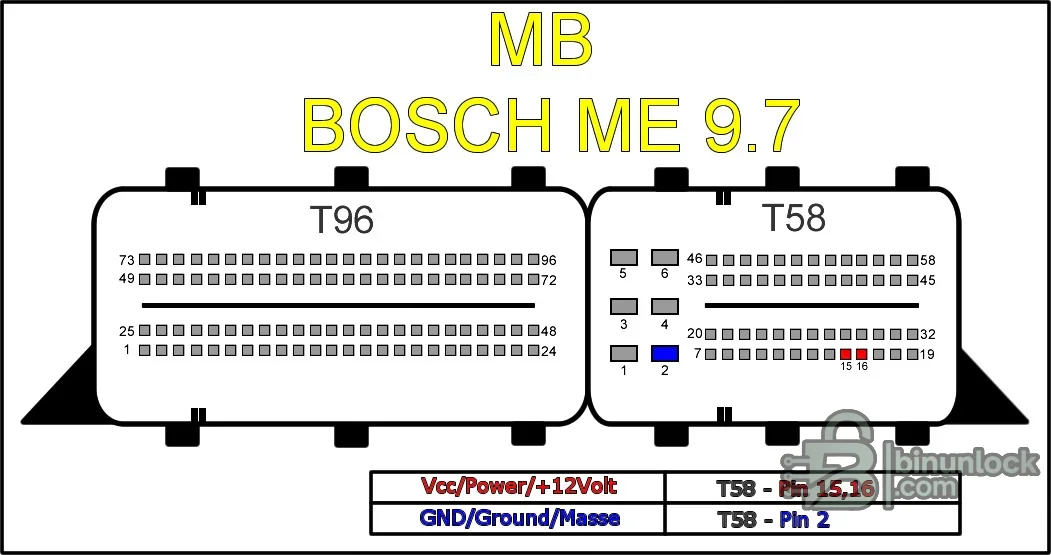
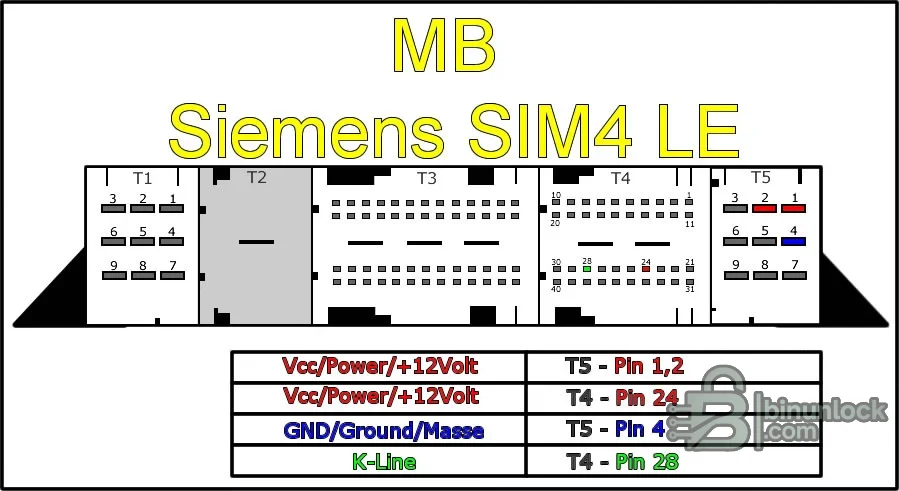
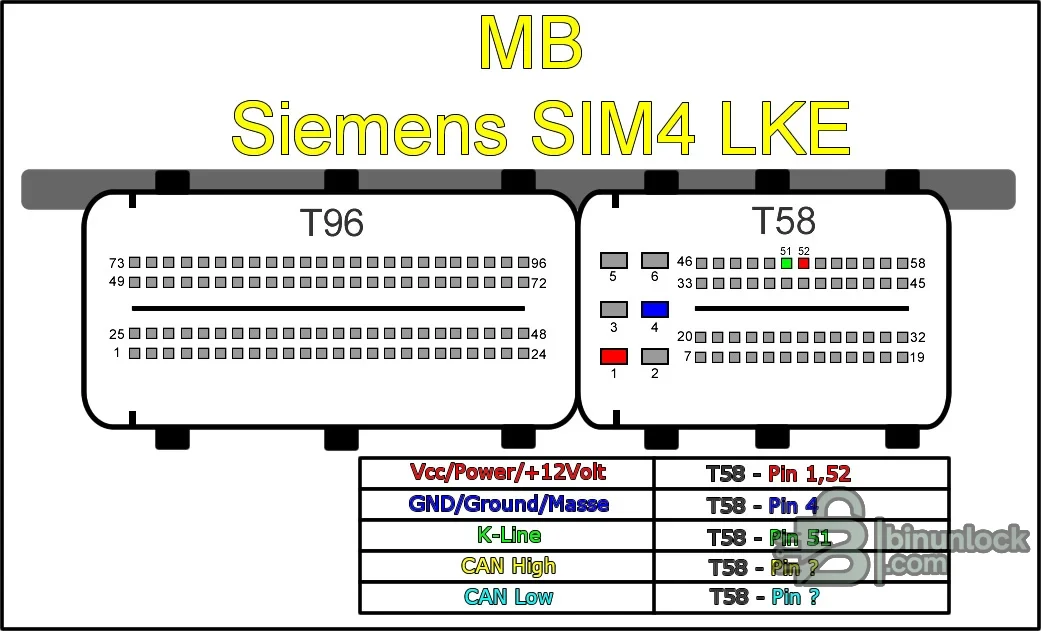
A diagram is not a substitute for checking the ECU label and connector numbering. Pin layouts can vary by hardware revision. Use a current-limited supply, confirm ground continuity before applying power and never probe an unknown pin with battery voltage.
The included executable is unsigned and has no embedded PE version metadata. It was inspected statically and was not launched during packaging because a genuine source screenshot was available. Scan the package again in your own isolated environment before use.
The source RAR passed a full test and exact extraction. The rebuilt encrypted 7z is independently tested and extracted again, and all eight publication files are matched to the pinned clean-payload inventory.
Renewing a dump does not by itself code the ECU to the vehicle. The workshop must first identify and back up the exact control unit, validate the edited file, write it safely, then perform the appropriate Mercedes-Benz initial-startup or personalization procedure with compatible diagnostic equipment. The original dump must remain available for recovery.
What ECU renewal means#
A used Mercedes engine ECU normally contains vehicle-specific identity, drive-authorization and adaptation data. A renew or virgin operation changes selected fields so the control unit can enter an initialization state suitable for authorized installation in another compatible vehicle.The application is file-based. It does not read an ECU through OBD, flash the controller, calculate keys or complete immobilizer pairing. Its role is limited to producing a renewed working copy from a compatible source dump.
- Input: a verified EEPROM, flash or MCU dump read from the target ECU
- Selection: the exact ECU and memory profile listed by the program
- Optional identity field: VIN handling where supported by that profile
- Output: a renewed file saved for external comparison and programming
- Final vehicle step: personalization, coding and adaptation with the correct Mercedes diagnostic workflow
Supported petrol ECU families#
The published support matrix and the program's included diagrams cover these petrol-controller groups:- Bosch ME2.0 / ME2.1: HC11E9 MCU-based applications
- Bosch ME2.7 and ME2.8: profiles using 5P08-family EEPROM data
- Bosch ME9.7: separate profiles for M58B flash and 95080 EEPROM reads
- Siemens SIM4 LE: A111 and A000 variants using 29F400 flash
- Siemens SIM4LKE: A271 application using 29F800 flash
- MR1: HC11E9 MCU-based profile
Common vehicle associations include late-1990s and 2000s Mercedes petrol platforms: C-Class, E-Class, S-Class, CLK, CLS, SL, SLK, ML, GL and G-Class applications using M111, M112, M113, M271, M272 or M273-era management. These model associations are orientation only. Mercedes used multiple ECU generations within the same chassis and engine family, so the Bosch/Siemens number and memory type—not the model name—must decide compatibility.
Supported diesel EDC15 profiles#
The diesel list contains Mercedes CDI/EDC15 profiles identified by application and memory type:- A613 CDI: 5P80 EEPROM
- A646 CDI: 5P80, 5P160 and 5P320 EEPROM variants
- A000 CDI: 5P320 EEPROM
- A612 CDI: 5P80 EEPROM
- A022 CDI: 5P80 EEPROM
- A024 CDI: 5P80 EEPROM
- A628 CDI: 5P80 EEPROM and a separate CAT 25C080 profile
These entries are commonly associated with OM611, OM612, OM613, OM646 and OM628-era diesel systems used across C-Class, E-Class, S-Class, M-Class and light-commercial applications. An A-number in the menu is not enough to identify every physical ECU. Confirm the full Mercedes part number, Bosch number, connector layout, engine code and original diagnostic identification.
Memory types and required reads#
The correct data source depends on the selected ECU:- 5P08/5P80, 5P160 and 5P320: serial EEPROM families used by several Bosch ME and CDI profiles
- 95080 / 25C080: SPI EEPROM data used by specific ME9.7 and A628 profiles
- HC11E9: internal MCU data for ME2.0/MR1 profiles
- 29F400 / 29F800: parallel flash images used by Siemens SIM4 LE and SIM4LKE profiles
- M58B: flash data used by one of the ME9.7 branches
Do not rename a different memory dump to make it appear compatible. File size, storage device and ECU family must all agree. If an ECU contains both flash and EEPROM, use the data type explicitly requested by the menu.
Vehicle and ECU identification checklist#
Before removing or reading the controller, record:- VIN, chassis series, model year and engine code
- Mercedes-Benz ECU part number and hardware/software status
- Bosch or Siemens manufacturer number
- Connector count and housing style
- Drive-authorization generation and currently fitted EIS/EZS type
- Whether the ECU is original, used, cloned or previously modified
- The memory device and exact dump size required by the selected profile
- Full pre-repair diagnostic scan and existing coding/adaptation state
A donor ECU should also be hardware- and software-compatible with the vehicle. Renewal cannot correct an incompatible output stage, communication protocol or calibration.
Safe dump preparation#
- Remove or bench-connect the ECU using the correct technical documentation and current limiting.
- Read the required EEPROM, flash or MCU with a suitable programmer.
- Make at least two independent reads and compare them byte-for-byte.
- Save the untouched original in two secure locations with ECU identifiers.
- Confirm file size and memory organization before opening a copy in the renew tool.
- Select the exact controller branch and review any factory-data fields shown by the application.
- Apply the renew operation to a working copy, never to the only original.
- Save the output under a new filename and compare every changed region with the original.
If repeated reads differ, stop. A renewal algorithm cannot repair a corrupt or incorrectly organized source dump.
Writing and personalization workflow#
After the output has been independently reviewed:- Program the renewed file with the correct voltage, device organization and verification enabled.
- Re-read the memory after programming and compare it with the intended output.
- Reassemble or reconnect the ECU without disturbing connector locks or grounds.
- Connect regulated vehicle battery support.
- Use authorized Mercedes diagnostic equipment to perform ECU initial startup, personalization and variant coding as required.
- Verify drive authorization, VIN, coding, engine start and communication with every related module.
- Clear only faults explained by the repair, cycle the vehicle correctly and complete a final diagnostic scan.
Legacy workflows often reference STAR/DAS; later platforms may require Xentry and online or security-authorized procedures. The correct process depends on chassis, drive-authorization generation and diagnostic access.
Bench connection diagrams#
The cleaned package retains seven reference diagrams for Bosch EDC15, ME2.0/2.1, ME2.7/2.7.2, ME2.8, ME9.7, Siemens SIM4 LE and SIM4LKE connectors. They identify power, ground and available K-line or CAN positions for the illustrated connector variant.A diagram is not a substitute for checking the ECU label and connector numbering. Pin layouts can vary by hardware revision. Use a current-limited supply, confirm ground continuity before applying power and never probe an unknown pin with battery voltage.
System requirements#
- A Windows PC capable of running a legacy native 32-bit x86 desktop application
- Windows XP through Windows 10 compatibility is commonly documented; an isolated Windows 7-era VM is a practical baseline for file editing
- At least 50 MB free for the utility, with additional secure space for original and renewed dumps
- A display resolution of 1024×768 or higher
- A suitable EEPROM/flash/MCU programmer with adapters for the selected memory
- A regulated bench supply and verified ECU connector documentation when bench work is required
- Mercedes-compatible diagnostic equipment for final personalization and coding
- A binary comparison tool for reviewing changed regions before programming
- No internet connection or vehicle interface is required for the offline file-editing step
The included executable is unsigned and has no embedded PE version metadata. It was inspected statically and was not launched during packaging because a genuine source screenshot was available. Scan the package again in your own isolated environment before use.
Package contents and cleanup#
The publication archive contains the real application plus seven functional ECU connector diagrams. Eight macOS metadata sidecars from the source archive were excluded because they contain no Windows application data and duplicate filesystem metadata rather than useful workshop content.- MB ECU executable — offline renew/virgin dump editor
- Bosch diagrams — EDC15, ME2.0/2.1, ME2.7/2.7.2, ME2.8 and ME9.7
- Siemens diagrams — SIM4 LE and SIM4LKE
The source RAR passed a full test and exact extraction. The rebuilt encrypted 7z is independently tested and extracted again, and all eight publication files are matched to the pinned clean-payload inventory.
Limits and recovery precautions#
Renewing the wrong file can leave an ECU unable to start, communicate or personalize. Treat the generated file as a repair candidate that still requires technical validation.- Never overwrite the only original dump
- Do not use a profile merely because its ECU family name looks similar
- Do not transfer calibration data between incompatible hardware numbers
- Do not assume the tool updates checksums or coding outside the renewed data area
- Do not install a donor ECU until output stages and software are confirmed compatible
- Keep a bench recovery method and the original memory image available
- Use renewal only for authorized replacement and repair, not to defeat vehicle security
Troubleshooting#
- File is rejected or fields remain blank: verify the chosen profile, memory device, file size and byte organization.
- Output looks identical: confirm that the source is not already renewed and that the correct data region was read.
- Program closes or will not open: use an isolated compatible 32-bit Windows environment rather than downloading random replacement libraries.
- ECU will not personalize: restore the original if safe, verify donor compatibility, drive-authorization generation, coding permissions and the exact initialization procedure.
- No communication after writing: check programming verification, connector pins, power and ground before repeating any write.
- VIN or coding is incorrect: perform the chassis-specific initial-startup/coding workflow; renewal alone does not complete those steps.
- Security software reports the executable: quarantine it, verify the SHA-256 identity and obtain an independent scan before deciding whether to use it.


