
MTX DTC Remover is a Windows ECU-file utility for locating and editing diagnostic trouble-code entries inside supported firmware binaries. The technician selects the exact ECU family, loads an original BIN, scans for the requested OBD/manufacturer code and saves the result as a separate file for later validation and controlled programming.
This is a calibration-file editor, not a vehicle scan tool: it does not read the ECU through OBD and it cannot repair the mechanical or electrical fault that caused a code. DTC editing should be the final documented step only when the root cause has been diagnosed, the change is lawful and the ECU family/software revision is genuinely supported.
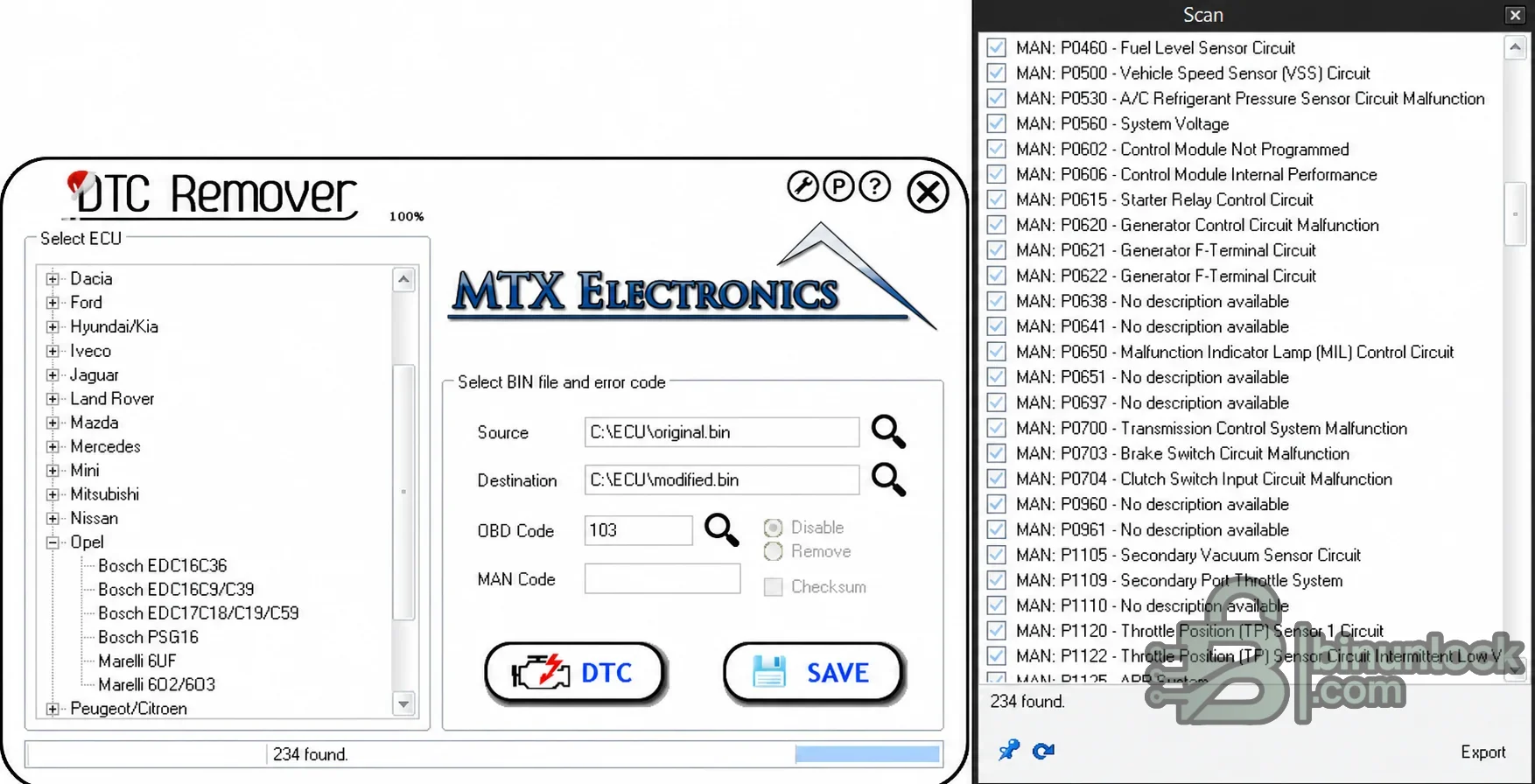
One code may appear several times in a firmware file, and similar byte patterns can occur in unrelated tables. A successful “found” count does not prove that every candidate should be modified.
The current official product catalog is much larger than this archived release. Do not assume that a controller appearing on today's website is available in the supplied build; launch the installed application and confirm the exact tree entry before accepting a job.
Examples across the official catalog include EDC16C3/C34/C39, EDC17C10/C46/C49/C60/C64/C69, EDC17CP variants, ME7, MED9 and MED17. The exact algorithm is manufacturer- and software-specific: two ECUs sharing the same Bosch family can use different DTC tables, record layouts or checksums.
These names describe ECU families rather than universal algorithms. Confirm whether the local application lists the exact sub-variant and whether Standard or PowerTools support is required. A BIN accepted by the file dialog can still be the wrong size or software layout for the selected solution.
This overview is for search and triage. The authoritative compatibility check is the exact ECU entry present in the installed build together with a matching binary size/software layout.
After any edit, check more than the dashboard lamp. Verify that normal diagnosis still communicates, unrelated DTCs remain reportable, readiness and safety functions behave correctly and the underlying subsystem has been repaired. Suppressing a code while a fault is active can hide freeze-frame information and complicate future service.
This package includes a generic legacy Visual C++ redistributable SFX because it was present in the source. Prefer current Microsoft-signed runtime installers obtained through a trusted workstation-management process when possible.
The nested RAR wrapper around the activation helper was removed after a full archive test and successful extraction. All three executables are unsigned x86 files. The activation helper has no product/version metadata and should be treated as especially high-risk; a legitimate current MTX licence is the safer option.
For road vehicles, comply with emissions, inspection and consumer-disclosure requirements. Where a competition or development vehicle is legally exempt, document that status and still retain normal diagnostic visibility wherever possible.
Static inspection is not a malware-clean guarantee, particularly for unsigned legacy installers and activation tools. Use a disposable, isolated workshop environment, retain trustworthy backups and never connect an unverified workstation directly to a customer's vehicle or business network.
This is a calibration-file editor, not a vehicle scan tool: it does not read the ECU through OBD and it cannot repair the mechanical or electrical fault that caused a code. DTC editing should be the final documented step only when the root cause has been diagnosed, the change is lawful and the ECU family/software revision is genuinely supported.
How the DTC editing workflow works#
The original interface separates the source BIN from the destination file so the untouched read can be preserved. After an ECU family is selected, the search dialog lists matching powertrain codes and manufacturer-specific entries, and the operator chooses the required action before saving.- Select the exact manufacturer and ECU family from the tree.
- Load a verified original binary in the Source field.
- Choose a different path for Destination; never overwrite the only original read.
- Enter the OBD code in its numeric form and, when required, the manufacturer code.
- Run the scan and verify every match against the ECU/software identity.
- Choose Disable or Remove only when the selected driver documents that behavior.
- Enable checksum handling only where the application exposes and supports it.
- Save the modified file, compare it byte-for-byte and validate it before flashing.
One code may appear several times in a firmware file, and similar byte patterns can occur in unrelated tables. A successful “found” count does not prove that every candidate should be modified.
Brands and ECU families visible in the supplied build#
The genuine source screenshot shows branches for Dacia, Ford, Hyundai/Kia, Iveco, Jaguar, Land Rover, Mazda, Mercedes-Benz, Mini, Mitsubishi, Nissan, Opel and Peugeot/Citroën, with additional entries available by scrolling. The expanded Opel branch visibly includes:- Bosch EDC16C36
- Bosch EDC16C9/C39
- Bosch EDC17C18/C19/C59
- Bosch PSG16
- Marelli 6JF
- Marelli 602/603
The current official product catalog is much larger than this archived release. Do not assume that a controller appearing on today's website is available in the supplied build; launch the installed application and confirm the exact tree entry before accepting a job.
Bosch diesel and petrol ECU coverage#
MTX documentation covers a broad range of Bosch families across manufacturers. Common supported groups in the product line include EDC15, EDC16 and EDC17 diesel controllers, plus selected ME, MED, MD1 and MG1 petrol/diesel platforms in newer editions.Examples across the official catalog include EDC16C3/C34/C39, EDC17C10/C46/C49/C60/C64/C69, EDC17CP variants, ME7, MED9 and MED17. The exact algorithm is manufacturer- and software-specific: two ECUs sharing the same Bosch family can use different DTC tables, record layouts or checksums.
- Match the full Bosch number and vehicle software identifiers
- Confirm whether the file is a full flash, calibration area, virtual read or BDM/boot read
- Use only the matching MTX driver entry
- Do not resize, pad or truncate a file to make it load
- If the ECU is absent from the local tree, treat it as unsupported by this build
Continental, Siemens, Delphi, Denso and Marelli coverage#
Beyond Bosch, the wider MTX product line documents selected Continental/Siemens SID and SIMOS controllers, Delphi DCM/CRD families, Denso diesel controllers and Marelli ECUs. Representative catalog entries include SID201/208/803/803A/807, SID30x, DCM3.x/DCM6.x, Denso R2/RF and SH-based files, and Marelli 6JF/6F3/8DF/8F3/9DF groups.These names describe ECU families rather than universal algorithms. Confirm whether the local application lists the exact sub-variant and whether Standard or PowerTools support is required. A BIN accepted by the file dialog can still be the wrong size or software layout for the selected solution.
Manufacturer coverage examples#
- Alfa Romeo / Fiat / Lancia: Bosch EDC15/16/17, selected Delphi, Marelli and Siemens families
- Audi / Seat / Skoda / Volkswagen / Porsche: Bosch EDC/MED, Delphi DCM, Siemens PPD/SIMOS and PCR families
- BMW / Mini: Bosch EDC families, selected Continental MSD and Siemens MS controllers
- Ford: Bosch EDC, Continental SID, Delphi DCM and Marelli applications
- Mercedes-Benz: Bosch EDC, selected Continental SID and Delphi CRD families
- Opel / Chevrolet: Bosch EDC/PSG, Delphi, Denso and Marelli applications
- Peugeot / Citroën: Bosch EDC/MEV, Continental SID, Delphi DCM, Marelli and Siemens families
- Renault / Nissan / Dacia: Bosch EDC/DCU and Continental SID families
- Asian applications: selected Honda, Hyundai/Kia, Mazda, Mitsubishi, Subaru, Suzuki and Toyota ECUs
This overview is for search and triage. The authoritative compatibility check is the exact ECU entry present in the installed build together with a matching binary size/software layout.
Disable versus remove behavior#
Different ECU drivers can implement DTC suppression differently. A Disable action may change an enable mask or reporting class while retaining the code table; Remove may alter or neutralize the table entry. Official MTX notes call out exceptions where certain EDC15 drivers use a different method and the fault is no longer reported in diagnostics.After any edit, check more than the dashboard lamp. Verify that normal diagnosis still communicates, unrelated DTCs remain reportable, readiness and safety functions behave correctly and the underlying subsystem has been repaired. Suppressing a code while a fault is active can hide freeze-frame information and complicate future service.
Checksum and file-integrity checks#
The checksum option is not universal. If the selected driver exposes checksum handling, verify the saved file with a second trusted tool or the flasher's documented checksum process. If the control is unavailable, do not assume the ECU or programming tool will repair it automatically.- Keep the original read immutable and record its SHA-256 hash
- Save each change as a new revision with the requested code in the private filename/job log
- Use a binary comparison to confirm that only expected regions changed
- Confirm input and output lengths are identical unless the exact driver documentation says otherwise
- Test the file in a checksum verifier before programming
- Keep a proven recovery read and bench/boot procedure available
System requirements#
- Native Windows 7, 8, 10 or 11 desktop with administrator privileges, according to current MTX guidance
- A physical Windows installation; current MTX documentation states that the application does not run in a virtual machine
- No active VPN client while running the application, per the vendor's first-use notes
- Approximately 200 MB free for the application, prerequisites, source files and revisions
- A hex editor and independent checksum/comparison tool for verification
- A separate, proven ECU reader/programmer appropriate for OBD, bench, BDM or boot mode
- Stable vehicle or bench power for the later flashing stage
This package includes a generic legacy Visual C++ redistributable SFX because it was present in the source. Prefer current Microsoft-signed runtime installers obtained through a trusted workstation-management process when possible.
Package contents#
The cleaned archive contains the real files extracted from the source layers:- MTX DTC Remover setup executable
- The separately nested legacy activation helper supplied with the original package
- The bundled Visual C++ redistributable SFX prerequisite
The nested RAR wrapper around the activation helper was removed after a full archive test and successful extraction. All three executables are unsigned x86 files. The activation helper has no product/version metadata and should be treated as especially high-risk; a legitimate current MTX licence is the safer option.
Safe validation and flashing workflow#
- Diagnose and repair the physical fault before editing a code.
- Identify the ECU, processor, hardware/software number and read method.
- Create two matching original reads and preserve an immutable backup.
- Select the exact ECU driver and edit only the documented DTC entry.
- Compare original and modified files and verify checksum behavior.
- Program with the correct tool, stable voltage and a recovery plan.
- After programming, identify the ECU, read all DTCs and test the repaired subsystem.
- Perform an appropriate road/bench validation and ensure unrelated diagnostics still function.
- Store the original, modified file, code justification and test results in the private job record.
Legal and safety boundaries#
DTC editing must not be used to hide an unrepaired defect, conceal a vehicle's condition or defeat mandatory emissions and safety monitoring. Never suppress codes for airbags, ABS/ESC, steering, brakes, fuel leaks, thermal protection or other safety-critical systems as a substitute for repair.For road vehicles, comply with emissions, inspection and consumer-disclosure requirements. Where a competition or development vehicle is legally exempt, document that status and still retain normal diagnostic visibility wherever possible.
Troubleshooting#
- BIN is rejected: verify ECU family, read method, file size and whether the file is full flash or calibration only
- Requested DTC is not found: confirm P-code formatting, manufacturer code and exact software revision; do not search/раtсh arbitrary byte sequences
- Hundreds of matches appear: stop and recheck ECU selection—the screenshot's 234-match example demonstrates why manual confirmation matters
- Checksum option is greyed out: use the documented external/flasher checksum workflow rather than assuming none is needed
- Application will not run in a VM or with VPN: use a dedicated native Windows workstation as specified by the vendor
- Modified ECU no longer communicates: maintain power, use the original file and follow the exact bench/boot recovery procedure
- Security software flags the helper: do not whitelist it globally; use a licensed build or isolate and inspect the file independently
Package audit and security note#
The source archive and nested helper archive were fully tested and extracted. The prepared screenshot was cleaned only by replacing a personal desktop path with neutral file paths and removing the small external website text; the ECU tree, DTC list and application controls remain intact. No executable was launched during packaging.Static inspection is not a malware-clean guarantee, particularly for unsigned legacy installers and activation tools. Use a disposable, isolated workshop environment, retain trustworthy backups and never connect an unverified workstation directly to a customer's vehicle or business network.


