
New Genius GenFile Extractor is a compact offline Windows utility for opening a compatible GEN_FILE container and extracting the calibration payload for inspection or an authorized tuning workflow. It is intended for files produced in the New Genius/K-Touch ecosystem, where the working file may be wrapped rather than supplied as a directly editable raw ECU binary.
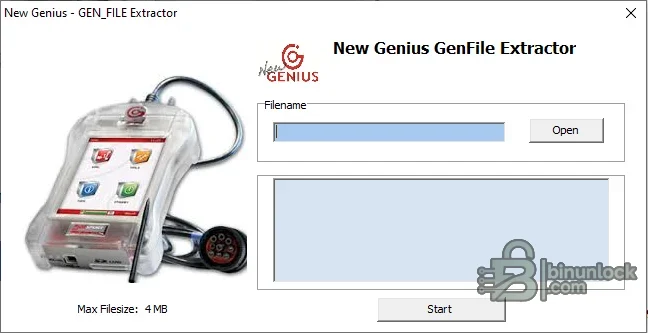
The interface is deliberately simple: select one source file, review the displayed path, and start extraction. A status panel reports progress or an error, and the application states a maximum accepted input size of 4 MB. It does not connect to a vehicle and it does not replace the New Genius console, a checksum module or an ECU editor.
The supplied preview is the genuine application interface. It shows the filename field, Open and Start controls, output/status area and the explicit file-size limit.
This utility addresses only the extraction step for a compatible GEN_FILE. It is useful when the container is recognized by the program and a technician needs to identify or inspect the underlying calibration data. It does not make an incompatible slave file editable, remove contractual restrictions, create a valid modified file for every protocol or guarantee that an extracted result can be written back.
The extractor is a separate third-party desktop utility and should not be confused with official Dimsport software. Its presence does not provide a New Genius license, protocol subscription, master account, slave-to-master conversion, checksum service or technical support. Use it only with files you are entitled to process.
A file called GEN, GEN_FILE or Genius is not automatically compatible. Different hardware generations, firmware revisions, master/slave arrangements and clone ecosystems may use unrelated wrappers. Preserve the original and test only a working copy.
Run the program from a writable disposable folder. This prevents an output from being mixed with the original and makes it easier to see exactly which file was created.
Do not force a wrong-size output into an editor definition or pad it to match an expected length. That can hide a failed extraction.
For every job record the vehicle, engine, ECU manufacturer and family, hardware number, software number, read protocol, New Genius device mode and original file size. If two files from the same protocol behave differently, stop and compare their wrapper structure rather than assuming the ECU is unsupported.
Do not rename an extension in the hope of converting the content. Renaming changes only the filename. A valid transformation must preserve the payload, required metadata, size and checksum behavior expected by the target tool.
No internet or vehicle connection is required for the extraction operation. The supplied executable is a standalone unsigned x86 application; use an isolated workshop PC or VM and verify its pinned hash before launch.
The extractor does not perform checksum correction or write-back. Never assume its output is ready to flash merely because an editor opens it.
The executable was inspected statically and was not launched during packaging because the source included an authentic, readable interface screenshot. The publication archive uses encrypted headers and is independently tested after creation.
The interface is deliberately simple: select one source file, review the displayed path, and start extraction. A status panel reports progress or an error, and the application states a maximum accepted input size of 4 MB. It does not connect to a vehicle and it does not replace the New Genius console, a checksum module or an ECU editor.
The supplied preview is the genuine application interface. It shows the filename field, Open and Start controls, output/status area and the explicit file-size limit.
Purpose of the utility#
A professional ECU read/write workflow can involve several file layers:- The original data read by the programming tool
- A tool-specific container used for storage or transfer
- The raw calibration or binary data required by an editor
- A modified file prepared for writing through the same tool family
This utility addresses only the extraction step for a compatible GEN_FILE. It is useful when the container is recognized by the program and a technician needs to identify or inspect the underlying calibration data. It does not make an incompatible slave file editable, remove contractual restrictions, create a valid modified file for every protocol or guarantee that an extracted result can be written back.
New Genius workflow context#
New Genius is a stand-alone Dimsport console designed for serial ECU communication through the vehicle OBD-II socket or dedicated diagnostic connectors. The official platform checks file size and checksum consistency before programming, can use protocol-specific recovery procedures, and supports a changing application list across cars, motorcycles, commercial vehicles and agricultural equipment.The extractor is a separate third-party desktop utility and should not be confused with official Dimsport software. Its presence does not provide a New Genius license, protocol subscription, master account, slave-to-master conversion, checksum service or technical support. Use it only with files you are entitled to process.
Input requirements#
- A local GEN_FILE generated by a compatible New Genius/K-Touch workflow
- Maximum input size of 4 MB, as shown in the application
- A complete file copied without transfer truncation or renaming damage
- Known vehicle, ECU hardware and software identification
- Authorization to inspect or modify the calibration
A file called GEN, GEN_FILE or Genius is not automatically compatible. Different hardware generations, firmware revisions, master/slave arrangements and clone ecosystems may use unrelated wrappers. Preserve the original and test only a working copy.
Basic extraction workflow#
- Copy the original Genius file into a dedicated case folder.
- Record its exact byte size and SHA-256 hash.
- Keep an immutable backup outside the extraction folder.
- Open the utility and select the working copy with the Open button.
- Confirm that the displayed path points to the intended file.
- Start the extraction and wait for the status area to complete.
- Identify any output created in the working directory.
- Hash the output and compare its size with the expected ECU memory region.
- Open it in a hex viewer before loading it into tuning software.
Run the program from a writable disposable folder. This prevents an output from being mixed with the original and makes it easier to see exactly which file was created.
How to validate the extracted result#
Extraction success is not enough. Before editing, verify:- File size: it should match the expected calibration or full-read size for the exact ECU protocol
- Content entropy: the output should not be entirely blank, repeated padding or an obvious copy of the wrapper
- Header/footer structure: compare against a known original from the same ECU family where legally available
- Identification strings: part number, software number or calibration ID should correspond to the vehicle
- Checksum support: determine which tool will validate or correct checksums after editing
- Round-trip plan: confirm how the modified data will be returned to the programming device before changing anything
Do not force a wrong-size output into an editor definition or pad it to match an expected length. That can hide a failed extraction.
Vehicle and ECU compatibility#
The extractor itself does not contain a public vehicle/ECU application list. Compatibility follows the container structure, not a particular make or controller. New Genius as a platform supports many OBD and dedicated-connector protocols, but that broad official tool coverage must not be interpreted as universal extractor coverage.For every job record the vehicle, engine, ECU manufacturer and family, hardware number, software number, read protocol, New Genius device mode and original file size. If two files from the same protocol behave differently, stop and compare their wrapper structure rather than assuming the ECU is unsupported.
File types in the Dimsport ecosystem#
Official Dimsport workflows use multiple file extensions for different purposes, including original reads, modified calibrations, recovery data, protocol/support packages and communication logs. A calibration editor may expect a raw BIN or a platform-specific original/modified file rather than a GEN container.Do not rename an extension in the hope of converting the content. Renaming changes only the filename. A valid transformation must preserve the payload, required metadata, size and checksum behavior expected by the target tool.
System requirements#
- Windows PC with native 32-bit x86 application support
- Windows 7, 8.1, 10 or 11 with WOW64 enabled on 64-bit systems
- 1 GHz processor and 1 GB RAM
- At least 100 MB free storage plus space for source and output copies
- Write access to the working directory
- A hex viewer and hashing utility for output validation
- The appropriate licensed New Genius/Dimsport workflow for any later vehicle programming
No internet or vehicle connection is required for the extraction operation. The supplied executable is a standalone unsigned x86 application; use an isolated workshop PC or VM and verify its pinned hash before launch.
Safe editing and write-back planning#
- Do not edit the only extracted copy.
- Identify whether the result is calibration-only or a complete binary.
- Use a definition that matches the exact software version.
- Make one controlled change at a time and document it.
- Apply checksum correction with a method proven for that ECU.
- Confirm whether the programming platform expects raw, original, modified or wrapped data.
- Keep the original vehicle read and a recovery file available.
- Use stable battery support and follow the protocol instructions during writing.
The extractor does not perform checksum correction or write-back. Never assume its output is ready to flash merely because an editor opens it.
Package contents and integrity#
The cleaned package contains one Windows executable. The original encrypted RAR passed a complete archive test and extraction, and the executable hash and byte size were pinned before repacking. The file is a native x86 GUI program, unsigned, with no separate installer or bundled runtime.The executable was inspected statically and was not launched during packaging because the source included an authentic, readable interface screenshot. The publication archive uses encrypted headers and is independently tested after creation.
Limitations and troubleshooting#
- Open accepts the file but Start fails: verify that the container is genuinely compatible and below the displayed 4 MB limit.
- No output appears: run from a writable local folder, check the status panel and inspect the directory timestamps.
- Output size is unexpected: do not resize it; compare the container and protocol with a known-good job.
- An editor cannot identify the binary: confirm whether the extractor returned calibration data, a partial region or another wrapper.
- The modified file cannot be loaded by New Genius: the official workflow may require a different container, master account processing or checksum/signature handling. Restore the original workflow.
- The program is blocked by security software: keep it quarantined, verify the pinned hash and obtain an independent scan before deciding to run it.
- The application crashes on a large file: the interface explicitly limits the input to 4 MB; use the correct file or a documented tool for larger reads.


