
OSE Enhanced Flash Tool is a Windows utility for reading and writing calibration, binary, RAM and EEPROM regions through the ALDL diagnostic connection on supported Holden and GM Delco engine controllers. It is aimed at the older Australian Delco tuning ecosystem, where an operator works with an ALDL interface, OSE code or a compatible real-time/NVRAM configuration rather than a modern generic OBD flasher.
The program combines automatic controller detection with configurable device IDs, serial-port timing, echo handling, bus-chatter control and manual memory mapping. This makes it useful both for a known supported configuration and for an expert bench workflow where the exact ROM, calibration, RAM and EEPROM ranges have already been documented.
The package contains the current main executable, a legacy executable retained for comparison, and a GM ALDL interface document. The supplied preview shows the actual application at its ready screen before a controller is connected.
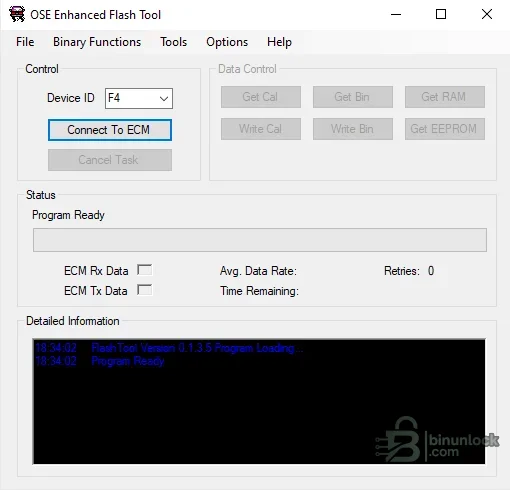
A greyed-out button means the connected definition does not expose that operation. Do not infer support merely because a menu entry exists.
This is controller-based coverage, not a promise that every vehicle carrying one of those badges can be written. Engine, transmission, PCM service number, operating-system code, memcal/NVRAM hardware, ALDL bus layout and interface design must all be confirmed first. Later CAN-based GM controllers are outside the normal ALDL workflow.
The data interface must support the controller's ALDL signalling. Vehicles with an 8192-baud ALDL port can use a compatible USB/serial interface; early 160-baud ECMs need appropriate hardware that provides the higher-speed data path. The included GM ALDL document is retained as technical reference, but wiring and interface polarity should be verified against the exact hardware before connection.
Flash-memory PCMs require additional care because a failed full-binary write can leave the controller unresponsive. Establish a stable read workflow and keep recovery hardware available before enabling any write operation.
These values are reference definitions, not universal settings. Entering an incorrect map can produce an incomplete read or target the wrong area during a write. Prefer a tested device definition and verify the result size and content against independent documentation.
Do not label a 64 KiB result as a complete backup without confirming the controller definition and bank behavior. For recovery planning, obtain a verified full read through a method known to cover every bank.
Migration is designed around calibration files. Migrating a full binary does not automatically install a newer operating system. A safer workflow is to migrate and save the calibration, load it into a controller already running the intended compatible operating system, and then read back the resulting binary for verification.
High-speed mode can provide faster reads and writes when the controller code supports it. In automatic mode the program falls back if errors are excessive. File validation before writing should remain enabled; disabling it removes a major protection against an incompatible binary.
The application has been used on modern 64-bit Windows through the legacy framework, but compatibility depends on the USB driver. A dedicated offline workshop laptop or a Windows virtual machine with controlled USB pass-through is preferable to a general-purpose daily-use PC.
Vehicle-specific binary data can contain security or identity information. Redact VIN, security bytes and owner details before sharing a file or screenshot publicly.
A successful connection does not prove that a full write is safe. If Get Bin reports errors, the author specifically warns against using Write Bin until the communication path produces clean repeated reads.
The source archive and nested archive both passed complete integrity and extraction tests. Both executables are native x86 programs, statically inspected and unsigned. They were not executed during packaging because the source supplied an authentic interface screenshot.
The program combines automatic controller detection with configurable device IDs, serial-port timing, echo handling, bus-chatter control and manual memory mapping. This makes it useful both for a known supported configuration and for an expert bench workflow where the exact ROM, calibration, RAM and EEPROM ranges have already been documented.
The package contains the current main executable, a legacy executable retained for comparison, and a GM ALDL interface document. The supplied preview shows the actual application at its ready screen before a controller is connected.
Main read and write functions#
After a controller is detected, the tool enables only the operations supported by that device definition. The principal controls are:- Get Cal: reads only the tunable calibration area rather than the complete firmware image
- Get Bin: reads the binary range defined for the detected controller
- Get RAM: captures the configured volatile-memory region for analysis
- Get EEPROM: reads the EEPROM region on controllers that expose it
- Write Cal: writes only the calibration portion, including when a compatible full binary is selected as input
- Write Bin: writes the complete supported binary range and is intended for operating-system updates, not routine table changes
A greyed-out button means the connected definition does not expose that operation. Do not infer support merely because a menu entry exists.
Supported controller families and vehicle scope#
The software was developed around Holden Commodore-era Delco ECM and PCM communication over ALDL. Documented configurations include:- VR/VS automatic controllers: definitions commonly identified by the $11 and $58 code families
- VR/VS manual controllers: $12/OSE 12P and related $5A configurations
- VS Ecotec PCM: the $51 family with separate calibration, RAM and EEPROM ranges
- VT 3.8-litre Ecotec applications: reported working over a correctly configured 8192-baud ALDL interface
- VX, VU and VY Holden V6 flash PCMs: supported workflows exist for reading calibration, binary, RAM and EEPROM data when the exact PCM and interface setup is compatible
- OSE, Kalmaker and selected real-time-enabled factory devices: automatic discovery and configured device IDs are available, but features vary by code and hardware
This is controller-based coverage, not a promise that every vehicle carrying one of those badges can be written. Engine, transmission, PCM service number, operating-system code, memcal/NVRAM hardware, ALDL bus layout and interface design must all be confirmed first. Later CAN-based GM controllers are outside the normal ALDL workflow.
Memcal, NVRAM and flash-memory requirements#
For a memcal-based ECM or PCM, writing calibration data requires a suitable NVRAM replacement loaded with write-capable code such as an OSE calibration. A standard UV-erasable EPROM cannot be rewritten in-circuit simply because the application can communicate with the controller.The data interface must support the controller's ALDL signalling. Vehicles with an 8192-baud ALDL port can use a compatible USB/serial interface; early 160-baud ECMs need appropriate hardware that provides the higher-speed data path. The included GM ALDL document is retained as technical reference, but wiring and interface polarity should be verified against the exact hardware before connection.
Flash-memory PCMs require additional care because a failed full-binary write can leave the controller unresponsive. Establish a stable read workflow and keep recovery hardware available before enabling any write operation.
Documented memory maps#
The author's reference settings include these common starting points:- VR/VS automatic: ROM 0000–FFFF, calibration 6000–8FFF, RAM 0000–08FF and EEPROM 0E00–0FFF
- VR/VS manual: ROM 8000–FFFF, calibration 8000–8FFF and RAM 0000–01FF; the referenced ECM does not provide a separate EEPROM area
- VS Ecotec: ROM 0000–FFFF, calibration 2000–5FFF, RAM 0000–1FFF and EEPROM 0E00–0FFF
These values are reference definitions, not universal settings. Entering an incorrect map can produce an incomplete read or target the wrong area during a write. Prefer a tested device definition and verify the result size and content against independent documentation.
Important 128 KiB PCM limitation#
VS Ecotec and later 128 KiB PCMs use bank switching. The documented flash-tool path accesses bank 1, the first 64 KiB, so Get Bin does not necessarily produce the controller's complete 128 KiB image. This limitation is critical when comparing files or planning a clone.Do not label a 64 KiB result as a complete backup without confirming the controller definition and bank behavior. For recovery planning, obtain a verified full read through a method known to cover every bank.
OSE calibration migration#
The tool includes a migration workflow for older OSE 12P calibration data. It can compare the older layout with a newer definition and identify tables or scalars that were added or whose resolution changed. Empty or changed areas still require manual review by someone who understands the calibration.Migration is designed around calibration files. Migrating a full binary does not automatically install a newer operating system. A safer workflow is to migrate and save the calibration, load it into a controller already running the intended compatible operating system, and then read back the resulting binary for verification.
Interface and communication settings#
The Preferences screen stores the selected vehicle/interface combination and COM port. Advanced options include:- ECM and BCM device IDs
- BCM and ECM chatter suppression
- VX-and-later heartbeat detection using the documented bus frame
- Interface echo handling or automatic echo detection
- Wait-for-silence timing, retry count and COM timeout
- Automatic high-speed communication with fallback to normal speed
- Selection of controller types to detect and identify
- File validation before writing
High-speed mode can provide faster reads and writes when the controller code supports it. In automatic mode the program falls back if errors are excessive. File validation before writing should remain enabled; disabling it removes a major protection against an incompatible binary.
System requirements#
- Windows PC with 32-bit application support; on 64-bit Windows this is provided by WOW64
- Microsoft .NET Framework 3.5 enabled in Windows Features
- A reliable USB-to-serial or dedicated ALDL interface suitable for the target baud rate and electrical signalling
- A correctly installed virtual COM-port driver
- Administrator access may be needed to enable the legacy .NET component or adjust serial-device behavior
- At least 1 GHz CPU, 1 GB RAM and 100 MB free storage are sufficient for the application and normal read files
- A stable 12–14 V vehicle or bench supply appropriate for ECU programming
- A binary editor such as TunerPro plus the correct definition file when calibration tables will be changed
The application has been used on modern 64-bit Windows through the legacy framework, but compatibility depends on the USB driver. A dedicated offline workshop laptop or a Windows virtual machine with controlled USB pass-through is preferable to a general-purpose daily-use PC.
Safe first-read workflow#
- Identify the exact ECM/PCM part number, service number, operating-system code and memcal/NVRAM configuration.
- Confirm that the ALDL interface uses the correct vehicle pin, signal level and baud rate.
- Connect a regulated power supply and disable sleep, screen saver and USB power saving.
- Select the appropriate vehicle/interface profile and COM port.
- Use Connect to ECM and confirm the detected device before enabling any data action.
- Perform Get Cal or the supported read operation first; do not begin with Write Bin.
- Repeat the read at least twice and compare hashes byte-for-byte.
- Store one verified original away from the working folder.
- Only then inspect or edit a copy with the correct definition.
Vehicle-specific binary data can contain security or identity information. Redact VIN, security bytes and owner details before sharing a file or screenshot publicly.
Safe calibration-write workflow#
- Confirm that the controller is fitted with writable hardware or is a documented flash PCM.
- Use a calibration file that matches the exact operating system and memory layout.
- Leave file validation enabled.
- Verify that repeated reads complete with zero communication errors.
- Prefer Write Cal for normal tuning changes; reserve Write Bin for a documented operating-system update.
- Do not move the interface, cycle ignition, start the engine or allow the laptop to sleep during a write.
- Read the calibration back after programming and compare it with the intended file.
- Keep an EPROM/NVRAM programmer or documented bench-recovery method available.
A successful connection does not prove that a full write is safe. If Get Bin reports errors, the author specifically warns against using Write Bin until the communication path produces clean repeated reads.
Package contents#
The cleaned archive contains the principal Windows executable, a legacy build for comparison with older definitions, and the expanded GM ALDL interface document. The redundant nested RAR is replaced by its verified contents so every functional file is directly accessible.The source archive and nested archive both passed complete integrity and extraction tests. Both executables are native x86 programs, statically inspected and unsigned. They were not executed during packaging because the source supplied an authentic interface screenshot.
Troubleshooting#
- No controller is detected: confirm COM port, ignition state, interface wiring, device ID and the selected vehicle profile.
- The application receives frames but cannot connect: change echo handling to Auto Detect and verify the interface polarity and driver settings.
- Reads stop or contain errors: reduce speed, increase retry/timeout values, disable USB power saving and check bus chatter.
- The cursor behaves like a serial mouse: Windows may have misidentified incoming ALDL data as a pointing device; disable the affected serial-mouse detection before logging.
- Get Bin returns only 64 KiB from a 128 KiB PCM: this is the documented bank-1 limitation, not a complete backup.
- Write controls remain disabled: the detected device or loaded code does not advertise that operation. Do not bypass the check.
- A migrated calibration has blank areas: review tables/scalars that changed layout and populate them using the correct definition before upload.
- The program will not start: enable .NET Framework 3.5 and verify 32-bit application support.
- Security software blocks the executable: keep it quarantined until its pinned hash and an independent scan are reviewed; unsigned legacy tools should be run only in isolation.
Limitations and workshop notes#
- This is a specialist Holden/GM Delco ALDL tool, not a universal OBD-II or CAN flasher
- Vehicle names alone are insufficient for compatibility; controller hardware and code family decide support
- Some reads cover only a bank or memory region rather than the entire physical device
- Write capability depends on NVRAM/flash hardware and compatible controller code
- Full-binary writing carries a real recovery risk and should be bench-proven first
- The supplied executables are unsigned legacy x86 binaries
- Never share unredacted ECU dumps or logs containing owner/security data


