
PCMflash is a modular Windows application for reading and writing automotive ECU and TCU memory through SAE J2534 interfaces. Depending on the licenses stored in the attached Guardant USB key, a supported module can provide controller identification, diagnostic operations, flash or EEPROM access, checksum handling and OBD, bench or boot-mode service functions.
This package is a legacy installer set commonly associated with early third-party or “China dongle” hardware. It does not contain a module licence, does not activate an unsupported key and is not an official universal China-dongle edition. The exact modules shown after launch are determined by the physical protection key; an installer version by itself is not an ECU compatibility list.
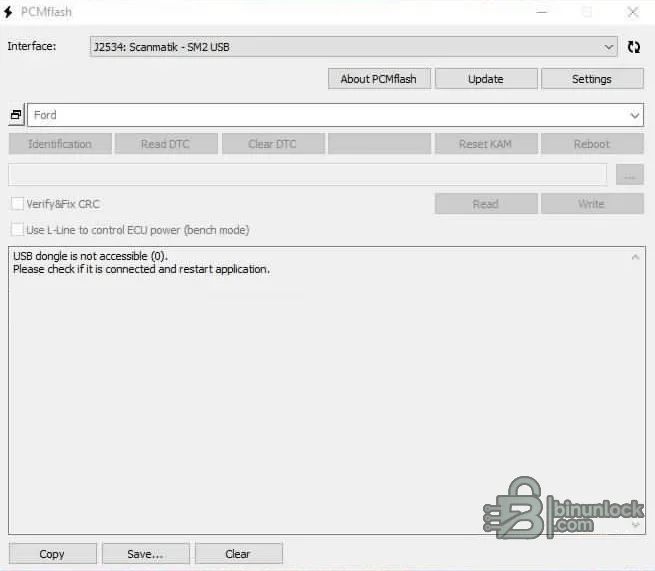
Buttons are enabled only when a licensed module, compatible interface and valid controller context are present. The screenshot correctly shows a Scanmatik J2534 device selected while the software reports that the USB licence key is unavailable; this is expected when the Guardant key is disconnected.
Representative controller families across the PCMflash ecosystem include Bosch EDC16/EDC17/MED17, Bosch ME9/MED9, Continental SIMOS and PCR, Delphi DCM, Denso SH705x/SH725xx, Infineon Tricore, Aisin and ZF transmission controllers. This list describes the modular product architecture, not guaranteed coverage in the supplied legacy build or in any particular dongle.
Ford/Mazda VCM-compatible J2534 hardware appears in the official interface list, but support still depends on the module and controller. Confirm whether a protocol targets an engine ECU, PowerShift/other TCU or a bootloader before connecting. Never substitute a VCM device simply because the vehicle brand matches.
These names contain many hardware and software revisions. An EDC17 or MED17 label alone is not sufficient: read the complete Bosch number, vehicle part number and software identifiers, then confirm the exact protocol documentation. Bench pinouts, boot points, power sequencing and checksum behavior vary substantially even within the same ECU family.
Transmission support is likewise module-specific and can cover selected Mitsubishi, Temic, Getrag, Aisin, ZF, Denso, Bosch and manufacturer-specific TCUs. Do not use an engine protocol on a transmission controller or infer gearbox coverage from a vehicle-level sales description.
The developer explicitly warns that counterfeit Guardant keys and copied adapters working only with old software are unsupported and can contribute to ECU damage. A clone label or successful program launch is not evidence of electrical quality, valid licensing or safe protocol implementation.
Before using this archive, open the software offline with the intended key and record which module numbers are actually available. If the program says the USB dongle is not accessible, reseat it, verify the Guardant service/driver and check Device Manager. Do not repeatedly install random emulator drivers or modify the system clock, because that can make diagnosis harder and may violate the licence agreement.
A duplicate copy of the legacy installer was omitted because its SHA-256 hash was byte-for-byte identical. The legacy setup and Guardant driver have valid Authenticode signatures in the audited Windows environment. The primary setup contains the expected PCMflash signer identity, but its timestamp/certificate chain could not be fully verified and is recorded as an unknown signature error rather than claimed valid.
Modern Windows may enforce newer certificate or driver-signing requirements that legacy installers cannot satisfy. Use a dedicated workshop PC or isolated VM and never weaken system-wide security controls merely to load an unknown dongle driver.
If communication fails after erase, stop random attempts and use the documented recovery path for the exact ECU. Switching module, file or pinout while a controller is in boot/recovery state can turn a recoverable interruption into hardware damage.
ECU calibration changes can affect emissions, safety systems, drivetrain protection and road legality. Preserve compliant original data, use approved calibrations and follow the laws applicable to the vehicle. The three retained executables were inspected statically and never executed during packaging; static inspection and digital signatures are not a malware-clean guarantee.
This package is a legacy installer set commonly associated with early third-party or “China dongle” hardware. It does not contain a module licence, does not activate an unsupported key and is not an official universal China-dongle edition. The exact modules shown after launch are determined by the physical protection key; an installer version by itself is not an ECU compatibility list.
Core PCMflash workflow#
The original interface separates the selected J2534 adapter, licensed module/protocol and controller operation. Depending on that exact module, available controls can include:- ECU or TCU identification and software/hardware information
- Read and clear diagnostic trouble codes where implemented
- Read flash, calibration or EEPROM areas
- Write a verified original, modified or recovery file
- Checksum verification and correction for protocols that explicitly provide it
- ECU reset/reboot or KAM reset on selected platforms
- OBD communication in the vehicle and bench/boot access with an appropriate cable or power box
Buttons are enabled only when a licensed module, compatible interface and valid controller context are present. The screenshot correctly shows a Scanmatik J2534 device selected while the software reports that the USB licence key is unavailable; this is expected when the Guardant key is disconnected.
Module-based vehicle and ECU coverage#
PCMflash is licensed per module rather than as one all-inclusive vehicle list. The official catalog spans engine, transmission, AdBlue, boot/bench, truck/commercial and motorcycle/boat applications. Long-running module families include Ford and Mazda generations, Honda/Acura, Nissan/Infiniti, Subaru, Mitsubishi, Renault, VAG, Kia/Hyundai, Toyota/Lexus, Mercedes-Benz, JLR, PSA and other regional platforms.Representative controller families across the PCMflash ecosystem include Bosch EDC16/EDC17/MED17, Bosch ME9/MED9, Continental SIMOS and PCR, Delphi DCM, Denso SH705x/SH725xx, Infineon Tricore, Aisin and ZF transmission controllers. This list describes the modular product architecture, not guaranteed coverage in the supplied legacy build or in any particular dongle.
- Check the module number stored in the key before promising support for a vehicle
- Match ECU manufacturer, exact family, hardware number, software number and processor—not only make/model
- Verify whether the selected protocol offers real read, virtual read, write, checksum, EEPROM or recovery
- Use the connection diagram issued for that exact module and revision
- Do not assume a later online module list applies to an older installer
Ford, Mazda and North American applications#
The official module structure contains multiple Ford gasoline, diesel, EcoBoost, Power Stroke and transmission groups together with several Mazda generations. Typical communication can be OBD for supported production ECUs, while certain recovery or low-level operations require bench or boot access.Ford/Mazda VCM-compatible J2534 hardware appears in the official interface list, but support still depends on the module and controller. Confirm whether a protocol targets an engine ECU, PowerShift/other TCU or a bootloader before connecting. Never substitute a VCM device simply because the vehicle brand matches.
VAG, Bosch and European ECU families#
PCMflash modules include VAG K-line and CAN/UDS families as well as Bosch bootloader groups used across multiple manufacturers. Examples in the broader catalog cover ME(D)17, EDC17, MED9, EDC16, PSG16 and selected SIMOS/PCR applications.These names contain many hardware and software revisions. An EDC17 or MED17 label alone is not sufficient: read the complete Bosch number, vehicle part number and software identifiers, then confirm the exact protocol documentation. Bench pinouts, boot points, power sequencing and checksum behavior vary substantially even within the same ECU family.
Asian, Renault/Nissan and transmission coverage#
The module catalog also includes Toyota/Lexus, Kia/Hyundai, Honda/Acura, Mitsubishi, Subaru, Nissan/Infiniti and Renault/Nissan groups. Separate bootloader or generation-specific modules may exist alongside ordinary OBD protocols.Transmission support is likewise module-specific and can cover selected Mitsubishi, Temic, Getrag, Aisin, ZF, Denso, Bosch and manufacturer-specific TCUs. Do not use an engine protocol on a transmission controller or infer gearbox coverage from a vehicle-level sales description.
Supported J2534 interfaces and hardware#
PCMflash requires a correctly installed SAE J2534 adapter driver. Official product information lists tested interface families such as OpenPort, Mongoose, Ford/Mazda VCM and Scanmatik devices; the supplied screenshot shows a Scanmatik SM2 selection. Some bench/boot modules additionally require a PowerBox or module-specific cable for controlled power, ignition and boot-pin handling.- Install only the driver supplied for the exact interface hardware and Windows architecture
- Confirm the adapter appears in PCMflash before connecting to an ECU
- Use direct USB rather than an unpowered hub and disable selective suspend for the session
- For bench work, use a current-limited laboratory supply and the exact documented pinout
- Never rely on cable colours without checking pin numbers and continuity
- Keep network updates disabled until the authenticity and compatibility of a legacy dongle are established
The developer explicitly warns that counterfeit Guardant keys and copied adapters working only with old software are unsupported and can contribute to ECU damage. A clone label or successful program launch is not evidence of electrical quality, valid licensing or safe protocol implementation.
Guardant key and licensing#
The application requires a Guardant protection key containing legally obtained module entitlements. The included Guardant driver installer only makes the key visible to Windows; it does not add licences, emulate a dongle or repair a blocked key.Before using this archive, open the software offline with the intended key and record which module numbers are actually available. If the program says the USB dongle is not accessible, reseat it, verify the Guardant service/driver and check Device Manager. Do not repeatedly install random emulator drivers or modify the system clock, because that can make diagnosis harder and may violate the licence agreement.
Package contents and installer verification#
The original outer RAR contained three nested wrappers. All were fully tested and opened. The cleaned archive contains the real installation files rather than those RAR/ZIP layers:- Primary PCMflash setup executable
- Legacy PCMflash setup executable retained for an older compatible key/workstation
- Guardant driver installer required for the USB protection key
A duplicate copy of the legacy installer was omitted because its SHA-256 hash was byte-for-byte identical. The legacy setup and Guardant driver have valid Authenticode signatures in the audited Windows environment. The primary setup contains the expected PCMflash signer identity, but its timestamp/certificate chain could not be fully verified and is recorded as an unknown signature error rather than claimed valid.
System requirements#
- Windows 7 or later, as specified in the PCMflash lifecycle documentation
- 32-bit application compatibility on the selected Windows installation
- Installed Guardant driver and a genuine licensed PCMflash USB key
- Installed J2534 driver for a supported PassThru interface
- Stable USB ports and sufficient permissions to install hardware drivers
- At least 200 MB free for the application, drivers, logs and temporary files
- For in-vehicle writes: a regulated battery support unit sized for the vehicle
- For bench/boot work: protected laboratory power, correct harness/PowerBox and module documentation
Modern Windows may enforce newer certificate or driver-signing requirements that legacy installers cannot satisfy. Use a dedicated workshop PC or isolated VM and never weaken system-wide security controls merely to load an unknown dongle driver.
Safe ECU reading and writing procedure#
- Identify the ECU/TCU label, hardware and software numbers, vehicle configuration and repair goal.
- Verify the required PCMflash module is genuinely licensed on the connected key.
- Open the exact module documentation and confirm OBD, bench or boot wiring and supported operations.
- Stabilize vehicle or bench voltage and prevent Windows sleep, restart and USB power saving.
- Perform identification and read DTCs before changing controller memory.
- Read every available original area and store two matching backups with SHA-256 hashes.
- Check file size, software identity, calibration source and checksum method before writing.
- Use only the documented mode and never interrupt power or communication during erase/write.
- After completion, cycle power as instructed, identify the controller again, clear only relevant DTCs and verify vehicle operation.
If communication fails after erase, stop random attempts and use the documented recovery path for the exact ECU. Switching module, file or pinout while a controller is in boot/recovery state can turn a recoverable interruption into hardware damage.
Troubleshooting#
- USB dongle is not accessible: verify the Guardant driver/service, physical key and licence; the installer alone cannot solve a missing entitlement
- J2534 interface is absent: reinstall its vendor DLL, confirm Windows architecture and close other diagnostic programs
- Module list is empty or incomplete: inspect the actual key licences and use an installer compatible with that key generation
- Read is unavailable: the protocol may use virtual read, identification-only access or require bench/boot mode
- Write button stays disabled: check module entitlement, selected protocol, file size/type and connection state
- Checksum warning appears: stop and verify whether that exact protocol performs correction, verification only or no checksum handling
- ECU stops responding: maintain power, preserve logs and original reads, and follow the module-specific recovery procedure
- Primary setup signature is not trusted: independently scan it and validate its hash in an isolated environment; do not override the warning globally
Legal, emissions and security notes#
Use PCMflash only with controllers, vehicles and licences you own or are authorized to service. Respect software licensing and obtain supported modules and hardware through legitimate channels. This legacy archive is provided for compatibility and preservation; it is not a promise of developer support for copied dongles.ECU calibration changes can affect emissions, safety systems, drivetrain protection and road legality. Preserve compliant original data, use approved calibrations and follow the laws applicable to the vehicle. The three retained executables were inspected statically and never executed during packaging; static inspection and digital signatures are not a malware-clean guarantee.


