
PSA BSI Tool is a Windows workshop suite for supported Peugeot and Citroen body-system interface repair. The main application exposes EEPROM and flash reading or writing, PIN retrieval, key learning and odometer-data fields, while the package also contains complementary PSA login and dump-to-PIN calculators plus FTDI interface drivers and English or Chinese manuals. These are security- and configuration-sensitive operations that require exact BSI identification and a recoverable original read.
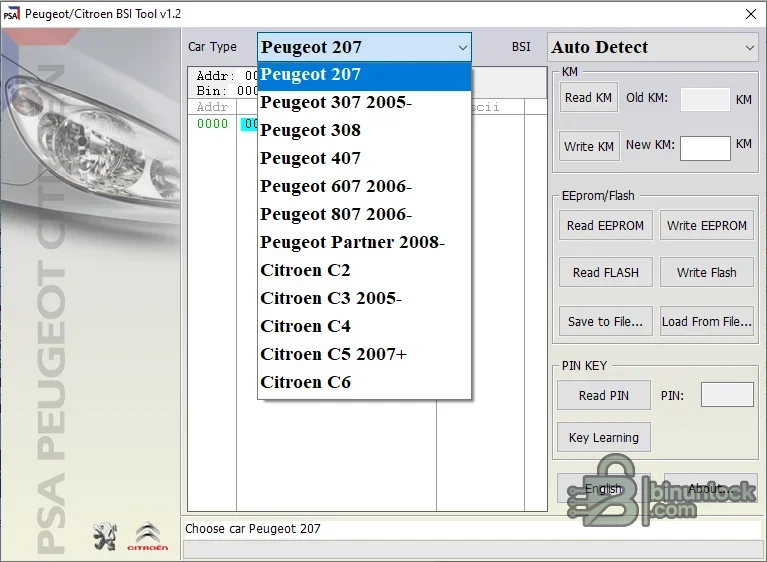
The visible model list is a starting point, not a universal compatibility guarantee. BSI supplier, hardware revision, EEPROM, firmware and vehicle network can differ within one model. Use auto-detect only after confirming the connected interface and expected BSI family.
The complementary utilities can assist with PSA login, key calculation and dump-to-PIN work. They do not replace a correct BSI read or prove that a file belongs to the target vehicle.
The archive includes x86 and x64 FTDI components, INF/CAT files and manuals. Driver age and customized interface identifiers can affect modern Windows installation; do not replace the supplied driver blindly if the hardware vendor requires a specific VID/PID configuration.
PIN and key-learning functions are vehicle security operations. Do not publish PINs, dumps or customer identifiers, and do not use the software without authorization.
The primary program and helper utilities are unsigned; the included FTDI drivers contain valid signatures where present. No executable was launched during preparation and no malware-clean claim is made.
For support, provide model, year, BSI supplier and part number, memory type, interface, operation, exact file size and redacted error. Never attach the full EEPROM, PIN, VIN or key data publicly.
Vehicle selections shown in the application#
- Peugeot 207
- Peugeot 307 from the mid-2000s period
- Peugeot 308 and 407
- Peugeot 607 and 807 from the mid-2000s period
- Peugeot Partner from the late-2000s period
- Citroen C2
- Citroen C3 from the mid-2000s period
- Citroen C4
- Citroen C5 from the late-2000s period
- Citroen C6
The visible model list is a starting point, not a universal compatibility guarantee. BSI supplier, hardware revision, EEPROM, firmware and vehicle network can differ within one model. Use auto-detect only after confirming the connected interface and expected BSI family.
Confirmed BSI functions#
- Read and write EEPROM
- Read and write flash
- Save memory data to a file and load it later
- Read PIN where the supported BSI and procedure allow it
- Perform the supplied key-learning workflow
- Read the stored distance value and prepare a replacement value for an authorized repair
The complementary utilities can assist with PSA login, key calculation and dump-to-PIN work. They do not replace a correct BSI read or prove that a file belongs to the target vehicle.
Required hardware#
- The compatible PSA BSI interface expected by this software
- A Windows computer with the supplied FTDI D2XX or virtual COM-port driver installed as required
- Stable vehicle or bench power and the correct connector or pinout
- A separate EEPROM programmer when the repair method requires an offline memory read
- A working diagnostic tool for identification, fault checks and post-repair configuration
The archive includes x86 and x64 FTDI components, INF/CAT files and manuals. Driver age and customized interface identifiers can affect modern Windows installation; do not replace the supplied driver blindly if the hardware vendor requires a specific VID/PID configuration.
Recommended BSI backup workflow#
- Verify vehicle ownership and record VIN, model, year, BSI label, supplier and hardware or software identifiers.
- Connect regulated power and confirm the interface and driver before opening a write function.
- Read EEPROM and flash where supported, then repeat each read and compare the files.
- Store untouched originals under read-only names with hashes.
- Perform PIN, key or distance work only on copies and only for a documented repair.
- Compare output length and changed regions before writing.
- Write with stable power, verify the operation and complete any required diagnostic configuration.
- Check locking, starting, lighting, wipers, indicators, windows and fault memory after the repair.
Mileage and legal use#
The distance field should be used only for lawful module repair or replacement with accurate record keeping. Many PSA vehicles synchronize mileage between modules; writing an incorrect value can propagate it and create a lasting discrepancy. Follow local disclosure and odometer laws and record both the original and final values.PIN and key-learning functions are vehicle security operations. Do not publish PINs, dumps or customer identifiers, and do not use the software without authorization.
Package contents and cleanup#
The cleaned package retains the main BSI program, both manuals, FTDI drivers, PSA login and key calculators, the full legacy key-calculator setup and the already expanded PSA dump helpers. Redundant nested driver and calculator archives were excluded after their contents were fully tested, and the empty runtime log was removed. Functional files remain in their original relative layout.The primary program and helper utilities are unsigned; the included FTDI drivers contain valid signatures where present. No executable was launched during preparation and no malware-clean claim is made.
System requirements#
Use a dedicated Windows workshop computer with administrative rights only when required for driver installation. The application itself is legacy software; an isolated compatibility environment may be more reliable on a modern host. Keep the interface on a stable USB port and prevent sleep or update restarts during a memory operation.Troubleshooting#
If auto-detect fails, verify vehicle selection, BSI power, interface driver, wiring and ignition state. If two reads differ, stop and correct the connection before calculating or writing. If PIN or distance values look implausible, confirm the BSI variant and file type rather than trying another model at random.For support, provide model, year, BSI supplier and part number, memory type, interface, operation, exact file size and redacted error. Never attach the full EEPROM, PIN, VIN or key data publicly.


