
Renault DF to P-Code Converter is a compact offline reference tool that translates many Renault-style DF fault identifiers into the closest known EOBD/OBD-II P-code and a short circuit or component description. It is intended to help a technician correlate a Renault diagnostic report with generic fault-code documentation, wiring information and test procedures without connecting the application itself to the vehicle.
The package also includes a separate ECU Info helper for identifying selected engine-control hardware from the leading digits of a Bosch-style part number. Neither program is a scan tool: it cannot read or clear faults, communicate through an interface, program an ECU or prove the cause of a fault. Treat every conversion as a lookup clue that must be checked against the exact ECU, diagnostic context and Renault workshop documentation.
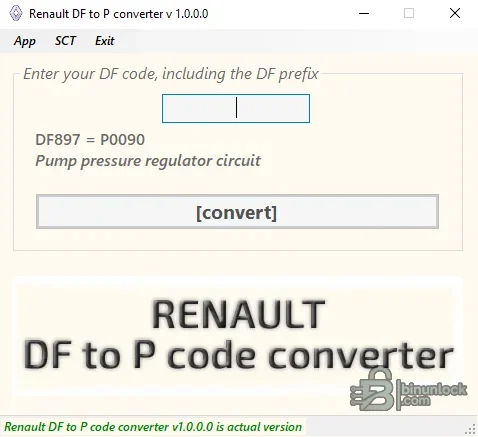
For example, the supplied interface demonstrates a DF entry returning a P-code and a pump-pressure-regulator circuit description. The developer's current product documentation gives another example involving an EGR-solenoid circuit. These examples illustrate the lookup method; they do not establish universal mappings for every controller.
Body, restraint and chassis faults frequently have manufacturer-specific meanings with no useful generic P-code equivalent. Even inside engine management, the same numeric DF value can require a different interpretation for another ECU program or Vdiag. If the tool returns no result—or returns a result inconsistent with the source diagnostic description—retain the original DF code and use the exact Renault fault-finding document.
Before relying on a conversion, record the following:
Do not use a generic P-code result to overwrite these details. They are what allow the workshop procedure and wiring diagram to be selected correctly.
A short circuit description such as “regulator circuit” can refer to wiring, supply voltage, a driver stage, connector resistance or a mechanically related condition. Replacing the named component solely from a lookup result is not a sound diagnostic method.
Use the complete physical label and multiple identifiers whenever possible. A shared six-digit prefix can cover numerous hardware and software variants, and a blank result does not mean the ECU is unsupported by the vehicle. Confirm the Bosch number, Renault part number, supplier, connector layout and diagnostic identification before choosing flash files, pinouts or repair information.
If the application does not start on a current Windows build, test it inside an isolated compatible VM rather than disabling security controls globally. Do not expose customer diagnostic reports or VIN-linked data to an untrusted environment.
Both files report the same pinned file version and are unsigned. They were inspected statically and were not executed during packaging because the source supplied genuine screenshots of both interfaces. The original source archive passed a full test and extraction, and the rebuilt encrypted 7z is independently extracted again to verify the exact clean file tree.
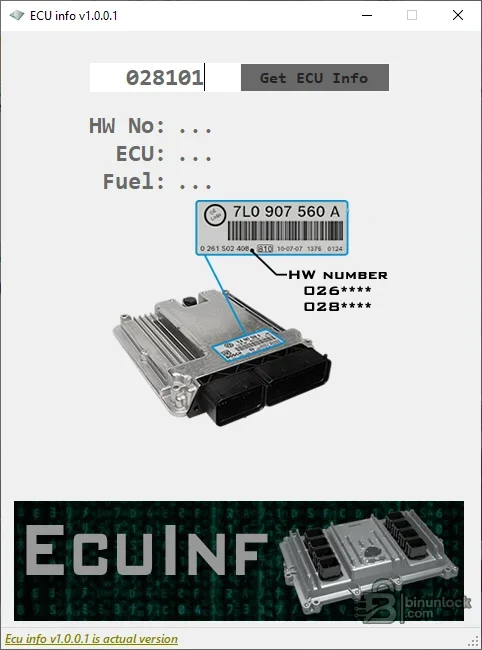
The package also includes a separate ECU Info helper for identifying selected engine-control hardware from the leading digits of a Bosch-style part number. Neither program is a scan tool: it cannot read or clear faults, communicate through an interface, program an ECU or prove the cause of a fault. Treat every conversion as a lookup clue that must be checked against the exact ECU, diagnostic context and Renault workshop documentation.
DF codes and generic P-codes explained#
Renault diagnostic equipment commonly presents internal fault identifiers with a DF prefix. Generic EOBD/OBD-II tools use standardized diagnostic trouble-code families such as P0xxx and P1xxx. A converter helps bridge the notation, but the two systems are not always one-to-one.- DF identifier: a Renault-oriented fault reference whose meaning can depend on the ECU family, software, Vdiag level and fault-definition suffix
- P-code: a powertrain-oriented EOBD/OBD-II identifier used by generic diagnostic equipment and service references
- Definition text: a short description of the monitored circuit or condition, not a diagnosis of the failed part
- Fault status: present, stored, intermittent and definition details must still be read from the original diagnostic session
For example, the supplied interface demonstrates a DF entry returning a P-code and a pump-pressure-regulator circuit description. The developer's current product documentation gives another example involving an EGR-solenoid circuit. These examples illustrate the lookup method; they do not establish universal mappings for every controller.
Systems and control units where DF references appear#
DF-style identifiers are found across many Renault and related diagnostic contexts, including engine injection, diesel fuel control, automatic transmission, ABS/ESP, airbag/pretensioner, UCH/body control, UPC/power distribution, steering and instrument-panel systems. The included converter is primarily useful where a corresponding EOBD P-code exists, which most often means an engine or powertrain fault.Body, restraint and chassis faults frequently have manufacturer-specific meanings with no useful generic P-code equivalent. Even inside engine management, the same numeric DF value can require a different interpretation for another ECU program or Vdiag. If the tool returns no result—or returns a result inconsistent with the source diagnostic description—retain the original DF code and use the exact Renault fault-finding document.
Vehicle and ECU compatibility#
The application does not expose a fixed model-year or ECU whitelist, so it should not be advertised as covering every Renault. It can assist with DF reports from Renault passenger and light-commercial vehicles and may also be useful on Dacia or Renault-derived systems when the original diagnostic report uses the same Renault DF definition. Compatibility is determined by the control unit and diagnostic definition, not by the badge alone.Before relying on a conversion, record the following:
- Vehicle model, model year, engine code and market
- Control-unit type: injection ECU, transmission, ABS/ESP, UCH, airbag or another module
- ECU manufacturer and complete hardware/software part numbers
- Renault diagnostic program number and Vdiag where available
- Full DF identifier, definition suffix and whether the fault is present or stored
- The wording shown by Renault CLIP, PyRen or another trusted Renault-capable diagnostic tool
Do not use a generic P-code result to overwrite these details. They are what allow the workshop procedure and wiring diagram to be selected correctly.
Using the DF converter#
- Read the fault with a Renault-capable diagnostic interface and save the complete report.
- Open the converter offline; no vehicle or J2534/ELM interface is required.
- Enter the identifier with its DF prefix exactly as recorded, then run the conversion.
- Record the returned P-code and description beside—not instead of—the original DF information.
- Compare the result with the source scan-tool wording, ECU type and the correct workshop manual.
- Check related faults, freeze-frame/live data, connector condition, power supply, grounds and wiring before condemning a component.
- After repair, clear codes with the diagnostic tool, follow any required validation drive or self-test and rescan all modules.
A short circuit description such as “regulator circuit” can refer to wiring, supply voltage, a driver stage, connector resistance or a mechanically related condition. Replacing the named component solely from a lookup result is not a sound diagnostic method.
Companion ECU Info utility#
The second program accepts a leading numeric fragment from an ECU label and, when its internal reference contains a match, displays hardware number, ECU family and fuel-type fields. The supplied screenshot uses a Bosch-style number beginning with 0 281 and shows where to locate the identifying digits on an ECU label.Use the complete physical label and multiple identifiers whenever possible. A shared six-digit prefix can cover numerous hardware and software variants, and a blank result does not mean the ECU is unsupported by the vehicle. Confirm the Bosch number, Renault part number, supplier, connector layout and diagnostic identification before choosing flash files, pinouts or repair information.
System requirements#
- A Windows PC capable of running legacy 32-bit x86 .NET desktop applications
- A conservative baseline of Windows 7 or later in an isolated workshop environment
- The Microsoft .NET Framework required by the application; use the Windows component source rather than third-party runtime bundles
- Approximately 10 MB free for the unpacked utilities, plus space for private diagnostic reports and screenshots
- No vehicle interface is needed for the offline lookup itself
- A separate Renault-capable scan tool and interface are required to obtain authoritative DF details and to clear or validate faults
- Current endpoint scanning before first use; both supplied executable files are unsigned
If the application does not start on a current Windows build, test it inside an isolated compatible VM rather than disabling security controls globally. Do not expose customer diagnostic reports or VIN-linked data to an untrusted environment.
Package contents#
The cleaned archive contains the two real x86 applications extracted from the source rather than the original RAR wrapper:- Renault DF to P code converter.exe — offline DF-to-P lookup and short description display
- ECU info setup.exe — companion ECU number/reference utility
Both files report the same pinned file version and are unsigned. They were inspected statically and were not executed during packaging because the source supplied genuine screenshots of both interfaces. The original source archive passed a full test and extraction, and the rebuilt encrypted 7z is independently extracted again to verify the exact clean file tree.
Limits and diagnostic cautions#
The official developer page describes the utility as converting typical Renault DF codes, which is an important limitation. A missing result, an older database entry or a superficially similar P-code should never be filled in by guesswork. Renault fault definitions can add numbered suffixes or context that a generic code does not preserve.- Do not erase the original DF code or diagnostic wording from the job record
- Do not assume one DF number means the same thing on all ECUs
- Do not remove or suppress a DTC because the converter found a matching P-code
- Do not replace a sensor or actuator before circuit, supply and plausibility tests
- Do not use the ECU Info result as proof that two control units are interchangeable
- Do not post VINs, registration data, customer names or full diagnostic reports publicly
Troubleshooting#
- No conversion appears: include the DF prefix, remove accidental spaces and verify the digits from the original scan report
- Returned description conflicts with CLIP: trust the ECU-specific Renault definition and record the converter result only as a rejected cross-reference
- Several P-codes look plausible: use ECU/Vdiag data and the full definition suffix; do not choose by component name alone
- ECU Info returns blanks: recheck the label digits and use the complete hardware and Renault numbers in a verified parts reference
- Program will not open: verify the .NET Framework, try an isolated compatible Windows environment and avoid downloading replacement DLLs from random sites
- Security software flags an executable: quarantine it, compare the SHA-256 identity and obtain an independent scan before deciding whether to use it


