
Renault Trucks NG Calculator is a legacy companion utility for authorized service work with Renault Trucks Diag NG3 and NG10 systems. It converts a challenge code from a protected diagnostic parameter into the password expected by the selected operation and includes option, ticket or token choices for numerous legacy truck systems.
The calculator is not a complete diagnostic program and does not communicate with the vehicle by itself. A compatible Renault Trucks diagnostic installation, interface and authorized service procedure are still required. Its purpose is limited to the code/password step presented by protected parameters.
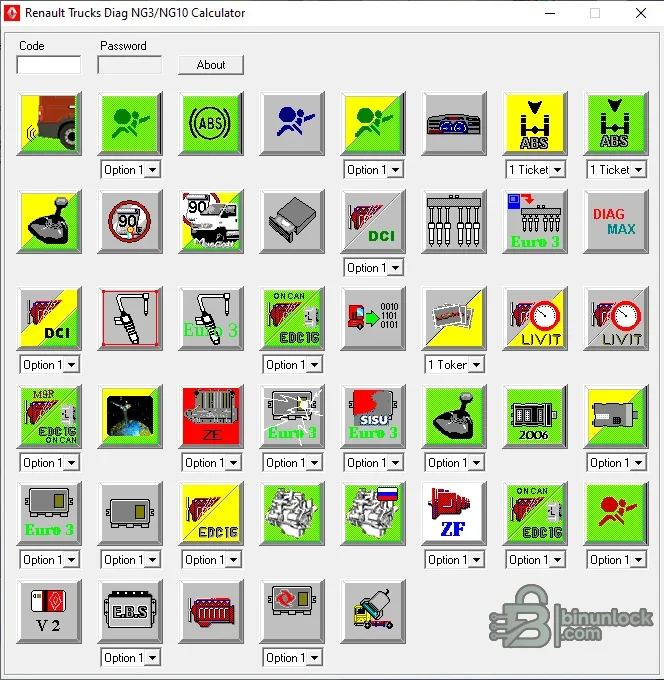
The genuine interface preview shows the code and password fields and the supplied operation icons, including engine, transmission, ABS, airbag, Euro emissions-generation and other system groups.
The result is meaningful only when the challenge code, selected icon and diagnostic operation belong to the same vehicle and session.
These icons show the calculator's menu, not a guaranteed application list for every truck, control unit or software release. Identify the vehicle and diagnostic prompt before choosing a profile.
Do not confuse NG3/NG10 calculator support with full coverage from later Renault Trucks Tech Tool or Volvo-based platforms.
Do not use the calculator to bypass fleet policy, tamper with regulated limits or alter a vehicle outside an approved repair or configuration procedure.
Modern Windows may require compatibility settings. Do not disable security controls on a general-purpose business PC to run legacy workshop software.
The calculator is not a complete diagnostic program and does not communicate with the vehicle by itself. A compatible Renault Trucks diagnostic installation, interface and authorized service procedure are still required. Its purpose is limited to the code/password step presented by protected parameters.
The genuine interface preview shows the code and password fields and the supplied operation icons, including engine, transmission, ABS, airbag, Euro emissions-generation and other system groups.
Main function#
- Accepts the code displayed by a compatible protected diagnostic operation
- Lets the technician choose the matching system or operation icon
- Supports option, ticket or token selections where exposed by the profile
- Calculates the corresponding password for entry back into the authorized diagnostic session
The result is meaningful only when the challenge code, selected icon and diagnostic operation belong to the same vehicle and session.
Systems represented in the interface#
The supplied screen contains profiles for multiple legacy Renault Trucks functions and system families. Visible labels and symbols include ABS, airbag, engine/ECU, DCI, transmission and ZF-related operations, Euro 3 and Euro 4 groups, Sisu-related entries, EDC variants and additional chassis or cab parameters.These icons show the calculator's menu, not a guaranteed application list for every truck, control unit or software release. Identify the vehicle and diagnostic prompt before choosing a profile.
Diagnostic platform context#
NG3 and NG10 were used with older Renault Trucks diagnostic environments and hardware generations. Third-party product documentation describes the calculator as a dealer-password tool for protected parameters and ticket/token operations. It is most relevant to legacy trucks and service software rather than current online OEM systems.Do not confuse NG3/NG10 calculator support with full coverage from later Renault Trucks Tech Tool or Volvo-based platforms.
Authorized workflow#
- Identify the truck by VIN privately and record model, production year and engine.
- Connect the correct Renault Trucks diagnostic interface and establish a stable session.
- Open the approved protected parameter or service routine.
- Record the displayed challenge code and exact operation name.
- In the calculator, select the matching system icon and option/ticket setting.
- Enter the challenge code and calculate the password.
- Return the result to the same diagnostic session without changing vehicle or operation.
- Document the original parameter, authorized new value and final verification.
Parameters and safety#
Protected parameters can affect speed limits, braking, suspension, transmission, engine behavior, emissions, body configuration and other safety-critical functions. Before changing anything, obtain the applicable Renault Trucks service instruction and confirm legal authorization.Do not use the calculator to bypass fleet policy, tamper with regulated limits or alter a vehicle outside an approved repair or configuration procedure.
System requirements#
Legacy supplier documentation lists Windows 2003, XP, Vista, 7, 8 and 10. A practical setup should include:- 32-bit-compatible Windows environment, preferably an isolated VM for the calculator
- At least 1 GB RAM and 100 MB free storage
- The complete three-file calculator folder kept together
- A separately licensed and configured Renault Trucks Diag NG installation
- Compatible diagnostic communication interface and vehicle cables
- Regulated battery support for lengthy configuration sessions
- Administrator access only where required by the legacy diagnostic stack
Modern Windows may require compatibility settings. Do not disable security controls on a general-purpose business PC to run legacy workshop software.
Troubleshooting#
- Password is rejected: confirm the challenge has not expired and the same diagnostic session and operation are still open.
- No matching icon: stop; do not select a visually similar system without service documentation.
- Different options produce different results: verify whether the diagnostic prompt requests an option, ticket or token profile.
- Calculator will not start: keep the EXE, DLL and INI together and use a 32-bit-compatible Windows VM.
- Diagnostic tool disconnects: restore the connection and obtain a fresh challenge code rather than reusing an old password.
- Parameter change is not accepted: confirm user permissions, vehicle state, ECU prerequisites and applicable service bulletin.


