
RNLT by TE is a focused offline file utility for a small set of Renault petrol ECU calibration workflows. The supplied interface provides separate choices for EMS3132 on 1.6-litre and 1.4-litre applications, plus a V42 1.6-litre path. It is intended to process an existing ECU read for the cold-start correction associated with the selected family; it does not read the ECU, identify the vehicle automatically or write the result back to the controller.
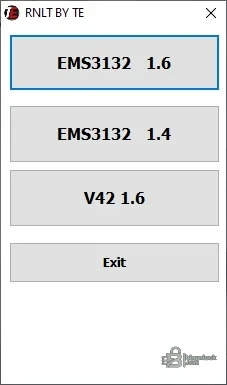
These three buttons are the exact coverage presented by the program. The engine displacement label is not enough on its own: confirm the ECU family, hardware number, software number and original file length before choosing a path. Do not apply an EMS3132 routine to a V42 file or assume that every Renault using the same engine size has the same controller.
The package does not include map definitions, a checksum report, recovery files or a list of known software numbers. Treat the output as a candidate modification that requires independent comparison and validation.
The supplied native executable is unsigned. It was inspected statically and never run during publication preparation. Scan it in your own isolated environment before opening customer files.
Disk usage is minimal, but keep separate folders for original reads, working copies, modified outputs and verification logs. Record hashes for each stage so the exact file written to the ECU is known.
If the application rejects the file, creates an unexpected size or changes more than the expected calibration region, stop. Do not pad, truncate or rename a file to force acceptance.
Confirmed controller selections#
- EMS3132 1.6
- EMS3132 1.4
- V42 1.6
These three buttons are the exact coverage presented by the program. The engine displacement label is not enough on its own: confirm the ECU family, hardware number, software number and original file length before choosing a path. Do not apply an EMS3132 routine to a V42 file or assume that every Renault using the same engine size has the same controller.
Intended use#
The utility is described and presented as a cold-start calibration helper. That means it should be used on a complete, stable source read from the matching ECU and only after mechanical causes of poor starting have been checked. Battery condition, fuel pressure, ignition, compression, coolant-temperature data, sensors and wiring can produce similar symptoms; software should not be the first diagnosis.The package does not include map definitions, a checksum report, recovery files or a list of known software numbers. Treat the output as a candidate modification that requires independent comparison and validation.
Required hardware and files#
- A Windows workshop computer with read/write access to a dedicated working folder
- An ECU reading and programming tool that explicitly supports the fitted EMS3132 or V42 controller
- Correct bench, boot or vehicle communication method for the ECU
- Stable regulated power for reading and especially writing
- A verified full original read and a second tool for binary comparison
The supplied native executable is unsigned. It was inspected statically and never run during publication preparation. Scan it in your own isolated environment before opening customer files.
Recommended calibration workflow#
- Identify the vehicle, engine, ECU family and label numbers.
- Read the controller twice with the same protocol and compare the files byte for byte.
- Store the original read outside the working directory.
- Open a copy and select only the exact EMS3132 or V42 path confirmed by the hardware.
- Save the result under a new name; never overwrite the original.
- Compare file length and every changed range, then verify checksum handling with the writing tool.
- Write only with stable power and a documented recovery method.
- After programming, clear relevant adaptations only when the Renault procedure requires it and verify cold and warm starts over multiple cycles.
System requirements#
The application is a small portable Windows executable and the package includes a short instruction telling the user to run it with administrative privileges. It does not bundle an ECU driver, pass-through interface driver or runtime installer. Use a controlled Windows environment; if elevated rights are necessary, isolate the machine and do not disable security controls globally.Disk usage is minimal, but keep separate folders for original reads, working copies, modified outputs and verification logs. Record hashes for each stage so the exact file written to the ECU is known.
Compatibility and checksum checks#
Before writing, compare the input size with a known-good read from the same controller and protocol. Determine whether the flashing tool expects a full flash, calibration segment or another container. Some tools correct checksums automatically and others require a prepared file; applying both methods without understanding them can invalidate the output.If the application rejects the file, creates an unexpected size or changes more than the expected calibration region, stop. Do not pad, truncate or rename a file to force acceptance.


