
TPROT Remover Tool is a small offline binary utility that searches an ECU file for the specific protection signature displayed by the application and applies its packaged transformation to a working copy. Its interface explicitly presents a hexadecimal search pattern and a Remove TPROT action, making the scope narrower and more transparent than a generic one-click ECU editor.
The package does not document a universal ECU list, and no broad compatibility claim should be inferred from the name. Use it only when the exact controller, software revision and required раtсh are already known from reliable technical information.
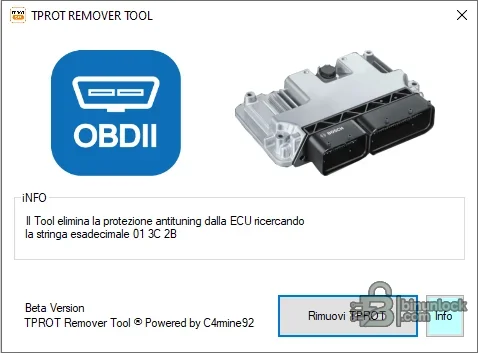
The package does not document a universal ECU list, and no broad compatibility claim should be inferred from the name. Use it only when the exact controller, software revision and required раtсh are already known from reliable technical information.
What this resource is for#
Use the tool as a controlled file-processing step for a supported ECU binary when anti-tuning protection handling is required by a lawful bench or programming workflow. Always prove the signature, inspect the byte-level difference and retain the untouched original.Confirmed functions#
- Open a local ECU binary file
- Search for the application-defined TPROT byte signature
- Apply the packaged signature modification to a working copy
- Save an output for independent binary comparison
- Provide a simple visual indication of the intended раtсh operation
Supported vehicles, controllers and files#
- Compatibility is signature-based rather than vehicle-name-based
- The visible application does not prove support for every Bosch EDC17, MED17 or similar controller
- Full flash, calibration and virtual-read formats may contain different layouts
- Exact ECU hardware and software numbers must be established before use
- A file without the expected signature must not be forced or padded
Package contents#
- Single portable native Windows application
- Original screenshot documenting the exact visible search pattern and action
- No ECU reads, calibration database, drivers or programming hardware
- Unsigned executable inspected statically without launch
System, hardware and interface requirements#
- Isolated Windows workstation
- Known-good binary from the exact ECU and software version
- Hex editor or binary-diff tool for reviewing the output
- Compatible bench, boot or OBD programmer chosen separately
- Stable power and a tested original-file recovery method
Recommended workshop workflow#
- Record the vehicle, controller label, hardware number, software number and communication method before starting.
- Read the original twice where practical, compare hashes and store one untouched copy outside the working directory.
- Confirm that file type, segment, byte length and ECU family match the selected function.
- Perform one documented operation on a copy and review every changed region before saving.
- Reopen or recheck the output, then validate it with the programmer or diagnostic platform before writing.
- Use regulated power during vehicle or bench work and complete a full identification and fault scan afterward.
Compatibility limits and responsible use#
- A file that opens successfully is not automatically compatible with the target controller, vehicle or hardware revision.
- Preserve a verified original read and compare byte length, identifiers and modified ranges before any write.
- Security, identity, emissions and anti-theft functions must be used only on property the technician is authorized to service and where the change is lawful.
- The supplied application does not replace OEM service information, stable power, a compatible interface or a tested recovery route.
- An unsigned legacy executable should be isolated and independently scanned before use; no malware-free claim is made.
Troubleshooting#
- File is rejected: verify full-read versus calibration-read format, exact byte length, family and software revision.
- Output is unchanged: confirm that the expected signature or supported data structure is actually present.
- Unexpectedly large changes: stop and compare against the original; do not flash an unexplained result.
- Vehicle communication fails: check power, grounds, ignition state, interface driver and bus wiring separately from file processing.
- Module does not recover after writing: restore the exact original with the documented bench or boot recovery method.


