
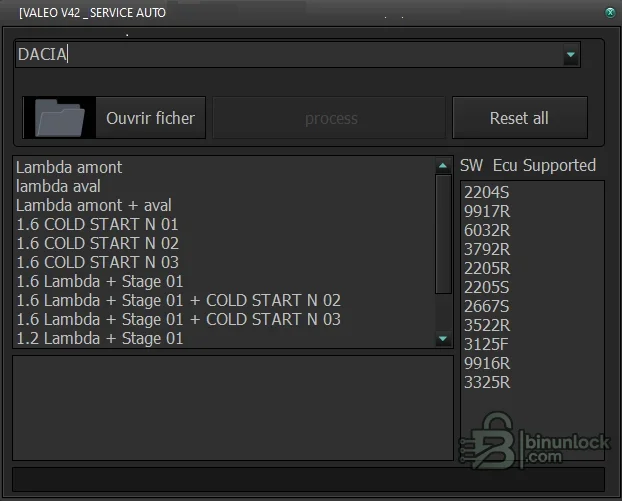
Valeo Renault/Dacia ECU File Utility is a focused offline editor for selected Valeo engine-controller binaries. Its interface separates brand selection, upstream or downstream lambda-related operations, combined sensor handling, cold-start processing and staged combinations, while also displaying a finite list of recognized software identifiers. That visible list is the practical compatibility gate for this package.
The application does not read the ECU or identify a vehicle through diagnostics. The technician must obtain the correct binary, verify its software ID and use a compatible programmer independently.
The application does not read the ECU or identify a vehicle through diagnostics. The technician must obtain the correct binary, verify its software ID and use a compatible programmer independently.
What this resource is for#
Use the utility to process a working copy of a supported Renault or Dacia Valeo binary only after the exact software identifier and requested operation are confirmed. Its narrow interface is suited to comparison-based work where every output change is reviewed before programming.Confirmed functions#
- Select Renault or Dacia processing context
- Open a supported Valeo ECU binary
- Apply the available upstream-lambda operation
- Apply the available downstream-lambda operation
- Apply combined sensor processing where the file is recognized
- Process the available cold-start function
- Use packaged combined stage operations when technically and legally appropriate
- Save a separate modified output for binary comparison
Supported vehicles, controllers and files#
- Recognized identifiers shown include 2204S, 9917R, 6032R and 3792R
- Additional visible identifiers include 2205R, 2205S, 2667S and 3522R
- The list also shows 3125F, 9916R and 3325R
- Brand selector covers Renault and Dacia contexts in the supplied interface
- No compatibility claim is made for an identifier absent from the application list
Package contents#
- Single portable native Windows executable
- Original interface screenshot documenting brands, actions and software identifiers
- No stock binaries, DAMOS, map packs, drivers or ECU programmer
- Unsigned application fully hash-pinned and inspected statically without launch
System, hardware and interface requirements#
- Windows PC or isolated virtual machine
- Exact binary read and software identifier from the target Valeo ECU
- Compatible programmer and checksum handling for the target controller
- Binary comparison tool and immutable original backup
- Legal authority and emissions-compliant intended use
Recommended workshop workflow#
- Record the vehicle, controller label, hardware number, software number and communication method before starting.
- Read the original twice where practical, compare hashes and store one untouched copy outside the working directory.
- Confirm that file type, segment, byte length and ECU family match the selected function.
- Perform one documented operation on a copy and review every changed region before saving.
- Reopen or recheck the output, then validate it with the programmer or diagnostic platform before writing.
- Use regulated power during vehicle or bench work and complete a full identification and fault scan afterward.
Compatibility limits and responsible use#
- A file that opens successfully is not automatically compatible with the target controller, vehicle or hardware revision.
- Preserve a verified original read and compare byte length, identifiers and modified ranges before any write.
- Security, identity, emissions and anti-theft functions must be used only on property the technician is authorized to service and where the change is lawful.
- The supplied application does not replace OEM service information, stable power, a compatible interface or a tested recovery route.
- An unsigned legacy executable should be isolated and independently scanned before use; no malware-free claim is made.
- Lambda and cold-start changes can affect emissions, drivability and catalyst protection and may be unlawful on public-road vehicles
Troubleshooting#
- File is rejected: verify full-read versus calibration-read format, exact byte length, family and software revision.
- Output is unchanged: confirm that the expected signature or supported data structure is actually present.
- Unexpectedly large changes: stop and compare against the original; do not flash an unexplained result.
- Vehicle communication fails: check power, grounds, ignition state, interface driver and bus wiring separately from file processing.
- Module does not recover after writing: restore the exact original with the documented bench or boot recovery method.


