
VBID is a VAG-focused firmware scanner that reads binary content and prints the identifiers it can recover in a console-style results window. The output can include software version, software part number, hardware number, calibration strings, ECU-family markers and checksum-related information useful for sorting an unlabeled file collection.
Unlike a generic printable-string extractor, VBID is organized around Volkswagen Group controller data and includes directory, result and renaming functions. It analyzes local files and does not communicate with a vehicle.
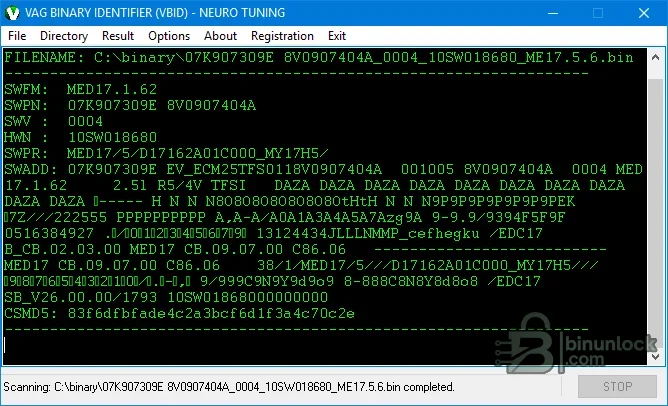
Unlike a generic printable-string extractor, VBID is organized around Volkswagen Group controller data and includes directory, result and renaming functions. It analyzes local files and does not communicate with a vehicle.
What this resource is for#
Use the application to identify unknown VAG reads, build consistent filenames and verify that a calibration belongs to the expected ECU before editing. It can reduce mistakes when multiple original and modified files have accumulated in the same workshop archive.Confirmed functions#
- Scan an individual VAG binary for structured identifiers
- Display software, hardware and calibration-related strings
- Directory-oriented workflow for larger file sets
- Results and renaming options for organizing identified binaries
- Read-only analysis of the selected input file
Supported controllers, files and vehicles#
- VAG ECU binaries containing identifier patterns recognized by the application
- The source interface demonstrates detailed output from a Bosch MED17-family read
- Other Bosch EDC/MED generations may be recognized when their identifiers follow supported patterns
- Coverage is based on binary structure, not a guaranteed vehicle-model list
Package contents#
- One portable VBID executable
- No drivers, flashing components or external database files
- The UI and binary are distinct from the existing RemapX generic analyzer resource
System and interface requirements#
- Windows PC or isolated virtual machine
- Full or calibration binary copied to a separate analysis folder
- Sufficient permissions to create renamed copies if using file-management features
- No OBD or bench interface is required for offline scanning
Recommended workshop workflow#
- Preserve the original file and its hash before identification
- Scan one known file first to understand the displayed fields
- Compare reported identifiers with the ECU label, read-tool log and diagnostic scan
- Use a consistent naming scheme that retains hardware, software and original/modified state
- Do not let a rename operation replace the only copy of a file
Compatibility limits and responsible use#
- Readable identifiers can be stale, duplicated or intentionally copied between calibrations
- A successful scan does not validate maps, checksums or flash compatibility
- Unknown layouts may produce partial raw strings rather than a clean identity
- The utility does not modify tuning maps or correct checksums
Troubleshooting#
- If the result is mostly raw text, verify that the input is not compressed or encrypted
- If identifiers conflict, compare multiple fields rather than trusting one part number
- If directory renaming is used, test on copies and review every proposed filename before committing


