
Vector HexView is a Windows file viewer, converter and editor for hexadecimal automotive data. The package combines the main application with its required Vector libraries, disclaimer, configuration file and reference manual. It is useful for inspecting firmware containers and prepared memory images before they enter a programming workflow; it is not an ECU flasher and does not communicate with a vehicle by itself.
Because conversion can alter addresses, gaps, padding and checksums, always retain the source file and verify the produced format against the target tool's documentation. A visually correct file is not proof that its address space or record checksums are suitable for flashing.
These helpers indicate integration with Vector-oriented measurement and flash-data workflows. They do not mean that every CANoe, CANape, FRP, ECU or sensor format is supported. Confirm the exact input structure and intended downstream tool before converting.
For ECU files, determine whether the file represents full flash, calibration, EEPROM or a container extracted by another tool. HexView does not supply ECU definitions or map names, and it cannot infer whether a binary belongs to a specific vehicle.
The executable and application libraries are unsigned, while their embedded metadata identifies Vector Informatik components and the main file utility. No files were executed during preparation. The final package preserves the complete functional tree rather than separating the executable from required DLLs.
No vehicle interface is required for offline file work. CANoe or another Vector environment may be required only for workflows involving trace or downstream project data; it is not included in this archive.
For support, provide the source and target formats, first and last addresses, exact byte counts, the operation selected and a short redacted sample of non-proprietary records. Do not post a complete commercial firmware image.
Core file operations#
The embedded application metadata identifies HexView as a hex-file viewer, converter and editor. Typical work includes opening a firmware or memory file, inspecting addresses and byte ranges, converting between supported record-oriented and binary representations, comparing expected boundaries and preparing data for another Vector or programming tool.Because conversion can alter addresses, gaps, padding and checksums, always retain the source file and verify the produced format against the target tool's documentation. A visually correct file is not proof that its address space or record checksums are suitable for flashing.
Automotive helper functions shown in this build#
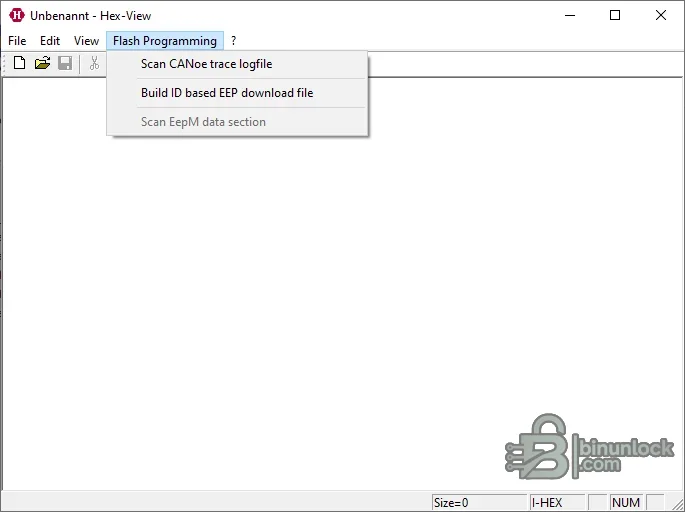
- Scan a CANoe trace logfile
- Build an identifier-based FRP download file
- Scan an EEPROM data section
- Work with the supplied export-processing and information-window libraries
These helpers indicate integration with Vector-oriented measurement and flash-data workflows. They do not mean that every CANoe, CANape, FRP, ECU or sensor format is supported. Confirm the exact input structure and intended downstream tool before converting.
Supported data context#
The resource is appropriate for engineers and calibration technicians working with hexadecimal, binary and record-based firmware data such as Intel-style HEX or Motorola S-record files. Use the included reference manual to select the correct import and export options. Pay particular attention to start address, address width, segment layout, fill bytes, record length and end-of-file records.For ECU files, determine whether the file represents full flash, calibration, EEPROM or a container extracted by another tool. HexView does not supply ECU definitions or map names, and it cannot infer whether a binary belongs to a specific vehicle.
Package contents#
- Main HexView Windows application
- Vector export-data processing, disclaimer, licensing and information-window libraries
- Configuration file used by the export-data component
- Reference manual in PDF format
The executable and application libraries are unsigned, while their embedded metadata identifies Vector Informatik components and the main file utility. No files were executed during preparation. The final package preserves the complete functional tree rather than separating the executable from required DLLs.
System requirements#
This is a legacy native Windows application. Embedded library descriptions explicitly reference older Windows generations, so modern operating-system compatibility should be tested in an isolated VM or workshop machine. Keep all supplied DLLs beside the executable. A PDF reader is required for the included manual.No vehicle interface is required for offline file work. CANoe or another Vector environment may be required only for workflows involving trace or downstream project data; it is not included in this archive.
Safe conversion workflow#
- Hash and archive the original input.
- Record the source format, address range, byte count and expected target format.
- Open a copy and inspect the first and last populated addresses.
- Choose conversion settings explicitly rather than relying on remembered defaults.
- Save to a new file and reopen the result.
- Compare payload bytes, address coverage, record checksums and fill areas with an independent tool.
- Only then pass the verified output to a flashing or engineering workflow.
Troubleshooting#
If an output is too large, check whether empty address gaps were filled. If it is too small, confirm whether high-address segments were omitted. Parser errors often come from mixed line endings, invalid record checksums, unsupported address widths or a file extension that does not match the actual content.For support, provide the source and target formats, first and last addresses, exact byte counts, the operation selected and a short redacted sample of non-proprietary records. Do not post a complete commercial firmware image.


