
VOL-FCR is a legacy Volvo diagnostic application for reading and clearing faults on supported pre-CAN vehicles and control units. The supplied package includes the program, installation files, model/system reference PDF and several generations of FTDI serial-interface drivers. It is most appropriate for mid-1990s through early-2000s Volvo platforms that use the control-unit selections shown in the application, not for modern Volvo diagnostics.
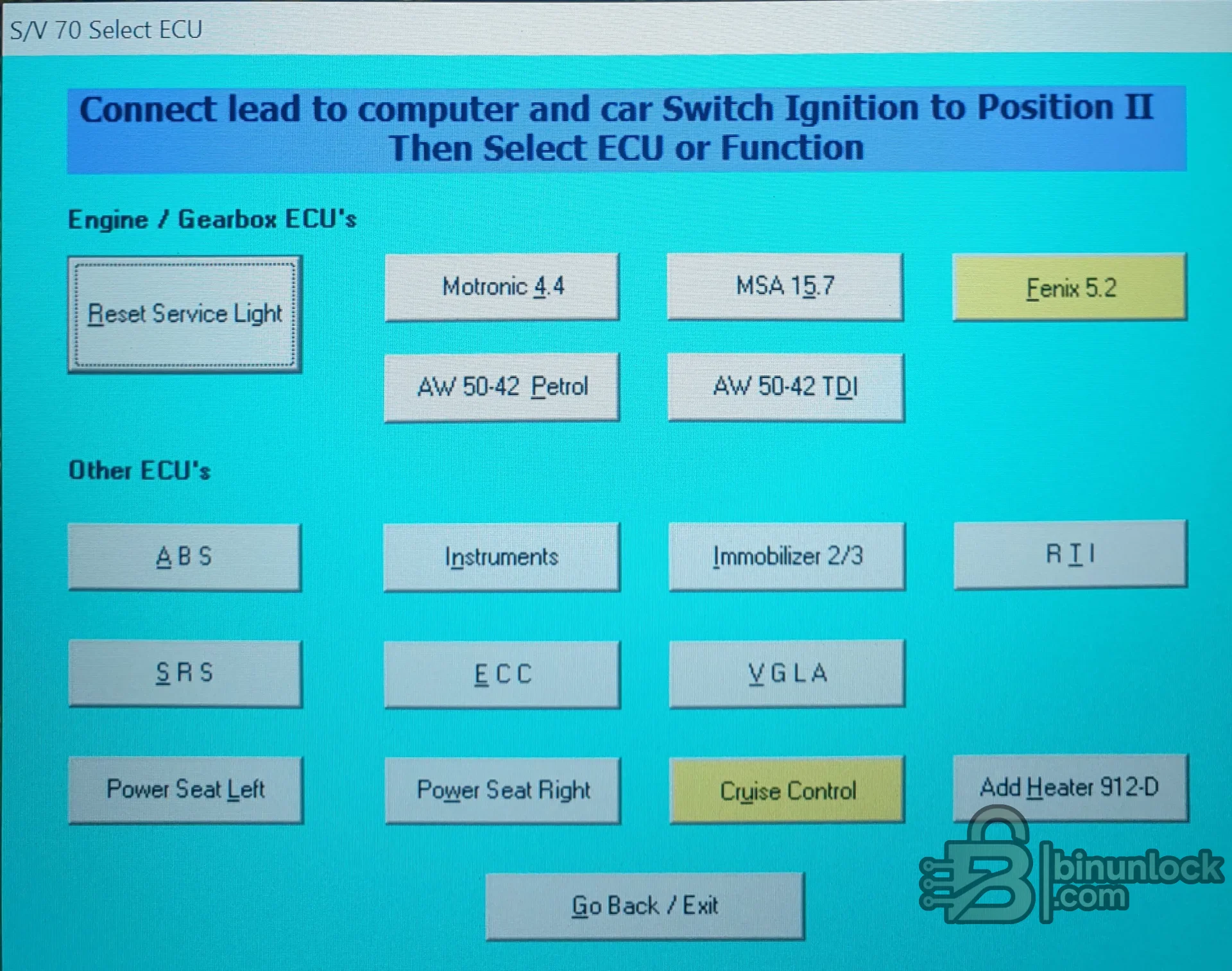
Coverage varies by engine, market, model year and diagnostic socket. The tool targets older Volvo architecture; it is not VIDA and should not be expected to diagnose later CAN-based platforms.
Not every button is available on every car. Confirm the ECU, connector and vehicle configuration before selecting a function.
Set the ignition to the position requested by the application only after the cable and computer connection are stable. Do not use a generic ELM adapter unless independent documentation proves compatibility with this program.
The main executable is unsigned. Some included FTDI driver files are signed while older components are not. No executable or installer was launched during preparation, and no malware-clean claim is made.
For support, provide the Volvo model, production year, engine, selected control unit, interface chipset, Windows version, COM port and exact error. Do not post VINs or customer details.
Vehicle coverage#
Published product coverage and the bundled material identify these representative ranges:- Volvo 800 Series from the mid-1990s onward
- C70 from the late-1990s period
- S40 and V40 from the late-1990s through the turn of the century
- S70 and V70 from the late-1990s period
- 900 Series plus S90 and V90 from the mid-1990s onward
Coverage varies by engine, market, model year and diagnostic socket. The tool targets older Volvo architecture; it is not VIDA and should not be expected to diagnose later CAN-based platforms.
Control systems shown by the program#
- Engine ECUs including Motronic 4.4, MSA 15.7 and Fenix 5.2
- AW 50-42 petrol and diesel automatic gearbox controllers
- ABS and instrument cluster
- Immobilizer generations 2 and 3
- SRS, ECC climate control and VGLA alarm/locking functions
- Service-light reset, cruise control, power seats and selected auxiliary-heater functions
Not every button is available on every car. Confirm the ECU, connector and vehicle configuration before selecting a function.
Required interface and connection#
The package is designed around a compatible serial or USB-to-serial diagnostic lead. Its bundled FTDI files include both virtual COM-port and direct-access components for several older Windows generations. Install only the driver appropriate to the interface hardware and operating system; modern FTDI guidance warns that third-party OEM interfaces can use customized identifiers or settings.Set the ignition to the position requested by the application only after the cable and computer connection are stable. Do not use a generic ELM adapter unless independent documentation proves compatibility with this program.
System requirements#
This is legacy Windows software. Contemporary product references commonly specify Windows XP for the original application, and the bundle contains older driver guides for Windows 98, 2000, ME and XP plus separate later x86/x64 FTDI packages. For a modern host, use a controlled compatibility VM with safe USB pass-through or a dedicated offline laptop.The main executable is unsigned. Some included FTDI driver files are signed while older components are not. No executable or installer was launched during preparation, and no malware-clean claim is made.
Recommended diagnostic workflow#
- Identify the exact model, year, engine, gearbox and diagnostic connector.
- Install the correct interface driver and confirm the assigned COM port.
- Connect the lead with ignition off, then follow the application's ignition instruction.
- Select only the ECU or function actually fitted to the vehicle.
- Read and record fault codes before clearing anything.
- Repair the underlying fault, then clear codes and rescan.
- For service reset or configuration functions, document the original state and verify the result.
Package cleanup and contents#
The cleaned archive retains the diagnostic program, setup CABs, supported-car document, functional driver packages and their offline installation guides. Web shortcut files, a Windows thumbnail cache and an unrelated legacy compression installer were excluded. Nested FTDI driver ZIP files were fully tested and preserved because they are functional installation content.Troubleshooting#
If the car does not communicate, verify model coverage, connector type, ignition position, interface chipset, driver, COM port and cable power. A port that appears in Windows is not proof that the lead uses the protocol expected by VOL-FCR. If one ECU connects while another does not, confirm that the second unit is actually fitted and supported for the vehicle year.For support, provide the Volvo model, production year, engine, selected control unit, interface chipset, Windows version, COM port and exact error. Do not post VINs or customer details.


