
VW Decode is an offline immobilizer-dump utility associated with Injetron/Chiptronic workflows. It reads a file previously acquired from the SMD EEPROM in a compatible Volkswagen immobilizer box, recognizes the supported Megamos structure and displays the recovered four-digit code.
The program does not read the vehicle or memory chip by itself. A suitable EEPROM programmer, correct pinout, stable read and verified dump are required before the decoder can be used. It is intended for authorized key, cluster or immobilizer repair on a vehicle with documented ownership.
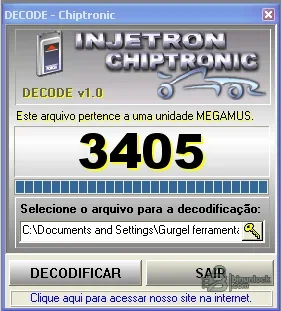
The genuine interface preview shows a recognized Megamos file and the calculated code. The Portuguese guide included in the package documents the basic file-selection sequence.
The supplied guide refers to copying the SMD EEPROM file from the immobilizer box with an external programmer. It also notes that some file-dialog paths may be inserted with quote characters; if the legacy interface includes those quotes in its text field, remove only the surrounding quotes before selecting Decode.
Do not treat the displayed number as proof that the dump is from the correct vehicle. Confirm the module label, vehicle records and diagnostic identification first.
If the application labels the file as a different unit, reports no code or produces inconsistent results from identical reads, stop and reassess the dump.
No internet connection or vehicle interface is used by VW Decode itself.
The source archive passed a full test and extraction. The retained executable and guide were pinned by exact size and SHA-256, and the unsigned x86 program was inspected statically without execution.
The program does not read the vehicle or memory chip by itself. A suitable EEPROM programmer, correct pinout, stable read and verified dump are required before the decoder can be used. It is intended for authorized key, cluster or immobilizer repair on a vehicle with documented ownership.
The genuine interface preview shows a recognized Megamos file and the calculated code. The Portuguese guide included in the package documents the basic file-selection sequence.
Supported workflow#
- Identify the immobilizer module and EEPROM package on the bench.
- Photograph orientation and record the chip marking before removal or in-circuit reading.
- Read the SMD EEPROM with an appropriate programmer and voltage setting.
- Perform at least two reads and compare their SHA-256 hashes.
- Save an untouched original outside the working folder.
- Open a copy in VW Decode through the file-selection button.
- Confirm that the application identifies the expected Megamos unit.
- Record the displayed code in the repair job, then validate it through the authorized service procedure.
Input requirements#
- A complete EEPROM dump from the compatible immobilizer box
- Correct byte order and file length for the module
- Stable repeated reads rather than a single uncertain dump
- No added text header, programmer project wrapper or compression
- Known module identity and proof of authorization
The supplied guide refers to copying the SMD EEPROM file from the immobilizer box with an external programmer. It also notes that some file-dialog paths may be inserted with quote characters; if the legacy interface includes those quotes in its text field, remove only the surrounding quotes before selecting Decode.
Megamos immobilizer context#
Megamos transponders and immobilizer control logic are used to prevent unauthorized engine operation. The immobilizer, key transponder and engine electronics exchange coded identity data, so a recovered PIN is only one part of a complete authorized adaptation workflow.Do not treat the displayed number as proof that the dump is from the correct vehicle. Confirm the module label, vehicle records and diagnostic identification first.
EEPROM reading precautions#
- Use ESD protection and the correct adapter for the package
- Do not exceed the memory device voltage
- Disconnect vehicle power before bench access
- Avoid clipping in-circuit when surrounding components can load the data lines
- Read twice, compare hashes and inspect for all-FF/all-00 or repeating corruption
- Keep the original dump write-protected
- Never write a calculated or edited file until the module type is confirmed
How to validate the recovered code#
Use the code only in the OEM or authorized locksmith procedure for the same vehicle and module. A useful validation record includes VIN or job identifier stored privately, immobilizer part number, EEPROM marking, programmer and adapter, dump byte size, SHA-256 and the diagnostic result. Do not publish VINs, customer names, PINs or raw security dumps in the discussion.If the application labels the file as a different unit, reports no code or produces inconsistent results from identical reads, stop and reassess the dump.
System requirements#
- Windows PC with 32-bit x86 application support
- Windows XP, 7, 8.1, 10 or 11; a legacy virtual machine may provide the most predictable file-dialog behavior
- At least 1 GB RAM and 100 MB free disk space
- Write access to a disposable working folder
- External EEPROM programmer, correct adapter and chip documentation
- OEM diagnostic or authorized key-adaptation equipment for the later service step
No internet connection or vehicle interface is used by VW Decode itself.
Package contents#
The cleaned package contains one decoder executable and the original Portuguese usage guide. The source archive also contained a second executable with a misspelled installer-style name, but it was byte-for-byte identical to the retained file and was removed as a duplicate.The source archive passed a full test and extraction. The retained executable and guide were pinned by exact size and SHA-256, and the unsigned x86 program was inspected statically without execution.
Limitations and troubleshooting#
- File is not recognized: verify the EEPROM type, read length, byte order and module family.
- Path error: copy the dump to a short local path and remove only surrounding quote characters shown in the legacy field.
- All reads differ: correct the programmer connection before using any decoder.
- Code is rejected: confirm module identity and use the approved diagnostic adaptation workflow; do not guess repeated PINs.
- Program will not open: use a 32-bit-compatible Windows VM and verify the published hash.


