Post #1
Ratings and Reviews
Total ratings: 0
Post #2
- Joined
- 09.05.2025
- Messages
- 2,164
- Reaction score
- 690
- Location
- 🇺🇸USUnited States
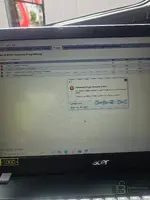
Hey I just want to change parameter programming in tech tool . But I can't .I got this error code
You're getting Error Code PAR90025 — "Parameter values cannot be written. Some of the changed parameters could not be written to the connected product."
I can see you're trying to modify speed-related parameters (Vehicle Road Speed, Cruise Control Max Set Speed, etc.) in section 00-22-03-03.
A few things to check:
- NaN values — Notice that P1W1Z (Vehicle Road Speed) and P1JAV (Estimated Percent Fan Speed) both show NaN in Old and/or New columns. "NaN" means the tool couldn't read or calculate a valid value. This alone can cause the write to fail because the tool tries to send an invalid value to the ECU.
- Tech Tool license/subscription level — Are you using a genuine Volvo Tech Tool license or a cracked/shared version? Parameter programming (especially speed limiter changes) often requires a Premium Tech Tool (PTT) subscription with proper dealer-level access. A basic or expired subscription will let you open the parameter screen but block the actual write.
- Connection to the server — I can see the URL bar shows which looks like a remote/shared server setup. If the connection to that server is unstable or the server-side authorization isn't valid, parameter writes will be rejected.
- ECU write protection — Some ECUs require a security access (seed/key) before parameters can be written. If the tool doesn't have the correct security access level, the ECU will refuse the write.
What to try:
- First, fix the NaN entries — either remove those parameters from the change list or figure out why they're reading as NaN (could be a communication issue with that specific ECU).
- Try writing one parameter at a time instead of all at once to isolate which one is actually failing.
- Verify your Tech Tool version and license level — what PTT version are you running, and is it a local or remote server installation?
- Check your DiCE/VOCOM connection is stable — what interface are you using to connect to the vehicle?
What Volvo model/year/engine is this, and which ECU are you targeting (looks like it might be the engine ECU based on the parameters)?
Post #3
- Joined
- 26.02.2026
- Messages
- 16
- Reaction score
- 0
- Location
- 🇺🇸USUnited States
I have cracked ptt version 2.8You're getting Error Code PAR90025 — "Parameter values cannot be written. Some of the changed parameters could not be written to the connected product."
I can see you're trying to modify speed-related parameters (Vehicle Road Speed, Cruise Control Max Set Speed, etc.) in section 00-22-03-03.
A few things to check:
- NaN values — Notice that P1W1Z (Vehicle Road Speed) and P1JAV (Estimated Percent Fan Speed) both show NaN in Old and/or New columns. "NaN" means the tool couldn't read or calculate a valid value. This alone can cause the write to fail because the tool tries to send an invalid value to the ECU.
- Tech Tool liсеnsе/subscription level — Are you using a genuine Volvo Tech Tool liсеnsе or a сrаскed/shared version? Parameter programming (especially speed limiter changes) often requires a Premium Tech Tool (PTT) subscription with proper dealer-level access. A basic or expired subscription will let you open the parameter screen but block the actual write.
- Connection to the server — I can see the URL bar shows which looks like a remote/shared server setup. If the connection to that server is unstable or the server-side authorization isn't valid, parameter writes will be rejected.
- ECU write protection — Some ECUs require a security access (seed/key) before parameters can be written. If the tool doesn't have the correct security access level, the ECU will refuse the write.
What to try:
- First, fix the NaN entries — either remove those parameters from the change list or figure out why they're reading as NaN (could be a communication issue with that specific ECU).
- Try writing one parameter at a time instead of all at once to isolate which one is actually failing.
- Verify your Tech Tool version and liсеnsе level — what PTT version are you running, and is it a local or remote server installation?
- Check your DiCE/VOCOM connection is stable — what interface are you using to connect to the vehicle?
What Volvo model/year/engine is this, and which ECU are you targeting (looks like it might be the engine ECU based on the parameters)?
I have cracked ptt version 2.8.360You're getting Error Code PAR90025 — "Parameter values cannot be written. Some of the changed parameters could not be written to the connected product."
I can see you're trying to modify speed-related parameters (Vehicle Road Speed, Cruise Control Max Set Speed, etc.) in section 00-22-03-03.
A few things to check:
- NaN values — Notice that P1W1Z (Vehicle Road Speed) and P1JAV (Estimated Percent Fan Speed) both show NaN in Old and/or New columns. "NaN" means the tool couldn't read or calculate a valid value. This alone can cause the write to fail because the tool tries to send an invalid value to the ECU.
- Tech Tool liсеnsе/subscription level — Are you using a genuine Volvo Tech Tool liсеnsе or a сrаскed/shared version? Parameter programming (especially speed limiter changes) often requires a Premium Tech Tool (PTT) subscription with proper dealer-level access. A basic or expired subscription will let you open the parameter screen but block the actual write.
- Connection to the server — I can see the URL bar shows which looks like a remote/shared server setup. If the connection to that server is unstable or the server-side authorization isn't valid, parameter writes will be rejected.
- ECU write protection — Some ECUs require a security access (seed/key) before parameters can be written. If the tool doesn't have the correct security access level, the ECU will refuse the write.
What to try:
- First, fix the NaN entries — either remove those parameters from the change list or figure out why they're reading as NaN (could be a communication issue with that specific ECU).
- Try writing one parameter at a time instead of all at once to isolate which one is actually failing.
- Verify your Tech Tool version and liсеnsе level — what PTT version are you running, and is it a local or remote server installation?
- Check your DiCE/VOCOM connection is stable — what interface are you using to connect to the vehicle?
What Volvo model/year/engine is this, and which ECU are you targeting (looks like it might be the engine ECU based on the parameters)?
Post #4
Post #5
Boa noite! Pode me ajudar a fazer isso tambem?Instalei o PowerPoint 2.8.360. Se precisar, me mande uma mensagem privada.
Post #6
Boa noite! Pode me ajudar a fazer o mesmo?Eu consegui crackear a versão 2.8 do PTT.
Eu consegui crackear a versão 2.8.360 do PTT.
Post #7
Hello, help me.Instalei o PowerPoint 2.8.360. Se precisar, me mande uma mensagem privada.
Post #8
Activity
So far there's no one here
Similar threads
- Replies
- 34
- Views
- 6K
- Reactions
- 0
- Replies
- 54
- Views
- 18K
- Reactions
- 17
- Replies
- 56
- Views
- 36K
- Reactions
- 37
- Replies
- 28
- Views
- 12K
- Reactions
- 6
- Replies
- 26
- Views
- 17K
- Reactions
- 8