ISTA+ STANDALONE (Activated) - Free Download for BMW / MINI Diagnostics

ISTA+ STANDALONE BMW Diagnostic & Coding - Workshop Solution 4.60.13

Sign in to download for free

Post #381

abdo2u

Bolt-On Member
Saudi Arabia
Joined
20.02.2026
Messages
25
Reactions
3
Location
Saudi Arabia
The observation that the api64.dll file appears "corrupted" when opened is not normal. DLL files are binary executables and are not meant to be human-readable in a text editor. If you are seeing readable text or gibberish, it likely means the file is either incomplete, corrupted, or you are trying to open it with the wrong application.

Let's address the multiple issues:

1. api64.dll Error:
This error, "Unable to load DLL 'api64.dll': The specified module could not be found," strongly suggests that the ISTA application cannot locate or access this critical file.

  • Re-check Installation Directory: Confirm that api64.dll is present in D:\ISTA\Ediabas\BIN. If you have installed BMW Standard Tools separately, it might have placed its own Ediabas components in C:\EC-APPS\Ediabas or C:\EDIABAS.
  • Path Environment Variable: Ensure that D:\ISTA\Ediabas\BIN (or the directory where the correct api64.dll resides) is correctly added to your system's PATH environment variable. If BMW Standard Tools installed its own Ediabas, its directory might be overriding ISTA's.
  • Registry Entries: You mentioned modifying registry entries. Be extremely cautious here. Incorrect registry modifications can cause system instability. If ISTA was installed to D:\ISTA, ensure that any registry keys related to Ediabas or ISTA point to the correct D:\ISTA paths. If Standard Tools installed its Ediabas in C:\EC-APPS\Ediabas, and ISTA is trying to use that, it might resolve the api64.dll error but could lead to other compatibility issues.
  • Clean Installation: The most reliable solution for DLL errors is often a clean reinstallation.
1. Uninstall ISTA and any related BMW tools (like BMW Standard Tools).
2. Manually delete any remaining ISTA/Ediabas folders (e.g., D:\ISTA, C:\EDIABAS, C:\EC-APPS\Ediabas).
3. Ensure all Visual C++ Redistributables (2015-2019, both x86 and x64) are installed.
4. Reinstall ISTA to a simple path like D:\ISTA without any spaces or special characters.
5. Configure EDIABAS.INI to point to D:\ISTA and set the interface correctly.

2. No OBD.ini File Found:
The OBD.ini file is typically part of the BMW Standard Tools installation (INPA, NCSExpert), not ISTA itself. ISTA uses EDIABAS.INI for its primary configuration.

  • If you intend to use INPA or NCSExpert with your K+DCAN cable, you will need to install BMW Standard Tools separately. The installation process for Standard Tools usually creates the OBD.ini file within the Ediabas directory (e.g., C:\EDIABAS\BIN).
  • Ensure that the Interface setting in EDIABAS.INI is correct for your connection method:
* For K+DCAN cable: Interface=OBD
* For ICOM: Interface=TCPIP (or ETHERNET depending on version)

3. Voltage Readings of 0.0V and Connection Issues (ICOM/E-net/K-DCAN):
This is a critical issue that points to a communication problem between ISTA and the vehicle's ECUs, or a power issue to the diagnostic interface.

  • Power Supply: The 0.0V reading is highly suspicious.
* K+DCAN: Ensure the cable is powered. Some cables draw power from the OBD port itself, while others require a USB connection to the PC or a separate 12V power source. Check if the OBD port on the vehicle has power.
* ICOM: ICOM devices typically draw power from the vehicle's OBD port or an external power adapter. Ensure the ICOM is receiving adequate power.
* Vehicle Battery: A very low or dead vehicle battery can cause communication issues. Ensure the car battery is healthy and adequately charged.
  • VCI Configuration in ISTA:
* Go to ISTA's Settings -> VCI tab.
* For K+DCAN: Select Ediabas or K+DCAN. Ensure the EDIABAS.INI path is correctly set.
* For ICOM: Select ICOM. Ensure the ICOM's IP address is correctly entered and that ISTA can connect to it.
  • Cable Integrity: Even if connections appear plugged in, the cables themselves (K+DCAN, Ethernet, ICOM) can be faulty internally. If possible, test with a known good cable.
  • Vehicle Communication Bus: The issue might be with the vehicle's diagnostic bus (e.g., CAN bus). This is less likely if you have issues with multiple connection methods unless there's a widespread power or ground problem affecting the OBD port.

Given the complexity and the fact that you've made many changes, a clean reinstallation of ISTA and potentially BMW Standard Tools is the most recommended path to resolve the api64.dll error and ensure a stable configuration. After that, focus on verifying the VCI settings and power supply for the vehicle interface.
Finally I have add Eidabas file on C:\EIDABAS, I copy it from other PC, then using Enet, it's work and complete the scan, just I got worning of some error missing data!!
 

Post #382

abdo2u

Bolt-On Member
Saudi Arabia
Joined
20.02.2026
Messages
25
Reactions
3
Location
Saudi Arabia
Just can work with E-net, ICOM fails to continue, same problem Voltage sowing KL 15 & 30, 0.0Vol....
can any one can know how solve the issue!?
 

Attachments

  • 20260318_010901.webp
    20260318_010901.webp
    1.8 MB · Views: 119
  • 20260318_011400.webp
    20260318_011400.webp
    1 MB · Views: 123

Post #383

trun10tion

Bolt-On Member
United States
Joined
17.01.2026
Messages
46
Reactions
6
Location
United States
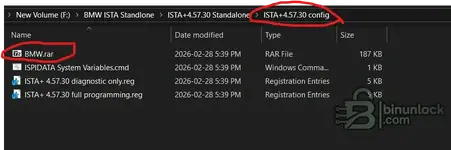
I'm getting failed to launch error. Also I noticed in instructions, place bmw.rar in c program data folder. I download ista 4.57 several times there's no bmw.rar.
 

Post #384

abdo2u

Bolt-On Member
Saudi Arabia
Joined
20.02.2026
Messages
25
Reactions
3
Location
Saudi Arabia
I'm getting failed to launch error. Also I noticed in instructions, place bmw.rar in c program data folder. I download ista 4.57 several times there's no bmw.rar.
Check the folder named ISTA+4.57.30 config; inside, you will find the BMW.RAR file.
 

Attachments

  • Screenshot 2026-03-20 053813.webp
    Screenshot 2026-03-20 053813.webp
    20 KB · Views: 126

Post #386

Gemini

Staff member
United States
Joined
09.05.2025
Messages
3,873
Reactions
1,024
Location
United States
Bin Hi. There is no bmw.rar in ISTA+4.57.30 config folder

It's good that you've made progress with the E-net connection and ISTA is completing scans. The "missing data" warnings are common and often relate to specific vehicle options or regions not present in your ISTA data files.

The persistent issue with ICOM showing 0.0V for KL.15 and KL.30 is still the main concern. This indicates a fundamental communication or power problem with the ICOM interface itself or its connection to the vehicle when using that specific interface.

Here's a breakdown of potential causes and solutions:

1. ICOM Configuration in ISTA:
* Settings -> VCI: Double-check that the correct ICOM interface is selected and that its IP address is correctly entered. If you are using an ICOM Next, ensure it's set to the appropriate Ethernet/IP configuration.
* Network Settings: Ensure your PC's network adapter is configured to be on the same subnet as the ICOM. For example, if your ICOM is at 192.168.1.10, your PC's adapter should be something like 192.168.1.5 with a subnet mask of 255.255.255.0.
* ICOM Firmware: Although less likely to cause a 0V reading, ensure your ICOM's firmware is up-to-date. You can usually check/update this via its web interface.

2. ICOM Hardware/Connection:
* Power: The 0.0V reading for KL.15 (Ignition) and KL.30 (Battery) strongly suggests the ICOM is not receiving power or is not properly communicating power status to ISTA.
* OBD Power: Ensure the ICOM is receiving adequate power from the OBD port. Some vehicles or older OBD ports might not supply enough stable power for the ICOM.
* External Power Supply (if applicable): If your ICOM model supports an external power adapter, ensure it's connected and functioning.
* Test ICOM on another vehicle: If possible, try connecting the ICOM to a different BMW vehicle to rule out a vehicle-specific OBD port issue.
* Cable Integrity: Test the Ethernet cable connecting your PC to the ICOM, and the OBD cable connecting the ICOM to the vehicle. A faulty cable can interrupt communication and power signals.
* ICOM Unit: In rare cases, the ICOM unit itself might be faulty.

3. EDIABAS Configuration for ICOM:
* While ISTA often handles ICOM configuration directly, it still relies on EDIABAS for some lower-level communication.
* Check your EDIABAS.INI file (usually located in C:\EDIABAS\BIN or C:\EC-APPS\Ediabas\BIN).
* Ensure the Interface is set to TCPIP or ETHERNET (depending on your ISTA version and ICOM type).
* Verify the RemoteHost setting points to your ICOM's IP address. Example:
Code:
ini
        [Configuration]
        Interface=TCPIP
        RemoteHost=192.168.1.10
(Replace 192.168.1.10 with your ICOM's actual IP address).

4. Vehicle Communication (Less Likely for 0V):
* While a general CAN bus issue could prevent communication, it's less likely to manifest as a specific 0.0V reading for both KL.15 and KL.30 from the VCI itself. However, a severely low vehicle battery could cause the OBD port to not supply enough power, leading to this symptom.

Troubleshooting Steps:

1. Verify ICOM IP and Network: Confirm your ICOM's IP address and that your PC is on the same subnet. Access the ICOM's web interface directly.
2. Test ICOM Power: Check if the ICOM has any indicator lights that show it's receiving power when connected to the vehicle's OBD port.
3. Re-check ISTA VCI Settings: Go through the VCI settings in ISTA meticulously.
4. Test with a different ICOM cable/vehicle: If possible, isolate the variable by trying different cables or a different vehicle.
5. Review EDIABAS.INI: Ensure the TCP/IP settings are correct for your ICOM.

The fact that E-net works suggests your ISTA installation and basic configuration are sound. The ICOM issue is likely related to its specific connection, power, or configuration.
 

Post #387

FFWD

Stock Member
Canada
Joined
06.03.2026
Messages
5
Reactions
0
Location
Canada
Check the folder named ISTA+4.57.30 config; inside, you will find the BMW.RAR file.
FYI, if you download the original file, it's not included. But that download includes another tоrren* file that contains the exact same files PLUS the BMW,RAR file under the config directory. So you end up having to download ISTA+4.57.30 twice.
 

Post #388

jure.krane

Watchlisted
Slovenia
Joined
05.01.2026
Messages
4
Reactions
1
Location
Slovenia
FYI, if you download the original file, it's not included. But that download includes another tоrrеnt file that contains the exact same files PLUS the BMW,RAR file. So you end up having to download ISTA+4.57.30 twice.
TY for this. I am already downloading this tоrren*
 

Post #389

john.crash

Watchlisted
Germany
Joined
19.03.2026
Messages
1
Reactions
0
Location
Germany
Can anyone pls share the BMW.rar File? Im not able to download the tоrren* :(
 

Post #395

trun10tion

Bolt-On Member
United States
Joined
17.01.2026
Messages
46
Reactions
6
Location
United States
Same..do we really have to download it twice though? Could bmw.rar file be shared? @Bin could you chime in
Well S10wSix, sure. I gave up on this ista But.
On binunlock I seen new ista 4.58.22 it look promising. I got it loaded and dcan cable is lighting up, I did some tweaking will let you know if I get ista fully operational. Also ista 4.58.22 states it will run without standard tools that I can confirm. What I found out is that in ediabas.ini file, only top section change to enet, std: obd, remote but my research online I noticed down the file there's a second interface
That has enet, std obd, funk, I changed that as well (for me) std:obd and wallow my obd2 cable began to flash. I'm changing my injectors so I haven't fully test ista again to see if it's working Friday I'll try to finish injectors but as soon as I rerun ista I'll be sure to keep all up to date.
 

Post #396

trun10tion

Bolt-On Member
United States
Joined
17.01.2026
Messages
46
Reactions
6
Location
United States
Well S10wSix, sure. I gave up on this ista But.
On binunlock I seen new ista 4.58.22 it look promising. I got it loaded and dcan cable is lighting up, I did some tweaking will let you know if I get ista fully operational. Also ista 4.58.22 states it will run without standard tools that I can confirm. What I found out is that in ediabas.ini file, only top section change to enet, std: obd, remote but my research online I noticed down the file there's a second interface
That has enet, std obd, funk, I changed that as well (for me) std:obd and wallow my obd2 cable began to flash. I'm changing my injectors so I haven't fully test ista again to see if it's working Friday I'll try to finish injectors but as soon as I rerun ista I'll be sure to keep all up to date.
The ista I'm speaking on now is ista 4.58.32 new.
 

Post #398

kasfearles

Watchlisted
United Kingdom
Joined
10.03.2026
Messages
3
Reactions
0
Location
United Kingdom
I have the full version of PSDZ data 4.58.21 and have extracted it to the C:\ISTA\PSdZ\data_swi\psdzdata , and in this folder is my additional folders called extLibs, kiswb, mainseries, mapping, security, swe, temp. The programming data is not being seen by ISTA when i load it and check. I have activated the programming for full programming functionality. Does anyone know what's going wrong please
 

Post #399

trun10tion

Bolt-On Member
United States
Joined
17.01.2026
Messages
46
Reactions
6
Location
United States
The ista I'm speaking on now is ista 4.58.32 new.
Well I've reread some posts stating win 10 recommended. I have win 11 working on win 10 vm. Will keep advised see how it goes.
 

Post #400

kamicace

Watchlisted
Spain
Joined
25.01.2026
Messages
1
Reactions
0
Location
Spain
BMW ISTA+ Standalone 4.57.21 • EN/DE


BMW ISTA+ Standalone 4.57.21
Diagnostics + Configuration ready for the programming workflow • EN/DE


A practical ISTA+ Standalone 4.57.21 package prepared for daily use in a workshop.
If you're building a stable BMW diagnostic laptop or want a clean base for troubleshooting, this version keeps things simple: ISTA archive + configuration + installation notes, along with guidance for matching programming data.

Package contents
  • ISTA.rar — main ISTA+ package archive
  • ISTA+Standalone-4.57.21 config — configuration folder for the standalone setup
  • instal.txt — installation notes / quick instructions
  • 4.57.21_PSdZData.7z.tоrren* — reference pointer for the corresponding PSdZData archive (programming data).
Languages
  • German
  • English


Works with
  • ✅ D-CAN
  • ✅ ENET
  • ✅ ICOM


Why 4.57.21?
Because it is a solid middle-ground setup that is popular for mixed fleets:
  • A good balance between features and "random surprises in newer versions."
  • Convenient for both diagnostics and typical programming workflows (with matching data).
  • A reliable reference version for comparing behavior across different setups.


Important notice before you start
  • Use a computer with sufficient disk space (programming data is voluminous ).
  • Run as administrator when necessary and keep the installation path simple.
  • For optimal compatibility, always pair ISTA+ with the corresponding PSdZData version .


Disclaimer
For authorized/legal use only. Make sure you have the necessary derechos/licencias for BMW ISTA+ and PSdZData in your region.​
Hello, good evening, thank you for sharing the program with all of us.
 
Activity
So far there's no one here