
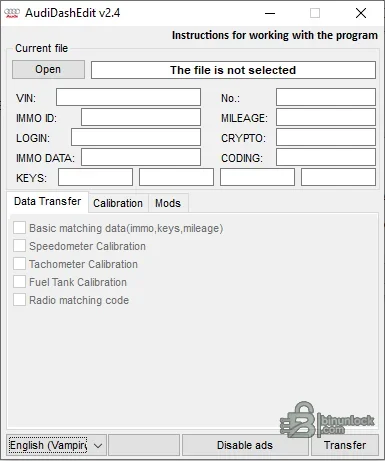
Audi DashEdit is a file-based instrument-cluster service utility for supported Audi dashboard dumps. Its interface exposes identity and immobilizer fields alongside transfer, calibration and modification pages, allowing a technician to inspect recognized data and prepare a corrected output file away from the vehicle.
The package contains three application generations with their language files, while the current application is the primary choice. Keeping the older builds can help when a legacy dump is accepted by an earlier parser but not by the current one.
The package contains three application generations with their language files, while the current application is the primary choice. Keeping the older builds can help when a legacy dump is accepted by an earlier parser but not by the current one.
What this resource is for#
The utility is intended for controlled instrument-cluster replacement and repair workflows where the original and donor memory contents have already been read with an external programmer. It does not communicate with the cluster directly and should not be treated as a substitute for a verified EEPROM backup.Confirmed functions#
- Open a supported dashboard binary and display VIN, immobilizer ID, login, mileage, crypto, coding and key fields
- Transfer basic matching data such as immobilizer information, keys and mileage between compatible files
- Expose speedometer, tachometer and fuel-tank calibration options
- Handle radio matching-code data where that structure is recognized
- Separate Data Transfer, Calibration and Mods pages for different service tasks
Supported controllers, files and vehicles#
- Audi instrument-cluster dumps recognized by the application parser
- Compatibility depends on the cluster generation, EEPROM or MCU layout and software revision
- The interface is multilingual through supplied Czech, English, French, German, Greek, Hungarian, Polish, Romanian, Russian and Spanish language files
- No broad model list is claimed because an Audi model can use multiple incompatible cluster families
Package contents#
- Current AudiDashEdit executable and language folder
- Two earlier executable branches with their corresponding language sets
- No executable was launched during preparation; identity and metadata were collected statically
System and interface requirements#
- Windows workshop PC or isolated virtual machine
- EEPROM or flash programmer capable of producing a complete, stable cluster dump
- Original and donor files of the same expected size for transfer operations
- Reliable power and a separate recovery path before writing data back to the dashboard
Recommended workshop workflow#
- Read the original memory at least twice and compare the reads byte for byte
- Save immutable original and donor backups with clear hardware labels
- Open the target file and verify that VIN, mileage and immobilizer fields are plausible before editing
- Apply only the required transfer or calibration operation, then save to a new filename
- Compare the modified file with the original and write only after the changed regions are understood
Compatibility limits and responsible use#
- A file opening successfully does not prove that every displayed field is correct
- Transferring immobilizer data between unrelated hardware can leave the cluster or vehicle unable to start
- Calibration changes must remain lawful and accurately documented
- The tool does not repair a physically damaged EEPROM, CAN fault or power-supply problem
Troubleshooting#
- Blank or nonsensical fields usually indicate an unsupported layout, incomplete read or wrong byte order
- If a donor file differs in size, do not pad or trim it merely to satisfy the program
- If the cluster fails after writing, restore the verified original dump before attempting another modification


