
Caterpillar Injector Trim Checksum Calculator is an offline specialist utility for recalculating supported Cat injector-trim data and FLS byte-block checksums after a controlled edit. The application accepts text from the Data section of a trim file, displays its checksum and injector serial number, and can update that identity. A second workflow calculates the checksum for a fixed-length FLS byte block. It does not communicate with an ECM or create measured calibration data for an injector.
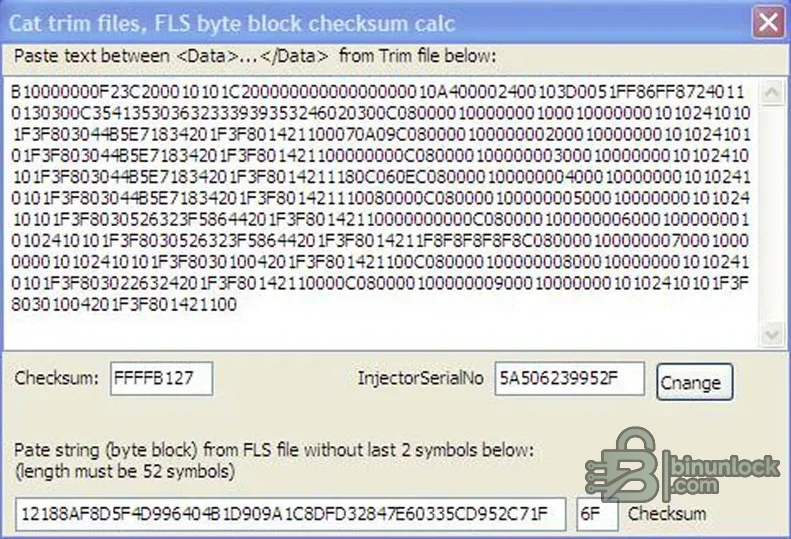
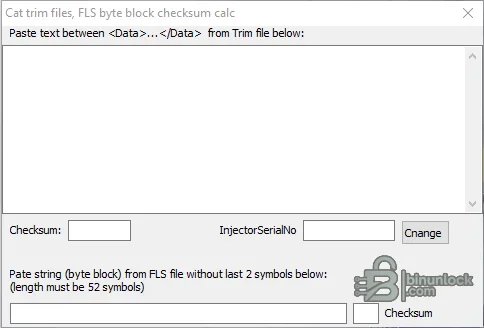
The active screenshot shows both a populated trim-file example and the FLS calculation path. The clean secondary preview at the bottom shows the empty workspace before data is entered.
This calculator cannot measure an injector, determine a correct calibration for unknown hardware or prove that a serial number belongs to the installed component. Use values only from authorized service information and verified injector documentation.
The package does not include Cat service software, ECM drivers, a communication adapter or injector calibration measurements. A small registration file supplied with the original application is preserved for functional completeness but its content is not published in the resource text.
A mathematically valid checksum does not validate the rest of the FLS data. Confirm that the byte block belongs to the correct engine and calibration context before using it.
For support, provide the engine and ECM families, a redacted structural example, input length and non-sensitive error text. Do not publish proprietary calibration data, customer serial records or a complete licensed trim file.
Confirmed functions in the interface#
- Paste the text located between the Data opening and closing tags of a trim file
- Display the current checksum and InjectorSerialNo value
- Change the injector serial number within the supported data structure
- Paste an FLS byte-block string without its final two checksum symbols
- Validate the expected 52-symbol byte-block length
- Calculate the replacement FLS checksum value
The active screenshot shows both a populated trim-file example and the FLS calculation path. The clean secondary preview at the bottom shows the empty workspace before data is entered.
What injector trim data represents#
Caterpillar explains that injectors receive unique calibration or trim information based on end-of-line measurements. That data allows the engine control system to account for measured injector characteristics. A checksum protects the structure against accidental or unauthorized corruption; correcting a checksum only makes the edited record internally consistent.This calculator cannot measure an injector, determine a correct calibration for unknown hardware or prove that a serial number belongs to the installed component. Use values only from authorized service information and verified injector documentation.
Required tools and source data#
- Windows computer for the portable calculator
- Original Cat trim file or verified FLS byte block from the authorized service workflow
- A plain-text editor that preserves the original character encoding and line structure
- The exact injector serial number and calibration identity for the installed part
- Caterpillar-compatible service software and communication adapter for later ECM work
- A protected copy of the untouched original file
The package does not include Cat service software, ECM drivers, a communication adapter or injector calibration measurements. A small registration file supplied with the original application is preserved for functional completeness but its content is not published in the resource text.
Recommended trim-file workflow#
- Identify the engine, ECM and physical injector position using authorized service records.
- Make a read-only backup of the original trim file and calculate its hash.
- Copy only the text inside the Data element into the upper calculator field.
- Confirm that the displayed injector serial number matches the file being edited.
- Change the value only when the replacement identity is verified.
- Save the recalculated data into a new file while preserving the original structure.
- Compare original and result and confirm that only the intended fields and checksum changed.
- Load or register the file using the documented Caterpillar service procedure, then verify status and faults.
FLS byte-block workflow#
For the lower calculator, paste the byte-block text without the final two checksum symbols. The interface requires a 52-symbol input. Preserve hexadecimal character order and do not insert spaces, line breaks or prefixes. After calculation, append or place the returned checksum only where the original file format requires it.A mathematically valid checksum does not validate the rest of the FLS data. Confirm that the byte block belongs to the correct engine and calibration context before using it.
Troubleshooting#
If the calculator rejects the input, remove XML tags from the Data paste, check for hidden spaces or line breaks and verify the FLS string length. If service software rejects the finished file, restore the original and compare encoding, XML structure, serial number, checksum placement and file naming. Do not invent padding or delete unknown fields.For support, provide the engine and ECM families, a redacted structural example, input length and non-sensitive error text. Do not publish proprietary calibration data, customer serial records or a complete licensed trim file.


