
DAS Smart Calculator is a compact offline companion for authorized Smart vehicle configuration procedures performed through Mercedes-Benz DAS. The application accepts the request data produced by the diagnostic workflow and calculates the corresponding TAN code for the selected function. It does not connect to the car, replace DAS or Xentry, or perform key programming by itself.
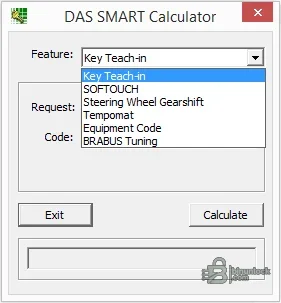
These names come directly from the supplied interface. The calculator produces a code from a DAS request; it does not guarantee that the selected option is physically fitted, legally permitted or compatible with a particular control-unit software level.
Do not use it as a generic Mercedes SCN calculator, modern Xentry online substitute or universal immobilizer program. If DAS does not present the matching request-code procedure, a generated value from a different menu is not a valid workaround.
The calculator itself is a single unsigned Windows executable and does not contain the DAS diagnostic platform. Its embedded metadata identifies it as a native Smart calculator. Run it in an isolated workshop environment and scan it locally before use.
If DAS rejects the result, recheck the request character by character, the selected feature, vehicle family, diagnostic data release and whether the request changed after leaving the screen. Repeated guessing can lock or complicate a security-related workflow.
Cruise control, steering-wheel shift and other equipment-dependent functions require the correct physical components and control-unit coding. A valid TAN only unlocks the diagnostic procedure; it does not install missing hardware or prove roadworthiness.
When asking for help, provide the chassis family, DAS data release, selected feature and a redacted error description. Do not publish live request codes, VINs or key data.
Functions available in the calculator#
- Key Teach-in for the DAS key-learning workflow
- SOFTOUCH activation where the vehicle and DAS procedure support it
- Steering Wheel Gearshift activation
- Tempomat or cruise-control activation
- Equipment Code calculation for the supported DAS configuration path
- BRABUS Tuning code calculation
These names come directly from the supplied interface. The calculator produces a code from a DAS request; it does not guarantee that the selected option is physically fitted, legally permitted or compatible with a particular control-unit software level.
Vehicle and diagnostic compatibility#
This tool belongs to the older Mercedes-Benz DAS environment used for Smart configuration and special-function access. Common references associate the workflow with Smart chassis families 450, 451, 452 and 454, but diagnostic availability can vary with production date, market, DAS data release and control-unit variant. Confirm that the active DAS screen actually requests the code type shown in this calculator.Do not use it as a generic Mercedes SCN calculator, modern Xentry online substitute or universal immobilizer program. If DAS does not present the matching request-code procedure, a generated value from a different menu is not a valid workaround.
Required software and hardware#
- A working Mercedes-Benz DAS diagnostic installation with the relevant Smart vehicle data
- A compatible diagnostic multiplexer and correctly installed communication drivers
- A Windows computer capable of running the supplied legacy portable executable
- The exact VIN, request code or other input requested by the active DAS procedure
- Stable vehicle voltage for any subsequent coding or teach-in operation
The calculator itself is a single unsigned Windows executable and does not contain the DAS diagnostic platform. Its embedded metadata identifies it as a native Smart calculator. Run it in an isolated workshop environment and scan it locally before use.
Recommended TAN-code workflow#
- Connect with DAS and identify the vehicle and control unit normally.
- Open the authorized special function, confirm the exact operation and record the request shown by DAS.
- Select the matching feature in the calculator; do not substitute a similarly named function.
- Enter the request data carefully and calculate the result.
- Return the calculated value to the same DAS session and complete the guided procedure.
- Read the final status, cycle the ignition only when instructed and verify the function.
If DAS rejects the result, recheck the request character by character, the selected feature, vehicle family, diagnostic data release and whether the request changed after leaving the screen. Repeated guessing can lock or complicate a security-related workflow.
Safety and authorization#
Key learning and equipment activation alter vehicle security or configuration. Verify ownership and authorization before starting. Keep customer VINs, request codes and generated TAN values out of public posts. Document the original coding and fitted hardware so the vehicle can be returned to its previous state if an option does not operate correctly.Cruise control, steering-wheel shift and other equipment-dependent functions require the correct physical components and control-unit coding. A valid TAN only unlocks the diagnostic procedure; it does not install missing hardware or prove roadworthiness.
Troubleshooting checklist#
- Confirm DAS—not an unrelated Xentry or third-party screen—is requesting the code.
- Verify the feature selection and whether the request is VIN-based or session-based.
- Check that the request has not refreshed after reconnecting or reopening the function.
- Confirm Smart chassis, production date and relevant control-unit identity.
- Use stable battery support before carrying out the final coding or key procedure.
When asking for help, provide the chassis family, DAS data release, selected feature and a redacted error description. Do not publish live request codes, VINs or key data.


