
Easy MB DAS2 Calculator is a compact offline utility for authorized Mercedes-Benz key and remote-control repair work on early DAS2/FBS2-era systems. It accepts memory files that have already been read from the immobilizer or infrared receiver, checks the loaded data and prepares remote-key data for one of eight selectable key positions. It is a file calculator, not an OBD diagnostic program, and it does not read a vehicle or program a memory device by itself.
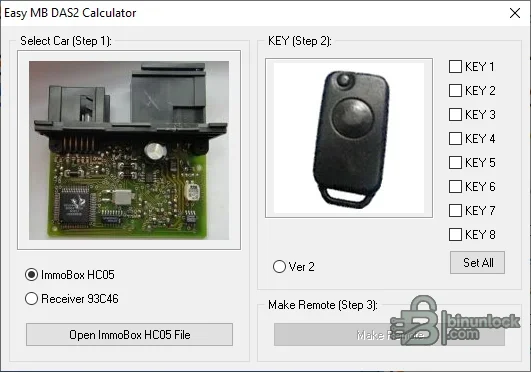
The supplied interface is specifically built around two dump sources: an ImmoBox HC05 file and a Receiver 93C46 file. Those labels are stronger compatibility evidence than a generic Mercedes model name. Confirm the fitted IFZ/immobilizer or receiver hardware, memory marking and dump size before calculating anything.
The package does not contain a vehicle interface, EEPROM programmer, soldering adapter, remote PCB, transponder, pinout library or automatic model detector. It also does not provide online coding, SCN functions or a direct connection to Xentry/DAS.
Before using a dump, identify the exact control unit and compare it with a trusted wiring or locksmith reference. On many period vehicles, the number and position of infrared receivers, the presence of a transponder ring and the module label help distinguish system variants. If the installed hardware does not match an HC05 immobilizer or 93C46 receiver workflow, do not force the file into this calculator.
Make at least two reads of the source memory and compare them byte for byte. A file that opens successfully is not proof of a good read; unstable connections, the wrong device selection or byte-order errors can still produce a plausible-sized but unusable dump.
Do not write a generated file directly over the only original. If the calculated output changes unexpected areas, the input cannot be independently identified or the vehicle uses a different authorization generation, stop and obtain module-specific documentation.
The executable is unsigned and contains no embedded Windows version metadata. No official operating-system compatibility list accompanies this build, so test it first on an isolated workshop machine. On modern 64-bit Windows, use a controlled compatibility environment if the program does not start normally; never disable platform security on a production diagnostic computer merely to run an unknown legacy binary.
When requesting help, provide the chassis series and production date, module part number, memory marking, programmer model, read method, exact byte count and a hash of the dump. Do not post a customer VIN, complete immobilizer dump, generated key data or other security-sensitive vehicle information publicly.
DAS2 and FBS2 system context#
Mercedes DAS2 belongs to the infrared remote and early drive-authorization generation used during the mid-1990s transition to transponder-based authorization. Workshop documentation distinguishes DAS2, DAS2a and the later DAS X arrangement, so the vehicle model and production year alone are not enough to identify the correct workflow.The supplied interface is specifically built around two dump sources: an ImmoBox HC05 file and a Receiver 93C46 file. Those labels are stronger compatibility evidence than a generic Mercedes model name. Confirm the fitted IFZ/immobilizer or receiver hardware, memory marking and dump size before calculating anything.
Supported input paths and functions#
- ImmoBox HC05: opens a binary read from the Motorola HC05-based immobilizer/IFZ module
- Receiver 93C46: opens a read from the 93C46 EEPROM used by the infrared receiver path
- Eight key positions: the interface exposes key slots 1 through 8 for selecting the intended record
- Ver 2 option: a selectable alternate calculation path is present for the relevant data layout
- Data checking: embedded program functions validate the opened buffer before the output action is enabled
- Remote output: the program creates working remote-key data from the selected source file and slot
The package does not contain a vehicle interface, EEPROM programmer, soldering adapter, remote PCB, transponder, pinout library or automatic model detector. It also does not provide online coding, SCN functions or a direct connection to Xentry/DAS.
Mercedes model coverage to verify#
Published DAS2/FBS2 references commonly associate this system family with W124, W140, W202, W208 and W210. Broader period references also list selected W129, W463 and early W170 applications. Treat this as platform context rather than a universal compatibility promise: equipment changed by production date, market and option package, and later cars may use DAS2a, DAS X or another authorization generation.Before using a dump, identify the exact control unit and compare it with a trusted wiring or locksmith reference. On many period vehicles, the number and position of infrared receivers, the presence of a transponder ring and the module label help distinguish system variants. If the installed hardware does not match an HC05 immobilizer or 93C46 receiver workflow, do not force the file into this calculator.
Required hardware and source data#
- An EEPROM or MCU programmer that explicitly supports the Motorola HC05 derivative fitted to the immobilizer, or the exact 93C46 device in the receiver
- The correct voltage, adapter, pinout and in-circuit or removed-device procedure for the target module
- A complete, repeatable binary read from the original vehicle module
- A compatible remote/key board and any separate transponder programming equipment required by the actual DAS variant
- A second hex viewer or comparison utility for confirming the original and generated files
Make at least two reads of the source memory and compare them byte for byte. A file that opens successfully is not proof of a good read; unstable connections, the wrong device selection or byte-order errors can still produce a plausible-sized but unusable dump.
Recommended workshop workflow#
- Verify vehicle ownership and record the VIN, chassis series, production date, immobilizer/receiver part number and memory marking.
- Identify whether the job is based on the HC05 immobilizer path or the 93C46 receiver path.
- Read the memory twice with suitable hardware, compare both reads and preserve an untouched backup.
- Open a copy in the matching section of the calculator and confirm that the program accepts the data.
- Select only a key slot known to be appropriate for the repair; do not overwrite a working slot without a documented reason.
- Generate the working output, save it under a new name and compare all changed regions against the original.
- Program and verify with the correct external equipment, then test remote locking and drive authorization according to Mercedes workshop procedure.
Do not write a generated file directly over the only original. If the calculated output changes unexpected areas, the input cannot be independently identified or the vehicle uses a different authorization generation, stop and obtain module-specific documentation.
System requirements#
- Windows desktop with support for legacy native 32-bit applications
- A local working directory with read/write permission for BIN/EEPROM files and backups
- No installer or vehicle driver is required by the supplied single-file portable application
- External memory-reading and key-programming hardware appropriate to the module remains mandatory
The executable is unsigned and contains no embedded Windows version metadata. No official operating-system compatibility list accompanies this build, so test it first on an isolated workshop machine. On modern 64-bit Windows, use a controlled compatibility environment if the program does not start normally; never disable platform security on a production diagnostic computer merely to run an unknown legacy binary.
Troubleshooting and compatibility checks#
If the calculator rejects a file, confirm the exact memory type, file length, byte order and whether the programmer saved headers or metadata around the raw dump. A result that appears valid but does not operate the remote can indicate the wrong system variant, an occupied key position, an incompatible remote board, a separate transponder requirement or a faulty source read.When requesting help, provide the chassis series and production date, module part number, memory marking, programmer model, read method, exact byte count and a hash of the dump. Do not post a customer VIN, complete immobilizer dump, generated key data or other security-sensitive vehicle information publicly.


