
Evolic is an offline ECU-file utility aimed at selected Renault and Dacia engine-management families. It opens a binary that has already been read with separate programming equipment, applies the chosen routine exposed by the interface and saves a new working file for comparison and later programming.
The supplied application groups its routines by ECU family and separates sensor-related, calibration, immobilizer and cold-start operations. It does not communicate with the vehicle, identify the ECU automatically or replace the bench/boot tool needed to read and write the controller.
These are menu labels in the supplied build, not a guarantee for every Renault or Dacia model, engine code and software number that uses a similarly named ECU. Compatibility must be confirmed from the controller label, processor or memory type, complete file size and exact calibration identification.
The interface does not document the byte ranges or checksum algorithm used by every routine. A button being available is not proof that an arbitrary file is supported. Always compare the output against the untouched original and stop if the file length changes or the modified area is implausibly large.
No interface drivers, pinouts or vehicle communication hardware are included. The application expects a compatible file to be supplied by the technician.
Sensor and emissions-related calibration changes may be prohibited on public roads. Use such functions only where the work is lawful and technically justified, such as controlled development, authorized repair or off-road competition. Normal mechanical diagnosis should precede any file modification.
For useful support, provide the ECU family, hardware and software numbers, engine code, read tool and mode, original/result sizes and redacted diagnostic faults. Do not post complete customer binaries, VINs or immobilizer secrets.
The supplied application groups its routines by ECU family and separates sensor-related, calibration, immobilizer and cold-start operations. It does not communicate with the vehicle, identify the ECU automatically or replace the bench/boot tool needed to read and write the controller.
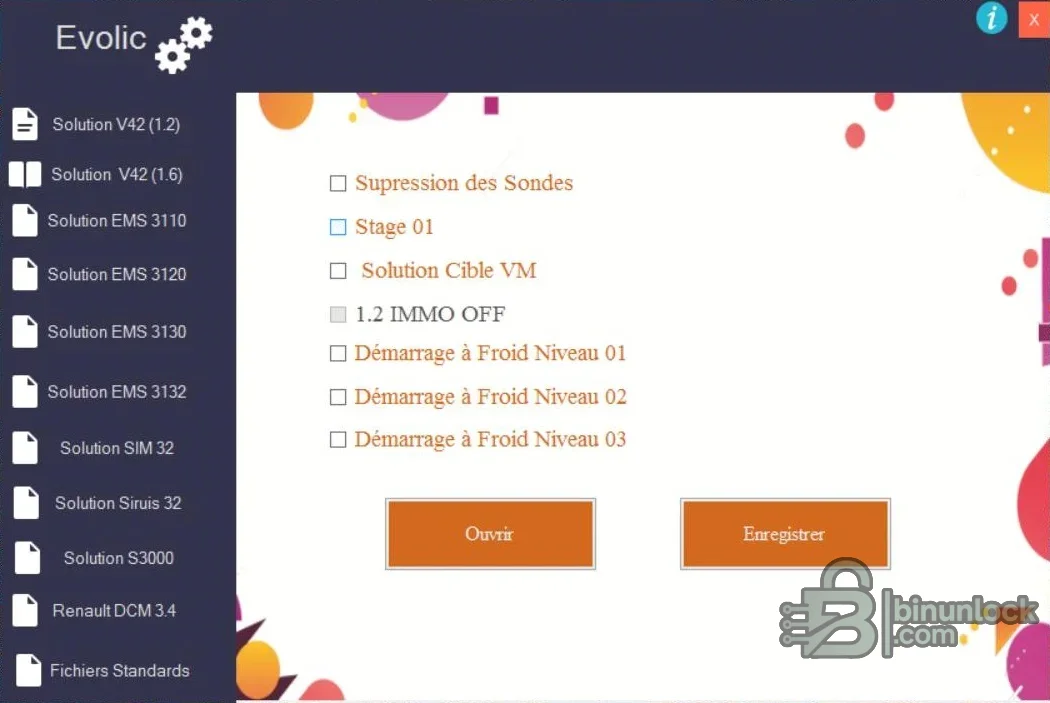
Controller families visible in the interface#
- EMS 3110
- EMS 3120
- EMS 3130
- EMS 3132
- SIM 32
- Sirius 32
- S3000
- Renault DCM3.4
- Two additional solution groups separated by engine/application profile
These are menu labels in the supplied build, not a guarantee for every Renault or Dacia model, engine code and software number that uses a similarly named ECU. Compatibility must be confirmed from the controller label, processor or memory type, complete file size and exact calibration identification.
Functions exposed by the program#
- Sensor or probe suppression routine for supported files
- A predefined first-stage calibration operation
- Target-VM solution where the selected ECU profile provides it
- Immobilizer-related file operation on the indicated small-engine profile
- Three cold-start adjustment levels
- Open source file and save processed result
The interface does not document the byte ranges or checksum algorithm used by every routine. A button being available is not proof that an arbitrary file is supported. Always compare the output against the untouched original and stop if the file length changes or the modified area is implausibly large.
Required equipment and source information#
- Windows computer capable of running a legacy 32-bit native application
- Bench, boot, BDM or compatible flasher for the exact ECU
- Verified pinout and regulated power supply
- Two matching reads of the original flash or EEPROM area
- Vehicle model, engine code, ECU maker, hardware number and software number
- Checksum correction and binary comparison tools appropriate to the controller
- Diagnostic equipment for pre-scan and post-write validation
No interface drivers, pinouts or vehicle communication hardware are included. The application expects a compatible file to be supplied by the technician.
Recommended file workflow#
- Record the vehicle and ECU identification before removing or opening the controller.
- Read the required memory twice and verify that both hashes match.
- Store an untouched original outside the application directory.
- Select only the controller group and operation proven for the exact software layout.
- Open a copy, apply one change at a time and save the result under a new name.
- Compare file size and every changed range in a hex or calibration tool.
- Correct or verify checksums according to the programming method.
- Program with stable voltage, verify the write and perform a complete diagnostic check.
Compatibility and legal limits#
Renault-family vehicles use several unrelated ECU, immobilizer and emissions architectures even within the same model generation. Do not infer support solely from an ECU marketing family. If the exact software number or file layout is unknown, treat it as unsupported.Sensor and emissions-related calibration changes may be prohibited on public roads. Use such functions only where the work is lawful and technically justified, such as controlled development, authorized repair or off-road competition. Normal mechanical diagnosis should precede any file modification.
Troubleshooting and recovery#
If the program rejects a file, confirm whether the programmer supplied a full read, calibration section or EEPROM and whether the selected profile expects that format. If the result produces a no-start, checksum fault or abnormal operation, restore the original and verify the write method before attempting another edit.For useful support, provide the ECU family, hardware and software numbers, engine code, read tool and mode, original/result sizes and redacted diagnostic faults. Do not post complete customer binaries, VINs or immobilizer secrets.


