
KIHelper is a file-based Volkswagen Group instrument-cluster utility for inspecting supported EEPROM dumps and changing selected MK4 and MK6 configuration fields. It identifies information contained in a compatible dump, presents the recognized part, hardware and software data, and saves a separate edited binary for later verification and programming.
The genuine interface includes supplied sample dumps and separates the available controls by cluster generation. It does not read a dashboard through OBD, program mileage automatically or guarantee compatibility with every VDO, Continental or Johnson Controls cluster.
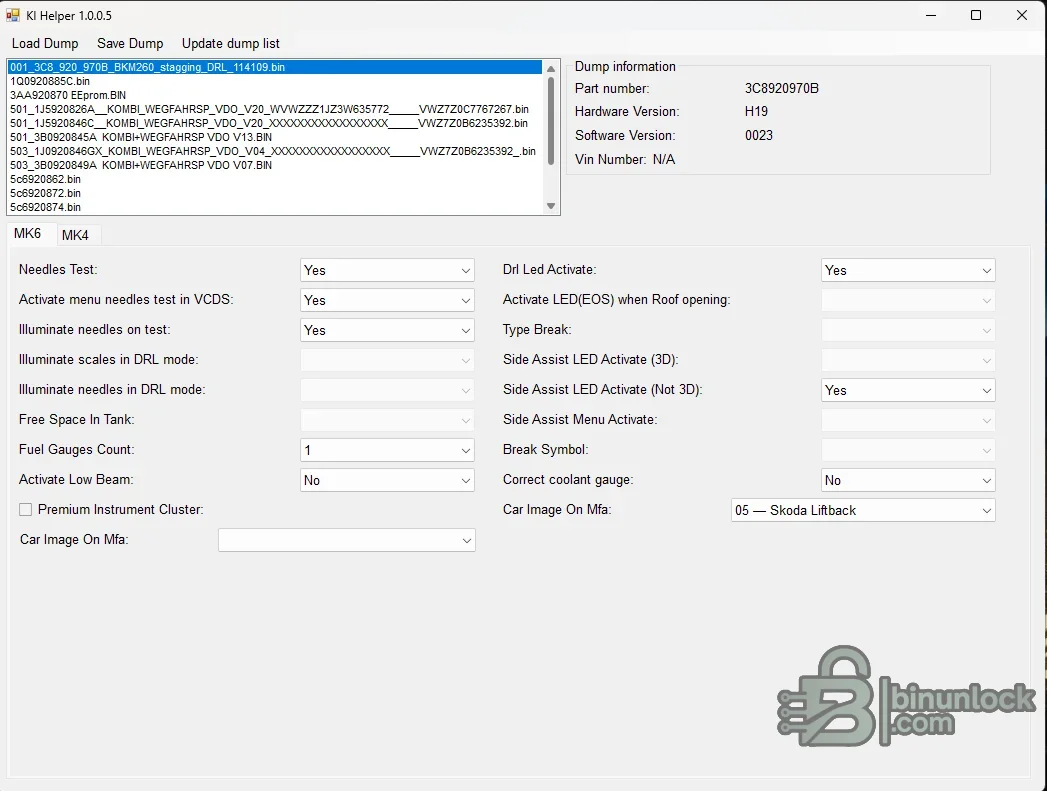
The bundled examples include Volkswagen and Skoda cluster part-number patterns and several EEPROM sizes. They are reference files for learning the interface, not donor data that should be copied blindly into another vehicle.
Not every field is enabled for every dump. Greyed controls indicate that the recognized layout does not expose the same option set, and forcing bytes from a different cluster generation can corrupt configuration or immobilizer data.
Cluster EEPROMs can contain immobilizer identity, coding, odometer and component-specific data. Save only the intended configuration changes and avoid copying VIN or security blocks between vehicles without a documented authorized replacement procedure.
The package does not include an EEPROM programmer, interface drivers or pinout database. Communication with the physical cluster is a separate step.
The main executable is unsigned and was inspected statically without being launched. Use a controlled Windows environment and perform your own local scan. Do not publish full customer dumps, complete VINs or immobilizer data in the discussion.
The genuine interface includes supplied sample dumps and separates the available controls by cluster generation. It does not read a dashboard through OBD, program mileage automatically or guarantee compatibility with every VDO, Continental or Johnson Controls cluster.
Information shown from a recognized dump#
- Instrument-cluster part number
- Hardware revision
- Software revision
- VIN field where the format contains one
- Source dump list and editable target selection
The bundled examples include Volkswagen and Skoda cluster part-number patterns and several EEPROM sizes. They are reference files for learning the interface, not donor data that should be copied blindly into another vehicle.
Configuration fields visible in the MK4 and MK6 tabs#
- Needle test and scale illumination behavior
- DRL-related needle and LED choices
- Menu activation through VCDS where the cluster supports it
- Fuel-gauge count and low-beam indication
- Premium instrument-cluster flag
- LED behavior when opening the roof
- Side-assist LED and menu choices
- Brake symbol and coolant-gauge correction
- Vehicle image selection for the multifunction display
Not every field is enabled for every dump. Greyed controls indicate that the recognized layout does not expose the same option set, and forcing bytes from a different cluster generation can corrupt configuration or immobilizer data.
Supported-file boundaries#
The application is intended for selected MK4 and MK6 Volkswagen Group instrument clusters. Actual support depends on the part number, supplier, EEPROM layout and software generation. The presence of sample files bearing Golf, Passat, Scirocco or Skoda identifiers does not establish universal model coverage.Cluster EEPROMs can contain immobilizer identity, coding, odometer and component-specific data. Save only the intended configuration changes and avoid copying VIN or security blocks between vehicles without a documented authorized replacement procedure.
System and tool requirements#
- Windows computer with a legacy .NET Framework environment; the supplied support library targets the older framework generation
- EEPROM programmer or proven cluster read/write tool for the exact hardware
- Stable bench power and verified cluster pinout when reading outside the vehicle
- Two matching original dumps and an immutable backup
- Hex comparison software for reviewing every changed byte
- Diagnostic tool such as VCDS or factory software for coding and post-write checks
The package does not include an EEPROM programmer, interface drivers or pinout database. Communication with the physical cluster is a separate step.
Recommended dump-editing workflow#
- Record the cluster label, part number, supplier and diagnostic identification.
- Read the EEPROM twice and verify equal size and hash.
- Open a copy in KIHelper and confirm that the displayed part, hardware and software information is plausible.
- Change only one documented option at a time.
- Save to a new filename and compare the result with the original.
- Verify that file length is unchanged and that edits remain inside the expected configuration area.
- Write with a verified programmer setup, read back and compare.
- Perform diagnostic coding and a complete instrument-cluster function test.
Package cleanup and included references#
The final archive keeps the application, language file, required logging library and documentation, shortcut, configuration file and sample dumps. A runtime log archive and Visual Studio development artifacts were excluded because they are not required for normal operation and may contain historic machine or session data.Troubleshooting and safety#
If a dump is not recognized, confirm the EEPROM type, byte order, read length and whether the programmer applied an offset or word swap. If a saved file causes a dead display or incorrect coding, restore the original immediately and verify the programming voltage and memory selection.The main executable is unsigned and was inspected statically without being launched. Use a controlled Windows environment and perform your own local scan. Do not publish full customer dumps, complete VINs or immobilizer data in the discussion.


