
MB Truck Explorer is legacy AutoVEI software for specialized electronic service operations on supported heavy vehicles. With the matching VEI hardware, licensed functions and correct cables, the platform can access selected control-unit memory, key and immobilizer operations, protected-code calculations and diagnostic fault functions.
The supplied interface exposes MR memory, Keys, VeDoc, FDOK, DAS passwords, Extra, Fault codes and Settings tabs. It is not a generic J1939 scan program and the installer alone cannot perform vehicle work without the compatible hardware, activation and module license.
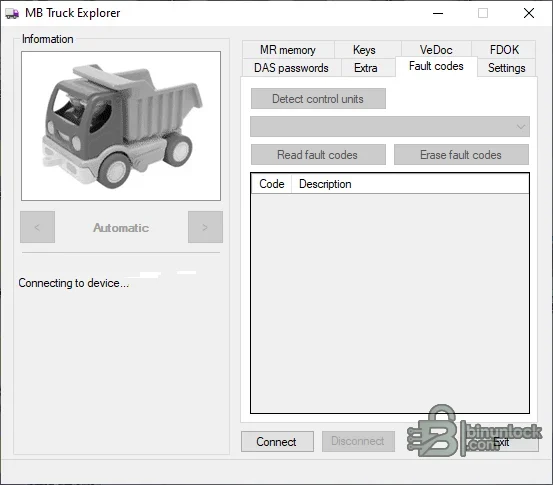
The visible tabs describe platform capability, not an entitlement included with every interface. AutoVEI separates functions by hardware generation and purchased licenses, so a missing tab or disabled operation normally requires checking device type, activation and subscription status rather than reinstalling the software.
Do not assume that a brand name means all years or ECUs. Coverage changes across VEI hardware generations, cables, microcontrollers and software releases. Confirm the exact vehicle, ECU, required license and connection method in the AutoVEI documentation before connecting.
The bundled installer is a 32-bit Windows package. Current AutoVEI hardware uses newer Truck Explorer releases, while older VEI devices are tied to their compatible software generation. Do not update or mix device generations without confirming vendor guidance.
VeDoc, FDOK and DAS calculations are security-related service functions. Use them only for authorized repair and do not post challenge codes, passwords, key data or customer identifiers publicly.
The supplied interface exposes MR memory, Keys, VeDoc, FDOK, DAS passwords, Extra, Fault codes and Settings tabs. It is not a generic J1939 scan program and the installer alone cannot perform vehicle work without the compatible hardware, activation and module license.
Functions represented in the supplied interface#
- Detect supported control units through the connected device
- Read and erase diagnostic fault codes where the active license supports the ECU
- MR or PLD memory service functions
- Truck key and immobilizer service functions
- VeDoc code calculation fields
- FDOK protected-parameter calculations
- DAS password workflow
- Additional truck-service operations exposed by the licensed hardware profile
The visible tabs describe platform capability, not an entitlement included with every interface. AutoVEI separates functions by hardware generation and purchased licenses, so a missing tab or disabled operation normally requires checking device type, activation and subscription status rather than reinstalling the software.
Vehicle and controller scope#
Legacy product references describe operations for Mercedes-Benz and MAZ trucks and buses, with selected MAN, Scania and Volvo applications and Claas industrial or agricultural equipment depending on hardware and license. Common Mercedes truck targets include MR or PLD engine controllers, FR or CPC functions and protected service calculations.Do not assume that a brand name means all years or ECUs. Coverage changes across VEI hardware generations, cables, microcontrollers and software releases. Confirm the exact vehicle, ECU, required license and connection method in the AutoVEI documentation before connecting.
Hardware, license and system requirements#
- Compatible genuine VEI hardware generation supported by the installed release
- Correct OBD or DirectConnect cable for the target ECU and operation
- Valid activation and the specific function licenses required for the job
- Windows workshop computer; the vendor lists support across legacy and modern Windows generations for its driver/software family
- Stable 12/24-volt power support appropriate to the truck system
- Reliable internet access when activation, support or account functions require it
- Service documentation and a recovery method for memory operations
The bundled installer is a 32-bit Windows package. Current AutoVEI hardware uses newer Truck Explorer releases, while older VEI devices are tied to their compatible software generation. Do not update or mix device generations without confirming vendor guidance.
Recommended diagnostic workflow#
- Identify the truck, ECU and network voltage and record all current fault codes.
- Confirm VEI hardware, cable and license compatibility for the exact operation.
- Connect stable power before any memory, key or protected-parameter work.
- Use Detect control units and verify the returned ECU identity.
- Create backups before writing memory or changing security-related data.
- Perform one documented operation at a time and keep the session log.
- Cycle power only when the service procedure requires it.
- Read faults again and validate engine, immobilizer and communication status.
Memory and key-service cautions#
Flash, EEPROM and key operations can immobilize a truck or corrupt a controller if the wrong protocol, voltage or module generation is selected. Never use a similar vehicle profile as a substitute for the exact ECU. For key work, verify ownership and retain every available original key before beginning.VeDoc, FDOK and DAS calculations are security-related service functions. Use them only for authorized repair and do not post challenge codes, passwords, key data or customer identifiers publicly.


