
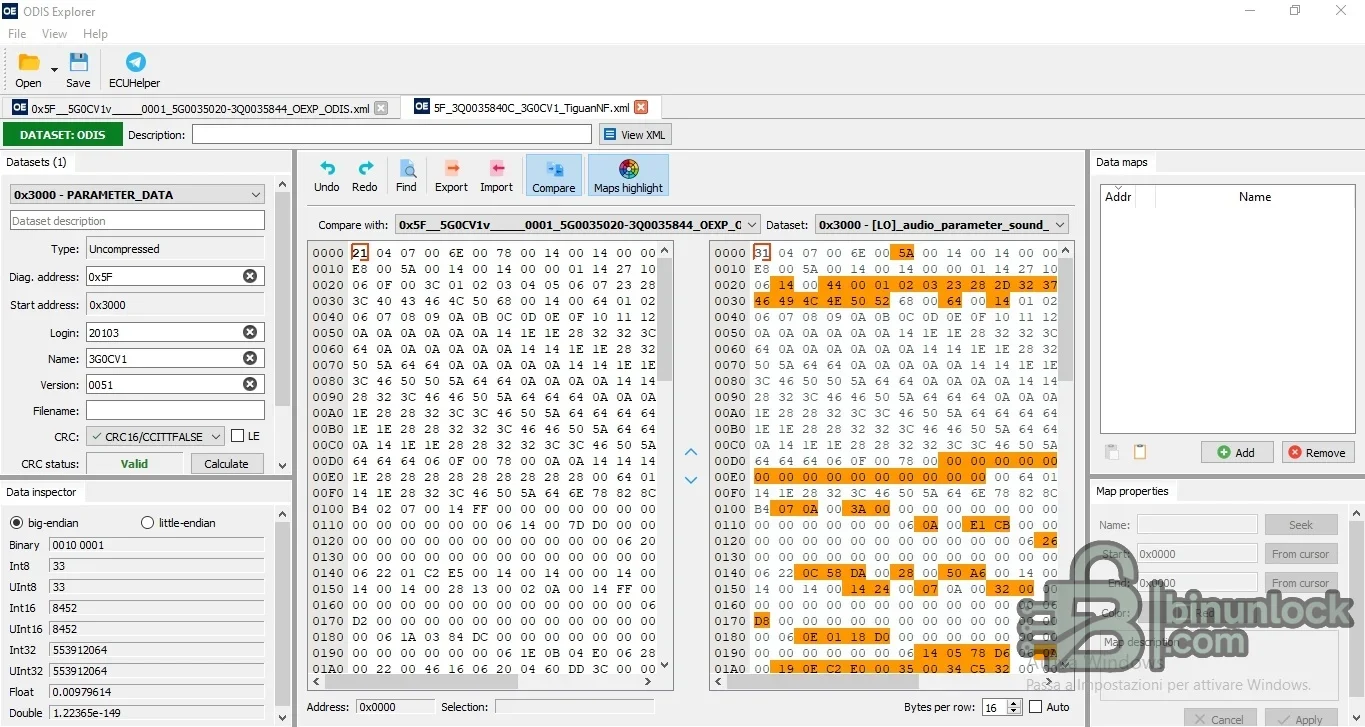
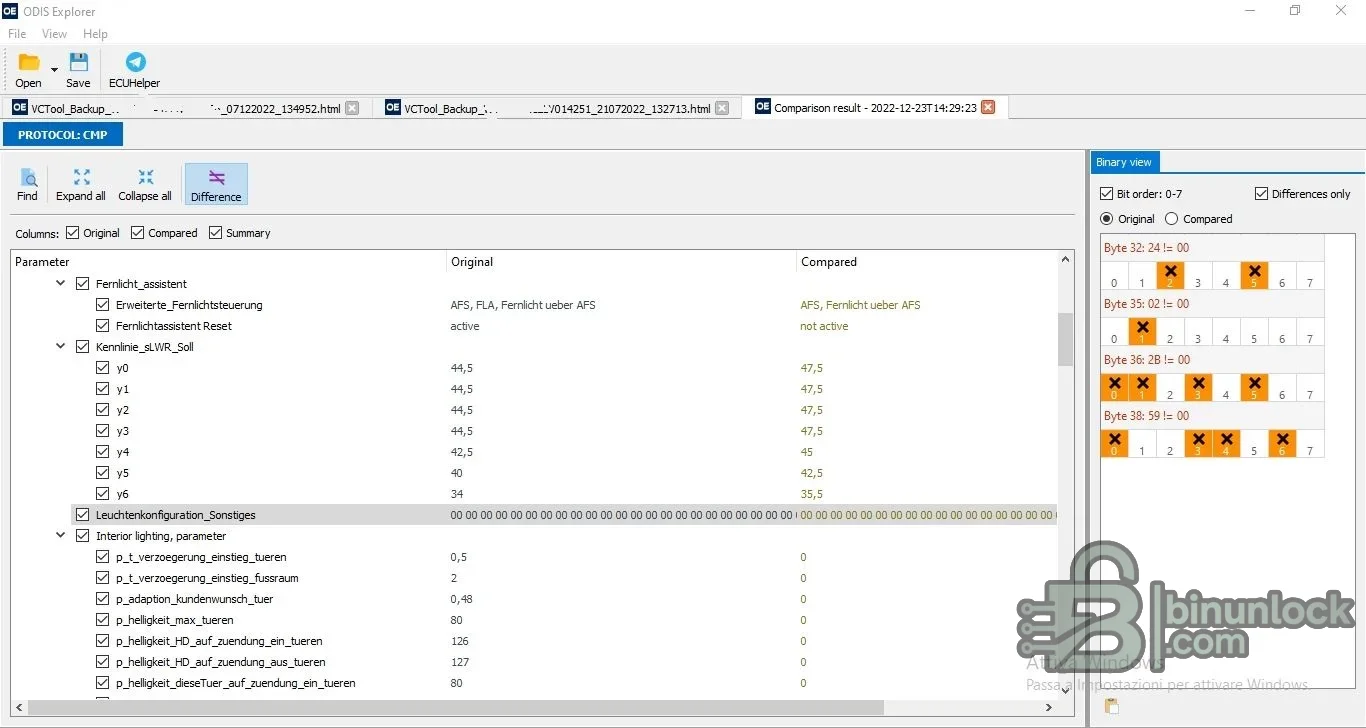
ODIS Explorer is an offline Windows utility for inspecting and comparing VAG engineering data rather than connecting directly to a vehicle. It opens ODIS Engineering protocols, VCP-style parameter datasets and supported flash-data containers, then presents their structure in searchable tables, hexadecimal views and comparison panels. The package includes the full portable Qt runtime, multilingual FAQ files and a sample dataset.
The exact options available depend on the source file type. Some encrypted or compressed payloads extracted from a container may still require a separate legitimate tool or project context.
Compatibility must be established by dataset identifier, diagnostic address, part number, protocol source and target ECU software. A dataset that parses correctly can still be wrong for the fitted module.
ODIS Engineering, VCP and a vehicle interface are not included. They are required only if the prepared data will later be used in an authorized diagnostic or parameterization session. Use a modern Windows workshop machine or VM with enough memory to compare large protocol files.
Several Qt libraries have valid signatures; the main application and some supporting libraries are unsigned. No executable was launched during preparation, and no malware-clean claim is made.
Never use an edited output without a recoverable original. An incorrect dataset can create diagnostic faults or leave a module improperly configured.
For support, provide the vehicle platform, module address, part number, data type, source tool, exact byte count and a screenshot of the non-sensitive error. Do not publish customer VINs, security logins or complete proprietary datasets.
Confirmed functions#
- View and compare ODIS Engineering protocol files
- Parse VCTool protocol files saved in HTML format
- Open and edit XML ODIS or VCP parameter datasets
- Map parameter data and inspect it in hexadecimal and typed numeric forms
- Compare datasets, highlight differences and export selected comparison columns
- Import or export data and calculate the CRC mode offered by the loaded dataset
- Unpack supported SGO and FRF containers, including FRF-to-ODX workflows described by the bundled changelog
The exact options available depend on the source file type. Some encrypted or compressed payloads extracted from a container may still require a separate legitimate tool or project context.
VAG data compatibility#
The utility is intended for Volkswagen Group diagnostic and parameterization data used around ODIS Engineering and VCP workflows. The supplied example references MIB infotainment parameter data, and the interface exposes ODIS dataset, address, login, name, file, version, CRC and data-map fields. This is file-format evidence, not a promise that every Volkswagen, Audi, SEAT, Škoda, Bentley or Lamborghini control unit can be edited safely.Compatibility must be established by dataset identifier, diagnostic address, part number, protocol source and target ECU software. A dataset that parses correctly can still be wrong for the fitted module.
Typical workflow#
- Preserve the original protocol, XML dataset, FRF or SGO container and record its hash.
- Open a copy and verify the displayed diagnostic address, dataset name, login and part-number context.
- Use search and comparison views to identify exact parameter differences.
- Change only documented values and save to a new file.
- Reopen the output, compare it against the source and review every changed byte or parameter.
- Validate CRC and container requirements with the tool that will perform the authorized parameterization.
- Maintain a known-good rollback file for the exact control unit.
System requirements#
The package is a portable Windows application built with a bundled Qt runtime. Keep the executable, Qt libraries, platform plugin, image-format plugin, style plugin and translations in their original relative folders. No separate Qt installation is required.ODIS Engineering, VCP and a vehicle interface are not included. They are required only if the prepared data will later be used in an authorized diagnostic or parameterization session. Use a modern Windows workshop machine or VM with enough memory to compare large protocol files.
Documentation and included files#
The cleaned archive preserves the English, German and Russian FAQ documents, the project README and changelog, translations, an example XML dataset and every runtime library required by the application. Those documents explain parsing and comparison behavior and are functional package content, not advertising copied into the public resource description.Several Qt libraries have valid signatures; the main application and some supporting libraries are unsigned. No executable was launched during preparation, and no malware-clean claim is made.
Parameter-editing precautions#
Parameterization can alter lighting, infotainment, assistance, comfort and other control-unit behavior. Do not copy values between vehicles only because part numbers look similar. Confirm hardware index, software train, dataset version, market configuration and fitted equipment. For safety-related functions, use manufacturer documentation and perform the required calibration and validation after writing.Never use an edited output without a recoverable original. An incorrect dataset can create diagnostic faults or leave a module improperly configured.
Troubleshooting#
If a file will not open, verify whether it is raw XML, an HTML protocol, an encrypted container or a file extracted by another program. If comparison results are empty, confirm that both documents contain the same protocol family and parameter scope. For CRC errors, identify the exact dataset type and byte order rather than cycling through modes.For support, provide the vehicle platform, module address, part number, data type, source tool, exact byte count and a screenshot of the non-sensitive error. Do not publish customer VINs, security logins or complete proprietary datasets.


