
Description
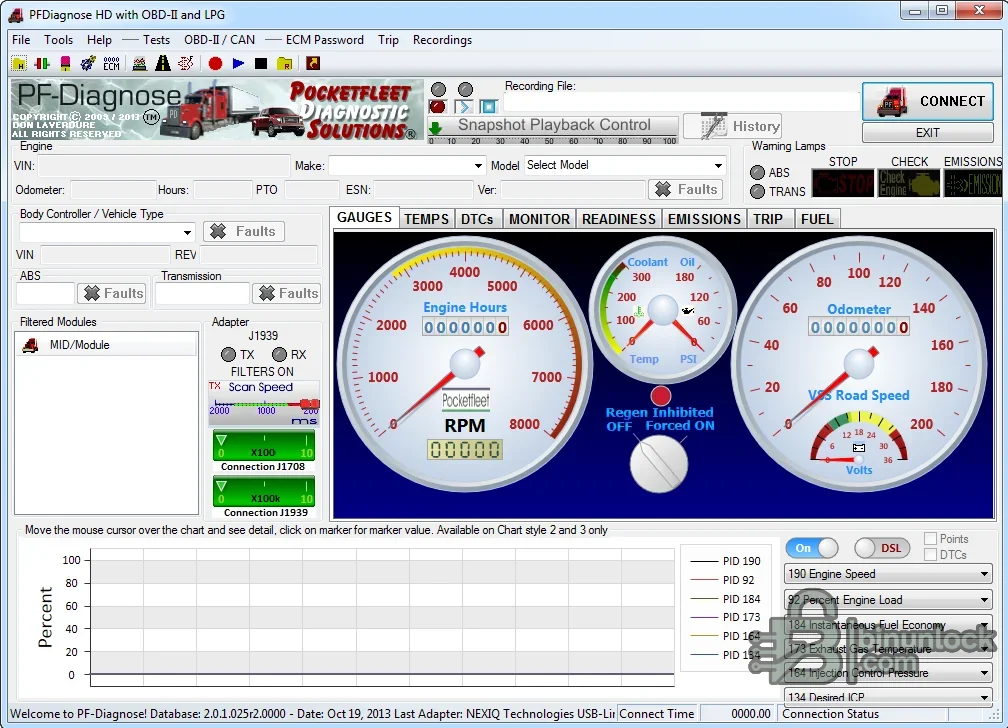
PF-Diagnose HD is a Windows diagnostic platform for heavy-duty and light-duty vehicles using SAE J1587/J1708, J1939, UDS and OBD-II through a compatible RP1210 or J2534 interface. It brings fault codes, live data, gauges, emissions monitors, trip information and recording tools into one service workspace.
Supported vehicles, ECUs and files#
Developer documentation focuses on North American heavy-duty diesel systems and also lists supported diagnostic access for platforms such as John Deere, post-2007 Isuzu, Hino live data, GMC Duramax, Ford, Chrysler, Toyota and Nissan where the vehicle and protocol are compatible. Coverage is protocol and module dependent; special tests are not available on every ECU.- SAE J1587/J1708 and J1939 commercial-vehicle networks.
- OBD-II and UDS modules exposed through a supported adapter and driver.
- Tested adapter families documented by the developer, including Dearborn DPA, NEXIQ USB-Link, Cummins INLINE and Drew Technologies interfaces.
- Other compliant RP1210/J2534 devices only when their driver correctly exposes the required protocol.
Functions#
- Read, describe and clear diagnostic trouble codes where the module permits it.
- Display live parameters as lists, gauges or graphs and filter the modules being monitored.
- Review readiness and emissions information on applicable OBD-II vehicles.
- Record snapshots or sessions and replay data for intermittent-fault analysis.
- View trip and vehicle information supplied by connected control units.
System and hardware requirements#
- Windows 7, 8 or 10 according to the developer FAQ, with administrator rights where driver installation needs them.
- A compatible RP1210/J2534 adapter with the correct vendor driver and current supported firmware.
- The proper diagnostic cable for the vehicle data link and a stable vehicle electrical system.
- Internet or activation access may depend on the licensing state of the installed application.
Recommended workflow#
- Install the adapter driver first and verify it with the vendor utility before opening PF-Diagnose.
- Select the adapter/protocol, connect with ignition on and start with module discovery and read-only data.
- Save DTC and live-data evidence before clearing faults or running an active test.
- Use control functions only with the correct service procedure and safe vehicle conditions.


