
VAG MED9.1 Immobilizer File Utility is a focused offline editor for supported EEPROM reads from Bosch MED9.1 engine controllers used in Volkswagen Group applications. The interface offers two distinct processing methods, opens an EEPROM file and exports a separate result while stating that the checksum is handled by the operation. It does not read the ECU, communicate over OBD or identify the controller automatically.
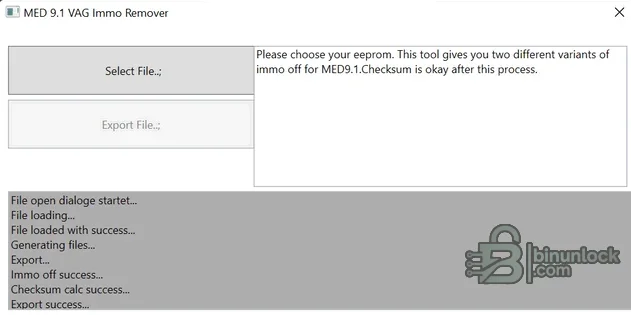
The existence of two methods indicates that more than one known data layout or strategy is expected, but the interface does not publish a complete hardware/software matrix. Select a method only when it is documented for the exact source file.
Check the ECU label and diagnostic identification before reading. The relevant input is an EEPROM data set, not an arbitrary flash or calibration file. A file being accepted by the program does not prove that the selected method matches its internal layout.
The package includes the application deployment files and setup bootstrapper, not ECU communication drivers or programming hardware.
Whenever standard immobilizer adaptation is available and appropriate, use the documented factory procedure. Security-related file modification should be limited to authorized repair, replacement, test-bench or motorsport work allowed in the relevant jurisdiction.
For support, provide the exact Bosch and VAG part numbers, programmer and mode, EEPROM size, selected method and redacted fault codes. Do not post full dumps, VINs or immobilizer secrets.
Confirmed functions#
- Select an EEPROM file from a MED9.1 controller
- Choose between the two immobilizer-processing variants shown by the application
- Export the processed file under a separate name
- Apply the program's integrated checksum handling for the supported operation
The existence of two methods indicates that more than one known data layout or strategy is expected, but the interface does not publish a complete hardware/software matrix. Select a method only when it is documented for the exact source file.
Controller and vehicle scope#
Bosch MED9.1 controllers appear in multiple Volkswagen, Audi, SEAT and Skoda gasoline applications. Immobilizer structure can differ with part number, processor, EEPROM content, software generation and vehicle platform. This resource therefore claims MED9.1 file support only; it does not claim universal support for every VAG MED9, MED17 or similarly named ECU.Check the ECU label and diagnostic identification before reading. The relevant input is an EEPROM data set, not an arbitrary flash or calibration file. A file being accepted by the program does not prove that the selected method matches its internal layout.
Required tools#
- Windows computer with a compatible .NET environment for the supplied ClickOnce-style package
- Bench, boot, BDM or EEPROM programmer explicitly supporting the MED9.1 controller
- Correct pinout and regulated power supply
- Two matching EEPROM reads and an untouched backup
- Hex comparison software for reviewing the output
- Diagnostic equipment for identification, fault scanning and post-repair adaptation
The package includes the application deployment files and setup bootstrapper, not ECU communication drivers or programming hardware.
Recommended workflow#
- Verify authorization and record vehicle and ECU identities.
- Read the EEPROM twice using the correct hardware mode and compare hashes.
- Store the untouched original securely and work only on a duplicate.
- Confirm which application method matches the exact controller and data layout.
- Process and export the result without overwriting the source file.
- Compare every changed byte range and verify that file length is unchanged.
- Program with stable power, read back and verify the result.
- Complete the documented diagnostic pairing or recovery checks.
Validation and limitations#
Integrated checksum handling applies only to the routine and file layout understood by the program. It does not validate the source read, repair flash checksums, correct a mismatched replacement ECU or guarantee compatibility with another module. Do not switch between the two methods by trial and error on the vehicle.Whenever standard immobilizer adaptation is available and appropriate, use the documented factory procedure. Security-related file modification should be limited to authorized repair, replacement, test-bench or motorsport work allowed in the relevant jurisdiction.
Troubleshooting#
If the file is rejected or the result fails, restore the original and confirm that the input is EEPROM rather than flash, the controller is genuinely MED9.1 and the read is complete. Check processor and EEPROM selection, byte order, source length and whether the correct processing method was used. Diagnose module communication and synchronization before making another change.For support, provide the exact Bosch and VAG part numbers, programmer and mode, EEPROM size, selected method and redacted fault codes. Do not post full dumps, VINs or immobilizer secrets.


